Installing the LM100 gateway
Page 40 Senstar LM100 Product Guide
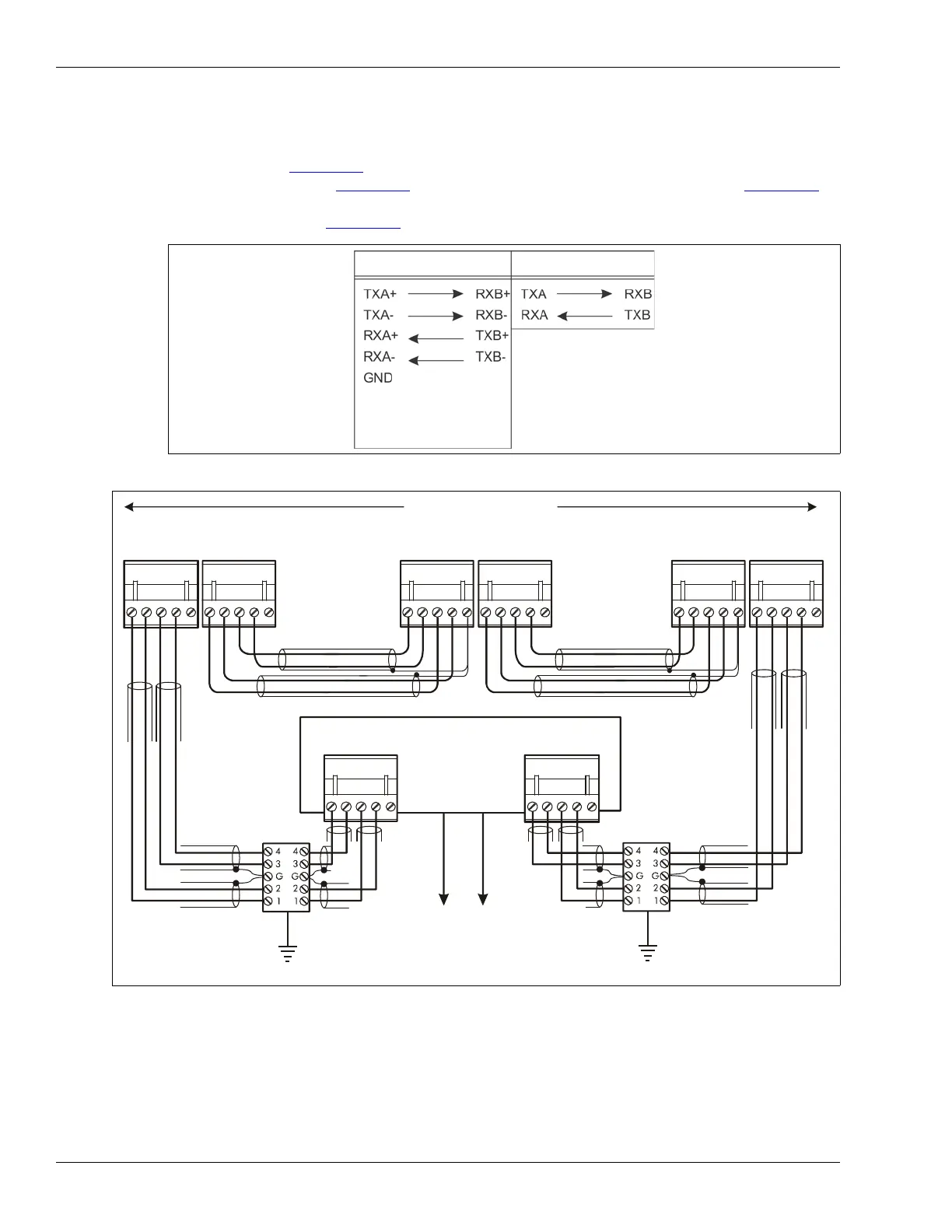
Silver Network data path connections
In the standard Silver Network setup, a point to point loop configuration is used for network
communications. Figure 42:
shows the network connections for the RS-422 and fiber optic
communication options. Figure 43:
illustrates an RS-422 based Silver Network and Figure 44:
shows a fiber optic based Silver Network. Silver Network’s using Ethernet communications use a
star configuration (see Figure 45:
).
Figure 42: Silver Network data connections (loop configurations)
Figure 43: Silver Network RS-422 wiring diagram
RS-422
Fiber Optic
(use single point
grounding, connect one
end of cable shield; trim
the other end and leave
it disconnected)
11
223344
55
R
X
B
+
R
X
B
-
G
N
D
T
X
B
+
T
X
B
-
R
X
A
+
R
X
A-
G
N
D
T
X
A+
T
X
A-
11
223344
55
12345 12345
12345 12345
R
X
B
+
R
X
B
-
G
N
D
T
X
B
+
T
X
B
-
R
X
A+
R
X
A
-
G
N
D
T
X
A+
T
X
A-
R
X
B
+
R
X
B
-
G
N
D
T
X
B
+
T
X
B
-
R
X
A+
R
X
A-
G
N
D
T
X
A
+
T
X
A-
R
X
A+
R
X
A-
G
N
D
T
X
A+
T
X
A-
12345
R
X
B
+
R
X
B
-
G
N
D
T
X
B
+
T
X
B
-
12345
maximum 60 devices
max. distance between devices = 1.2 km (3/4 mile)
first device second device last device
shield
shield
shield
shield
shield
shield
Use single point grounding - connect one end of the cable shield to ground, trim the other end and leave it disconnected.
Network Interface Unit
lightning
arrestors
lightning
arrestors
to Network Manager
NOTE:



 To Next Page