4-4 Function Descriptions
10
In Scan mode, the current measurement is displayed
on the main display. The main display will hold the last
values until the tachometer automatically turns off.
Memory mode:
The tachometer can store or recall 10 selectable
M A X m e a s u r e m e n t s , 1 0 s e l e c t a b l e M I N
measurements, 10 selectable AVG measurements
and 10 selectable DATA measurements.
To store a measurement:
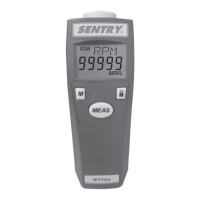
Press the MEAS button until the reading displayed
on the LCD display. Observe the reading and press
the M button to record. The maximum, minimum,
average and data during one shot measurement
will be stored into a memory set. Then the Data
number will increase by one.
To recall the stored data from memory:
Use the M button to scroll and view the stored data point.
a) See the flow chart 1 for a brief presentation of how
to recall the stored data sequentially.
b) See flow chart 2 for a brief presentation of how to
quick access or leap the data set to the next.
Stored data points will appear in the main display. Empty
memory locations will read "-----". Maximum, minimum
and average data will appear in the RPM, rPm, I/M,
M/M, Y/M and F/M display with MAX/MIN/AVG symbol.


 To Next Page