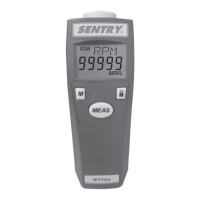
This document is the instruction manual for the Sentry Chroma Meter, models ST520 and ST522. It provides comprehensive information on the device's functions, technical specifications, usage, and maintenance.
Function Description
The Sentry Chroma Meter is a precision instrument designed for measuring light illuminance and color coordinates. It is capable of meeting CIE (International Commission on Illumination) photopic spectral response. The device offers various measurement capabilities, including:
- Illuminance measurement: Quantifies the amount of light falling on a surface.
- Color temperature and Correlated color temperature measurement: Determines the color appearance of a light source in terms of temperature.
- Color coordinate measurement: Provides numerical values (x, y, u', v') that define the color of a light source within a specific color space (CIE 1960 and CIE 1931).
- Custom reference value of color difference mode: Allows users to set a reference color and measure the difference between the current light source and the reference. This is particularly useful for quality control and matching applications.
- Measuring light source selection (522 model): The ST522 model allows selection of different light sources for measurement, including FL (Fluorescent light source), INC (Incandescent light source), and LED (LED light source). This feature enhances accuracy by matching the meter's response to the specific type of light being measured.
- Data Hold function: Freezes the current measurement on the display for easier reading and recording.
The device is suitable for a wide range of applications, including:
- Color LED Lighting
- Interior room lighting
- Street lighting
- Greenhouse lighting
- Commercial displays
- Film and television
- Projection halls
- Art galleries
- Warehouses
- Museums
- Stadiums
- Arenas
Important Technical Specifications
The Sentry Chroma Meter comes in two models, ST520 and ST522, with some differences in capabilities, particularly regarding light source selection.
Sensor Element:
- Both models use an SPC (Silicon Photocell) sensor.
Measuring Light Sources Selection:
- ST520: General Light Source
- ST522: FL (Fluorescent light source), INC (Incandescent light source), LED (LED light source)
Measuring Function:
- Illuminance: Ev (lx or fcd)
- Color Coordinate: (x, y), (u', v') (CIE 1960)
- Correlated Color Temperature: CT, Δuv
- Color Difference: (ΔEv, Δx, Δy), (ΔEv, Δu', Δv'), (ΔEv, Δu'v') (One set of reference color)
Correlated Color Temperature Difference Measurement (ΔCT):
Measuring Range:
- Ev: 0 ~ 80000 lx (0 ~ 7432 fcd)
- CT: 0 ~ 99990 K Max.
Accuracy (at 25°C, 60% RH):
- Ev: ± (3%+2 Digital) (3000 lx, standard illuminant A measured), x, y: ± 0.02 (100 lx, RGB LED Light)
- Ev: 1 (0-9999) · 10 (Over 10000), lx; 0.1 (0.0-999.9) · 1 (Over 1000), fcd;
- CT: 1 (0-9999) · 10 (Over 10000), K;
- x, y: 0.001; u', v': 0.001
Response Time:
Repeatability:
- x, y: ±0.003 (100 lx, RGB LED Light)
Temperature Drift:
- Ev: ± (5%+2 Digital) (3000 lx, standard illuminant A measured), x, y: ± 0.008 (100 lx, RGB LED Light)
Humidity Drift:
- Ev: ± (3%+2 Digital) (3000 lx, standard illuminant A measured), x, y: ± 0.005 (100 lx, RGB LED Light)
Operation Temperature:
- 32°F to 122°F (0°C to 50°C); Less than 80% RH
Store Temperature:
- 14°F to 140°F (-10°C to 60°C); Less than 85% RH
Battery Life:
- 70 hours or longer continuous use
Display:
- Automatic backlight LCD and triple reading display.
Data Hold:
Low Battery Indication:
Auto Power Off:
Weight:
- 6.3 oz. (179g) without battery
Dimensions:
- Main Instrument: 5.5 x 1.9 x 1.1 inch (140 x 49 x 29 mm)
- Sensor Probe: 6.5 x 2.0 x 1.4 inch (165 x 50 x 36 mm)
Accessories:
- 9V Battery x1, Instruction manual x1, Carrying case x1
The device is RoHS compliant, CE certified, and REACH (SVHC) compliant, indicating adherence to environmental and safety standards.
Usage Features
The Chroma Meter is designed for user-friendly operation with several convenient features:
Power ON/OFF:
- Press and hold the Power button for 2 seconds to turn the meter on. All symbols will appear for 2 seconds on the LCD. After power-on, the meter will measure and show readings continuously. To turn off, press and hold the Power button for 2 seconds.
Measuring Units:
- The illuminance (Ev) unit can be selected between Lux (lx) or foot-candle (fcd) by pressing the "Unit/▼" button.
Measuring Light Source Selection (ST522 model):
- After power-on, users can select the type of light source to be measured. In CT or ΔCT display mode, pressing the "Unit/▼" button for 3 seconds allows selection between FL (Fluorescent), INC (Incandescent), and LED light sources. This ensures more accurate CT values corresponding to the light source being measured. If the CT value exceeds the light source's defined value, the display will show "----", prompting the user to select a different light source.
Data Hold:
- During measurement, pressing the "HOLD" button freezes the measured values on the LCD. The "HOLD" symbol will appear. Pressing the "HOLD" button again returns the meter to continuous measurement.
Measuring Modes:
- The meter offers both Color Measurement and Color Difference modes, switchable by pressing the "Δ/▲" button.
- Color Measurement Modes:
- Ev, x, y (Illuminance, Color coordinate)
- Ev, u', v' (Illuminance, Color coordinate, CIE1960)
- Ev, CT, Δuv (Illuminance, Color temperature)
- Press the "MODE" button to toggle between these color measurement modes.
- Color Difference Modes:
- ΔEv, Δx, Δy (Color difference of Illuminance and Color coordinate)
- ΔEv, Δu', Δv' (Color difference of Illuminance and Color coordinate, CIE1960)
- ΔEv, ΔCT(522), Δu'v' (Color difference of Illuminance and Color temperature)
- This function allows comparison of illuminance, color coordinate, and color temperature between two or more light sources. Press the "Δ/▲" button to toggle the color difference mode.
SET Function (Color Difference Reference Value):
- This function allows users to set certain reference values (Evref, xref, yref, u'ref, v'ref, CTref(522)) to compare with a target color.
- Setting the Reference Value:
- Select one of the color difference modes.
- In Color Difference mode, press the "Δ/▲" button and hold for 3 seconds to enter set mode. The "SET" symbol will appear, and the Ev symbol will flash on the LCD.
- Using Measured Values: First, measure a light source. Press the "HOLD" button to hold these values as your reference. Then, press the "Δ/▲" button to toggle color difference mode. Press and hold "Δ/▲" for 3 seconds to enter set reference values mode. The SET symbol will appear, and the Ev reference value will flash. Use the "Unit/▼" or "Δ/▲" button to adjust the Ev reference value. Press the "MODE" button to cycle through and adjust other reference values (xref, yref, u'ref, v'ref, CTref). Press "MODE" again to exit set mode.
- Using Previous Values Stored in Memory: Directly select the color different mode (ΔEv, Δx, Δy). Press the "Δ/▲" button and hold for 3 seconds to toggle set reference values mode without Data Hold. The SET symbol will appear, and the Ev symbol will flash on the LCD. The default Ev reference will show the previous value stored in memory. Use the "Unit/▼" or "Δ/▲" button to adjust the Ev reference value. Press the "MODE" button to cycle through and adjust other reference values (xref, yref, u'ref, v'ref, CTref). Press "MODE" again to exit set mode.
- Zeroing Reference Values: Close the receptor cover. The measured values (Ev, x, y, Ev, u', v' or Ev, CT) will show zero. Repeat the process of setting reference values using measured values to zero the reference value.
Battery Change:
- The meter is powered by a 9V battery. A low battery symbol appears when the battery voltage drops. To replace, open the battery cover on the back, remove the old battery, and insert a new one, then close the cover securely.
Physical Features:
- LCD and Control Panel: The LCD displays data hold symbol, SET function symbol, low battery symbol, measuring symbols for primary, secondary, and tertiary readings, illuminance unit (lx or fcd), primary reading, color temperature unit (K), secondary reading, light source symbol (FL, INC or LED for 522), tertiary reading, and color difference symbol. The control panel includes Unit/Down button, Mode button, Up button, and Power and Hold button.
- Rear: Features a tripod socket, battery cover, magnet position, and anti-slippery pad.
- Probe: Consists of a receptor head, receptor cover, and grip. The receptor cover should be closed when not in use to prevent accumulation of irradiations and protect the light source.
Maintenance Features
Proper maintenance ensures the longevity and accuracy of the Chroma Meter:
Clean the Receptor Head:
- Blow off loose particles using compressed air.
- Gently brush remaining debris away with a camel's hair brush.
- Carefully wipe the surface with a cotton swab moistened with some water.
Clean the Housing:
- Wipe the meter with soap and water on a damp sponge or soft cloth.
Important Notes for Maintenance:
- Never use organic solvents (such as thinner, benzene, etc.) to clean the meter or receptor head.
- If the meter will not be used for a long time, remove the battery and close the receptor cover to prevent battery leakage and damage to the device.
- Always keep the receptor cover closed when not in use to prevent accumulation of irradiations, which could cause the sensor to age.
- Avoid disassembling or modifying the meter.
- Do not attempt to repair the meter yourself if it malfunctions; only qualified personnel should perform repairs.
- Do not immerse the meter in water.
- Do not press, push, or strike the LCD and receptor head.
- Do not use the meter in places where flammable or nearby the fire.
- Do not use this meter in environments outside its specified range: 32°F (0°C) to 122°F (50°C) at Relative Humidity no higher than 80%.

 Need help?
 General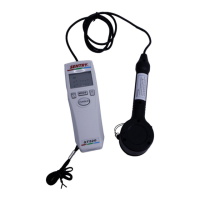

 To Next Page