15
5-2 SET Function
Color Difference:This function allows user to set certain
reference values (Ev
ref
, x
ref
, y
ref
, u'
ref
, v'
ref,
CT
ref
(522)) to
compare with the target color.
Set the Reference Value
You can select one of these color difference modes to set:
1. ⊿Ev, ⊿x, ⊿y
2. ⊿Ev, ⊿u', ⊿v'
3. ⊿Ev, ⊿CT(522), ⊿u'v’
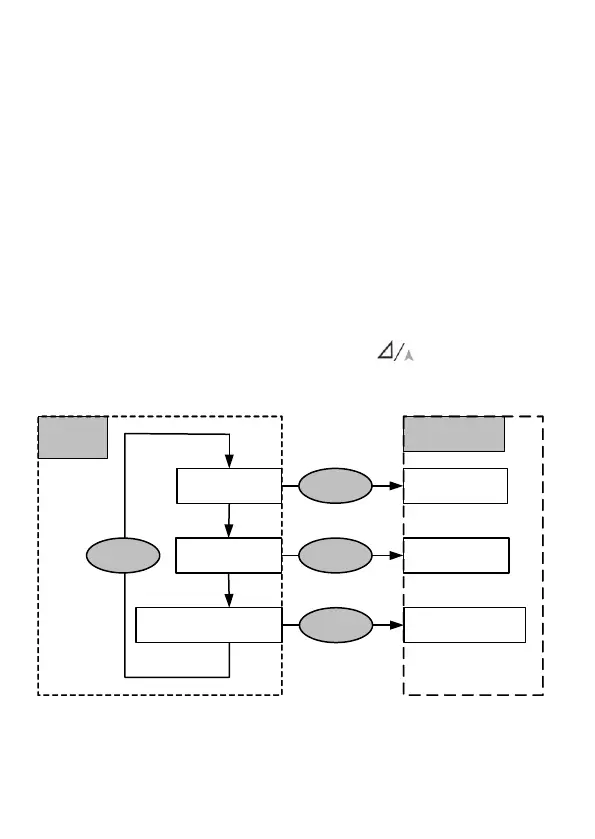
In the Color Difference mode, press the button and hold
for 3 seconds into set mode.(See diagram 5-2a)
Diagram 5-2a set reference values
Color
Difference
⊿Ev ⊿x ⊿y
⊿Ev ⊿u' ⊿v'
⊿
SET
Ev
ref
/ x
ref
/ y
ref
SET
Ev
ref
/ u'
ref
/ v'
ref
⊿
Set the
Reference Value
Hold for 3 secs.
⊿
⊿
SET
Ev
ref
/ CT
ref
(522)
Hold for 3 secs.
⊿Ev ⊿CT(522) ⊿u'v'


 To Next Page