Need help?
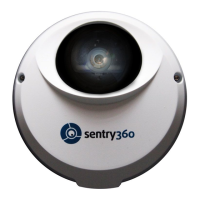
Do you have a question about the Sentry360 IS-IP200-IRB and is the answer not in the manual?
Illustrates and defines the various connectors on the IS-IP200-IRB, including network, power, alarm, and audio interfaces.
Explains how to connect the power supply to the IS-IP200-IRB, including PoE options and required equipment.
Details the procedure for connecting the IS-IP200-IRB to the network using an Ethernet cable, mentioning cable types and indicators.
Provides step-by-step instructions for mounting the IS-IP200-IRB on a wall or ceiling using the adjustable bracket.
Guides users through adjusting the zoom and focus of the vari-focal lens on the IS-IP200-IRB for optimal image quality.
Explains how to install and use the Device Search software to locate the IS-IP200-IRB on the network.
Details the process of finding and identifying the IS-IP200-IRB using its IP address and MAC address.
Provides the default administrator login credentials for the IS-IP200-IRB and emphasizes security.
Explains the automatic installation of the DC Viewer client program for viewing video streams from the IS-IP200-IRB.
Outlines the steps for downloading and installing the DC Viewer software to view the IS-IP200-IRB's home page.
 General
| Brand | Sentry360 |
|---|---|
| Model | IS-IP200-IRB |
| Category | Security Camera |
| Language | English |

 To Next Page