Home
Serafim
Controller
S1
Page 27
Serafim S1 - Page 27
71 pages
Manual
Save Page as PDF
To Next Page
To Next Page
To Previous Page
To Previous Page
Loading...
26
4.
S
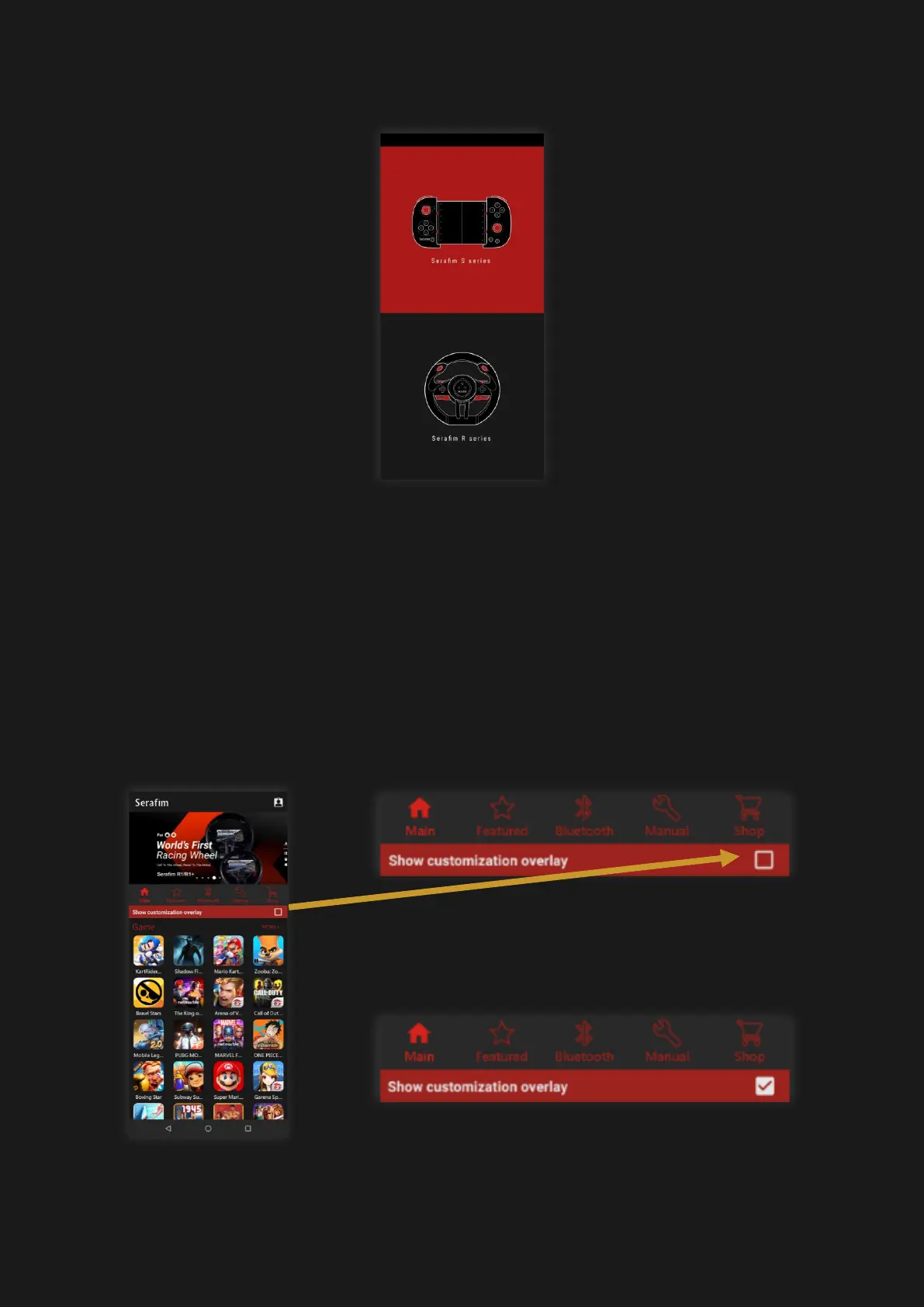
elect “Serafim S Series”
.
5.
In the m
ain sc
reen, press the square on
the right to activate customizatio
n
overlay. There will be a floating ga
dget
and then tap the controller icon in order
to customize button mapping.
26
28
Table of Contents
Main Page
Table of Contents
2
Disclaimer
4
Warranty
5
Component Names
6
How to Use
7
Button Customization
11
Button Customization (Android)
18
Button Customization (Ios)
26
Button Customization Hotkeys (Android)
30
Macros of Serafim Play Android
31
Macros of Serafim Play (Ios, Android)
34
How to Use on PPSSPP
35
Serafim Bluetooth Dongle (Win10)
39
HID Mode (Win10)
40
How to Use on Steam (Win10)
42
Steam Link (Win10)
45
Steam Link (Android)
49
How to Use on Nox Emulator
53
How to Use on Bluestacks
55
How to Use on Switch
58
Product Specification
59
Safety Notes
60
Faq
63
Serafim Websites
66
Compliance Information
67



 To Next Page