EasyManua.ls Logo

Servotronix CDHD2 - Motion Control Commands

Servotronix CDHD2
44 pages
Print Icon
To Next Page IconTo Next Page
To Previous Page IconTo Previous Page
Loading...
CDHD2
26 Operator Panel (HMI)
Enable / Disable
Code
C0003
Command
Enable/Disable (Toggle)
VarCom
EN / K
Sequence
Select: C0003
Press: Shift
Display: 00.000.
Press: Long Shift
Done: 00.000.
Sequence
Select: C0003
Press: Shift
Display: 00.000.
Press: Shift
Display: Flashing 0. in digit 1
Press: Long Shift
Done: 00.000.
Note
The ServoStudio toolbar/status bar might not accurately reflect change in
Enable/Disable state. Use the ST command in Terminal to verify.
Jog
Code
C0004
Command
Jog
VarCom
J
Note
Jog speed range: 1 rpm to VLIM
The jog command from the panel functions in both 0 and 8 modes
Sequence
Make sure drive is in appropriate operating mode.
Make sure drive is Enabled.
Select: C0004
Press: Shift
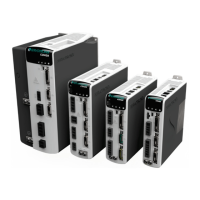
Display: joG88
Press: Shift
Display: 00.000.
Press: Shift
Display: flashing 0. in digit 1