4. Built-in Battery Operation
There are two ways to charge the battery:
1) Use the specific cord from us to charge the battery.
When the battery is in the charging state, the light will
flash.
2) When the battery is running out, the light of the battery
will not be light up even though you long press the
button. At this point, plz put the battery into the fridge to
charge the battery for a few hours with the fridge
plugged in. After the battery is automatically charged,
it can be used again.
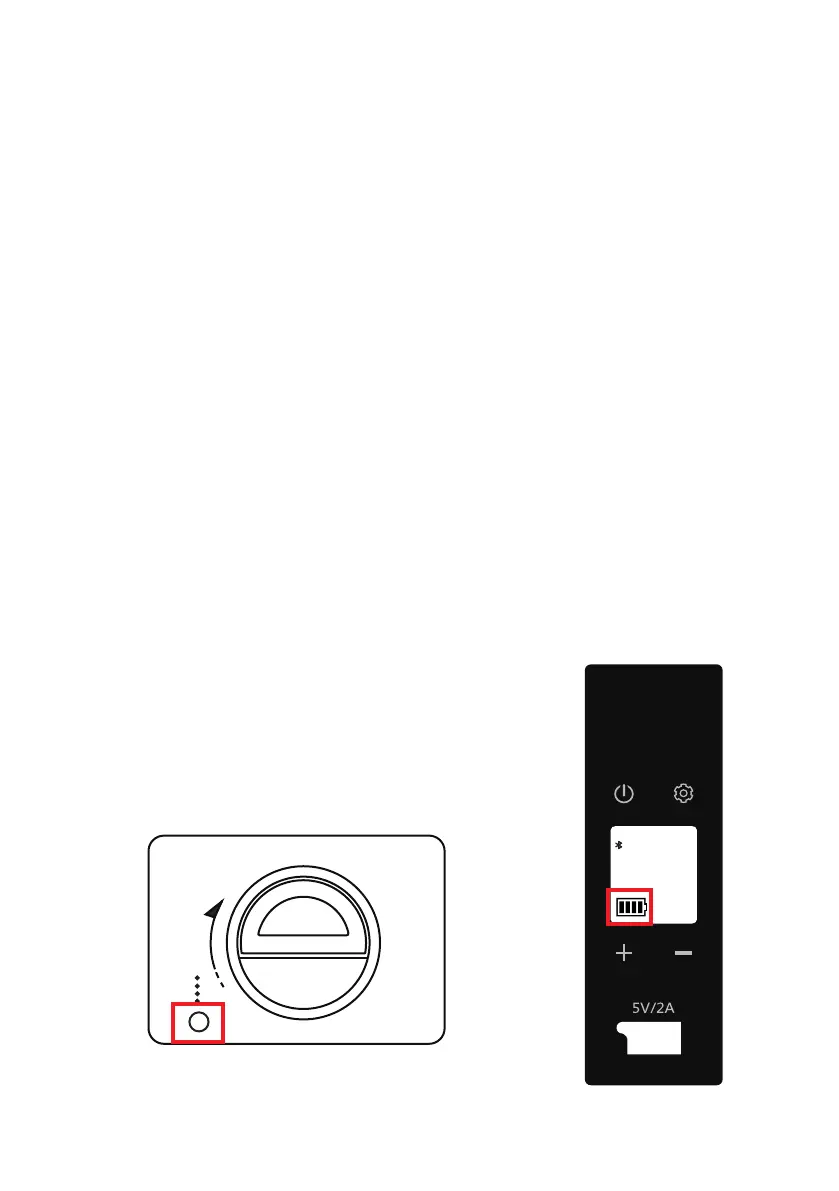
3) Put the battery into the fridge to charge the battery.
Then press and hold the button showing in Figure 1
for 3 seconds to switch the battery on. The light will
turn green and the capacity will be displayed on the
screen. When the battery is in the
charging state, the capacity will
show the dynamic effect. When it
is full, all 4 bars are illuminated,
as Figure2 shows.
How to charge the battery
888
°C
°F
MA X ECO H M L
88.8 V
N
E
P
O
Figure 1
Figure 2
08


 To Next Page