EasyManua.ls Logo

SetPower X50 - User Manual

SetPower X50
16 pages
Print Icon
To Next Page IconTo Next Page
Loading...
X50
User Manual
V1.0
Question and Answer IconNeed help?

Do you have a question about the SetPower X50 and is the answer not in the manual?

Summary

SAFETY INSTRUCTIONS

Disclaimer

Manufacturer's liability disclaimer for improper usage or accessories.

Operational and Maintenance Advice

Energy saving tips and cleaning/maintenance procedures for optimal use.

Usage Guidelines and Hazards

Dos and Don'ts, intended use, and critical safety hazards like electrical shock.

SPECIFICATIONS

GETTING STARTED

Key Setup Reminders

Key reminders for initial setup, including upright positioning and pre-cooling.

OPERATION

Basic Controls

Instructions for turning the unit on/off and adjusting the target temperature.

Settings Menu

How to access and use the settings menu for various functions like battery protection.

Built-in Battery Operation

Details on how to charge and operate the unit using its built-in battery.

Wireless Charging

ERROR CODES

WARRANTY & RETURN

Warranty Information

Details the 3-year compressor warranty and 1-year general warranty.

Customer Support Contact

Provides contact methods and required information for customer service inquiries.

Return and Refund Procedures

Outlines return policies and the process for refunds and replacements.

Summary

SAFETY INSTRUCTIONS

Disclaimer

Manufacturer's liability disclaimer for improper usage or accessories.

Operational and Maintenance Advice

Energy saving tips and cleaning/maintenance procedures for optimal use.

Usage Guidelines and Hazards

Dos and Don'ts, intended use, and critical safety hazards like electrical shock.

SPECIFICATIONS

GETTING STARTED

Key Setup Reminders

Key reminders for initial setup, including upright positioning and pre-cooling.

OPERATION

Basic Controls

Instructions for turning the unit on/off and adjusting the target temperature.

Settings Menu

How to access and use the settings menu for various functions like battery protection.

Built-in Battery Operation

Details on how to charge and operate the unit using its built-in battery.

Wireless Charging

ERROR CODES

WARRANTY & RETURN

Warranty Information

Details the 3-year compressor warranty and 1-year general warranty.

Customer Support Contact

Provides contact methods and required information for customer service inquiries.

Return and Refund Procedures

Outlines return policies and the process for refunds and replacements.

Overview

This document is the user manual for the SetPower X50 portable refrigerator.

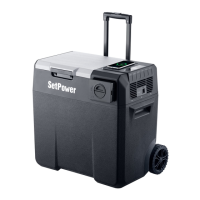
The SetPower X50 is a portable cooling device designed for various applications, including household use, staff kitchen areas in shops, offices, and other working environments, farmhouses, hotels, motels, other residential type environments, bed and meal environments, and catering and similar non-retail applications. It functions as a refrigerator, capable of maintaining temperatures for food and beverages.

Important Safety Instructions:

Users are advised to read the manual carefully before operating the appliance. The manufacturer is not responsible for damage due to improper usage or incorrect operation. Using non-recommended accessories can cause injuries and void the warranty. The appliance is not intended for use by persons with reduced physical, sensory, or mental capabilities, or lack of experience and knowledge, unless supervised or instructed by a person responsible for their safety.

Energy Saving Tips:

To optimize energy efficiency, place the unit on a dry, secure surface with adequate ventilation. Keep the lid closed and secure, opening it only when necessary. Cool down hot or warm food before placing it in the unit. Defrost the unit when ice forms on the internal walls or lid. Select the appropriate target temperature based on specific needs.

Cleaning & Maintenance:

Always power off and unplug the unit before cleaning or maintenance. Use non-abrasive detergent for cleaning the interior and exterior. Do not scrape the interior to defrost or de-ice. Avoid pressure-washing or spraying the fridge with a running water hose.

Dos and Don'ts:

  • Do not expose the unit to moderate or heavy rain.
  • Do not use the appliance near direct heat sources like flames or radiators.
  • Do not place open containers of liquid inside the fridge.
  • Securely place and arrange the contents of the fridge before using it in a moving vehicle.
  • Do not use electrical devices inside the food storage compartments unless approved or recommended by the manufacturer.
  • Do not store explosive items, such as aerosol cans with a flammable propellant.
  • Do not touch the compressor or condenser when the fridge is operating.
  • Ensure the supply cord is not trapped or damaged before setting up the appliance.

DANGER - Electrical Shock Hazard:

  • Do not immerse the product in water or use it in excessively muddy areas.
  • Do not use the cooler for any purpose other than as a portable cooling device.

FALL HAZARD:

  • Do not stand on the cooler, as this may damage the unit or cause injury.

RISK OF CHILD ENTRAPMENT:

Before disposing of the unit, remove the doors and leave the shelves in place to prevent children from easily climbing inside.

Technical Specifications (Model X50):

  • External dimensions (LxWxH): 616 × 351 × 560 mm (24.3 × 13.8 × 22.0 inches)
  • Net weight: 16.0 kg (35.3 lbs)
  • Storage volume: 50 liters (52.8 quarts)
  • Supply voltage: DC 12V/24V
  • Rated current: 7.8A/3.9A
  • Temperature setting: -20°C to +20°C (-4°F to 68°F)
  • USB output: 5V/2A

Getting Started:

  1. If the device was not placed upright after transit and delivery, keep it upright for 24 hours to ensure the compressor functions properly.
  2. For first-time use, if the device does not turn on or other problems are encountered, contact customer support.
  3. Pre-cool the empty unit before use to enhance system efficiency.

Operation:

The control panel features:

  • Power Button: To switch the unit on/off.
  • Setting Button: To access the settings menu.
  • Temperature Adjustment Buttons (+/-): To adjust the target temperature.
  • USB Port: For 5V/2A output.

Switched-on/off:

With the unit plugged in, long press the Power Button to switch the unit on or off.

Temperature Adjustment:

Press the "+" or "-" buttons to adjust the target temperature. The target value will flash on the gauge. Each press changes the temperature by one degree. Holding the button accelerates the adjustment process.

Settings Menu:

With the unit turned on, press and hold the Setting Button for 3 seconds to enter the Settings Menu. This menu includes three functions: Battery Protection Settings (H/M/L), °C / °F Settings, and MAX/ECO Settings. The target setting will flash on the gauge, indicating entry into the menu. Short press the Setting Button to cycle through the three functions.

  • MAX / ECO Settings: Short press "+" or "-" to toggle between MAX and ECO when MAX / ECO flashes.
  • °C / °F Settings: Short press "+" or "-" to toggle between °C and °F when °C / °F flashes.
  • Battery Protection Settings: Short press "+" or "-" to switch between H (High), M (Mid), and L (Low) when H / M / L flashes. Mid Level is the default setting.

Battery Protection Levels:

Power Source Protection Level HIGH MID LOW
Start-up Cut-off Start-up Cut-off Start-up Cut-off
12V 12.4V 11.1V 11.7V 10.4V 10.9V 8.5V
24V 25.7V 24.3V 24.2V 22.8V 22.7V 21.3V

Built-in Battery Operation:

There are two ways to charge the battery:

  1. Use the specific cord provided to charge the battery. The light will flash during charging.
  2. If the battery is completely drained, the battery light will not illuminate even with a long press. In this case, place the battery into the fridge and plug the fridge in for a few hours to charge the battery. Once automatically charged, it can be used again.
  3. To switch the battery on, place it into the fridge, then press and hold the button (as shown in Figure 1 in the manual) for 3 seconds. The light will turn green, and the capacity will be displayed on the screen. During charging, the capacity display will show a dynamic effect. When fully charged, all 4 bars will be illuminated (as shown in Figure 2 in the manual).

Operating Mode and Battery Protection in different power supply scenarios:

Current Power Supply Performed Operation Operating Mode Battery Protection Mode
No Power Supply Plugged into External Power Supply (AC/DC) Restore to the state before power is disconnected
Plugged into Built-in Battery Switch to ECO Mode Switch to L Level
Only Powered by External Power Supply Plugged into Built-in Battery No Changes
Only Powered by Built-in Battery Plugged into External Power Supply (AC/DC) No Changes Switch to M Level
Powered by both External Power Supply and Built-in Battery Disconnected from External Power Supply (AC/DC) Switch to ECO Mode Switch to L Level
Disconnected from Built-in Battery No Changes Switch to M Level

Wireless Charging:

  1. Ensure the device supports wireless charging and is placed in the designated charging area (as shown in Figure 3 in the manual). If charging is not initiated, try moving the phone slightly within the charging area.
  2. Rated Charging Power induction coil: 15W.
  3. Only one device can be charged wirelessly at a time.

Error Codes:

The fridge displays error codes if it malfunctions:

  • E1 Low Input-Voltage Error: Input DC voltage is below the protection setting, and battery protection is activated.
  • E2 Fan Error: Cooling fan overloads with more than 1A current.
  • E3 Motor Start Error: Compressor motor is blocked, or pressure difference in the refrigeration system is too high.
  • E4 Minimum Motor Speed Error: Compressor overloads, and the motor cannot maintain its minimum speed.
  • E5 Ambient Temperature Error: Refrigeration system overloads, ambient temperature is too high, or control is overheated.
  • E6 Thermal Sensor Fault: Thermal sensor is open-circuited or short-circuited.
  • E9 Connection Fault Between display screen and Controller Board: Issue with the connection between the display screen and the controller board.

Battery Failure Indicators:

If the battery fails, the battery icon on the screen will flash at a particular frequency:

  • Flashing Frequency 1: Low Battery.
  • Flashing Frequency OFF: Battery run out or battery insertion not detected.

Warranty & Return:

Warranty:

  • 3-year Warranty for the Compressor.
  • 1-year General Warranty for all other parts.
  • For warranty registration, contact SetPower for more information.

Customer Service:

If the product is received damaged or defective, contact customer service via:

  • Customer Support Email: support@setpowerusa.com
  • Amazon Message Service

When emailing, include the following information:

  • Order ID
  • Unit Model
  • Phone number
  • Description of the Defect
  • Delivery Address
  • Videos or Photos Related to The Defect

Note: Videos or photos are preferred as they help diagnose issues and improve problem-solving efficiency. If calling customer service outside working hours, leave a voice/text message, and they will respond after getting back to work.

Return Policy:

  • Amazon-Fulfilled Order: Postage is covered by Amazon within the Amazon return window. If the return window expires but the product is still under warranty, the return policy will be the same as a seller-fulfilled order.
  • Seller-Fulfilled Order: If the warranty is not expired, postage is covered if the return is confirmed to be due to a QUALITY ISSUE of the product.

Refund & Replacement:

  • For returns or exchanges, all accessories must be returned in their original condition and packaging.
  • After the unit is shipped, provide the tracking number and carrier for timely tracking and refund processing.
  • A full refund will be initiated once the package is delivered back to the warehouse.
  • If a return request is filed on Amazon, SetPower will process it within 48 hours and contact the user via Amazon Message Service. Users should pay attention to their Amazon Message Box or Email to avoid missing important notifications.

Our Guarantee:

SetPower products come with a 3-year warranty on the compressor and a 1-year warranty on all other parts. In the event of product failure when used according to the user guide, SetPower will repair or replace it. Full warranty terms and conditions are detailed in the user guide. Contact support@setpowerusa.com for any questions.

Quality Service Guarantee:

This product is warranted for 3 years on the compressor and 1 year for all other parts from the date of purchase. Goods come with guarantees that cannot be excluded under local consumer law. Users are entitled to a replacement or refund for a major failure and compensation for any other reasonably foreseeable loss or damage. Users are also entitled to have goods repaired or replaced if they fail to be of acceptable quality and the failure does not amount to a major failure. The warranty does not cover products not used in accordance with the user guide or those outside the warranty terms and conditions.

SetPower X50 Specifications

General IconGeneral
BrandSetPower
ModelX50
CategoryRefrigerator
LanguageEnglish

Related product manuals