28
Cleaning a room
6 Cleaning a room
Prepare room as follows:
– Remove loose objects that the robot could push in front of itself.
– Remove cables, draperies, and everything that could get entangled in the brushes.
– Remove breakable objects or objects that can tip over easily.
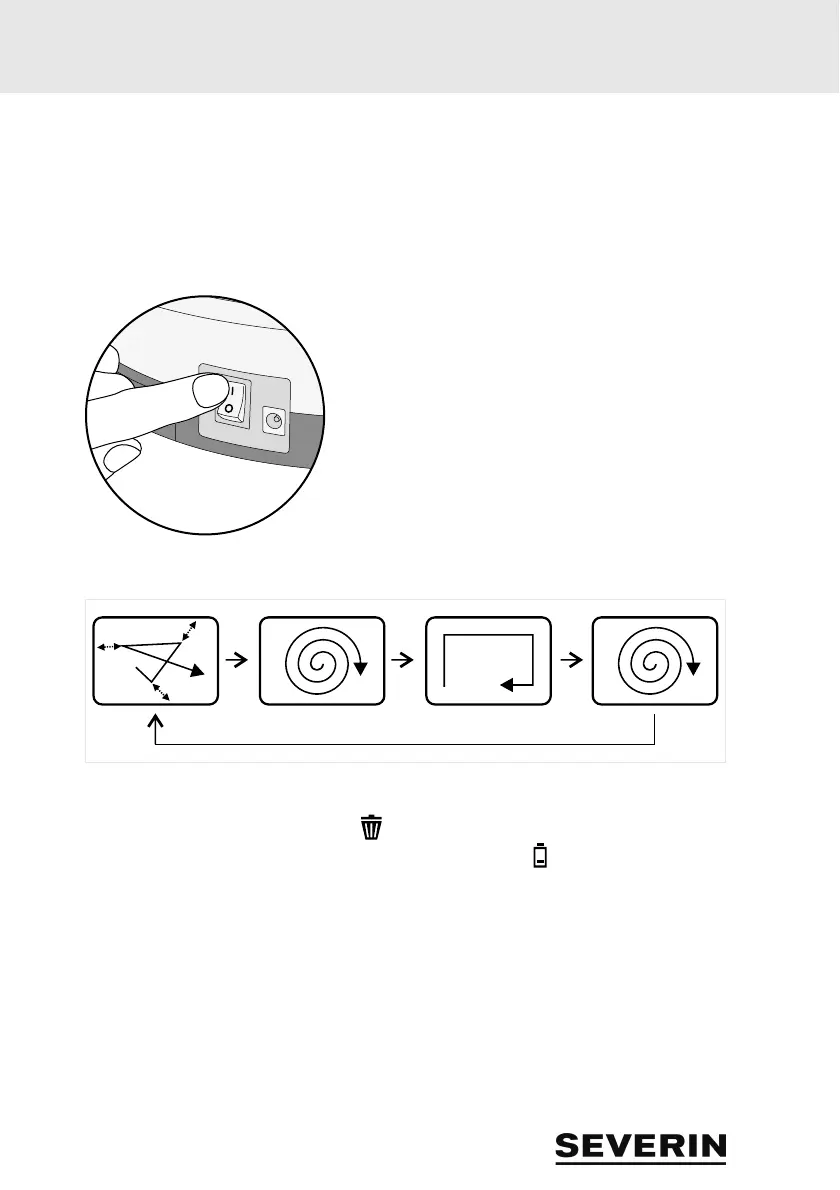
Switch the appliance on as follows:
1. Place appliance in the middle of the room to be cleaned.
2. Switch appliance on using the on/off switch (position "I"
- see detail).
The appliance will now clean the room according to the following pattern:
The appliance will now clean until
– the dust container is full and the LED lights up, page 29, “Emptying the dust container”.
– or until the rechargeable battery must be charged and the LED lights up, page 26, “Re-
charging the rechargeable battery”.
In both cases, the appliance stops after a while.
It will then emit a peep tone every minute
– until you switch it off using the on/off switch (position "0")
– or the rechargeable battery is discharged completely.
If you do not intend to use the appliance any longer,
then remove the rechargeable battery, page 36, “Removing the rechargeable battery”.



 To Next Page