21
Vacuum cleaning
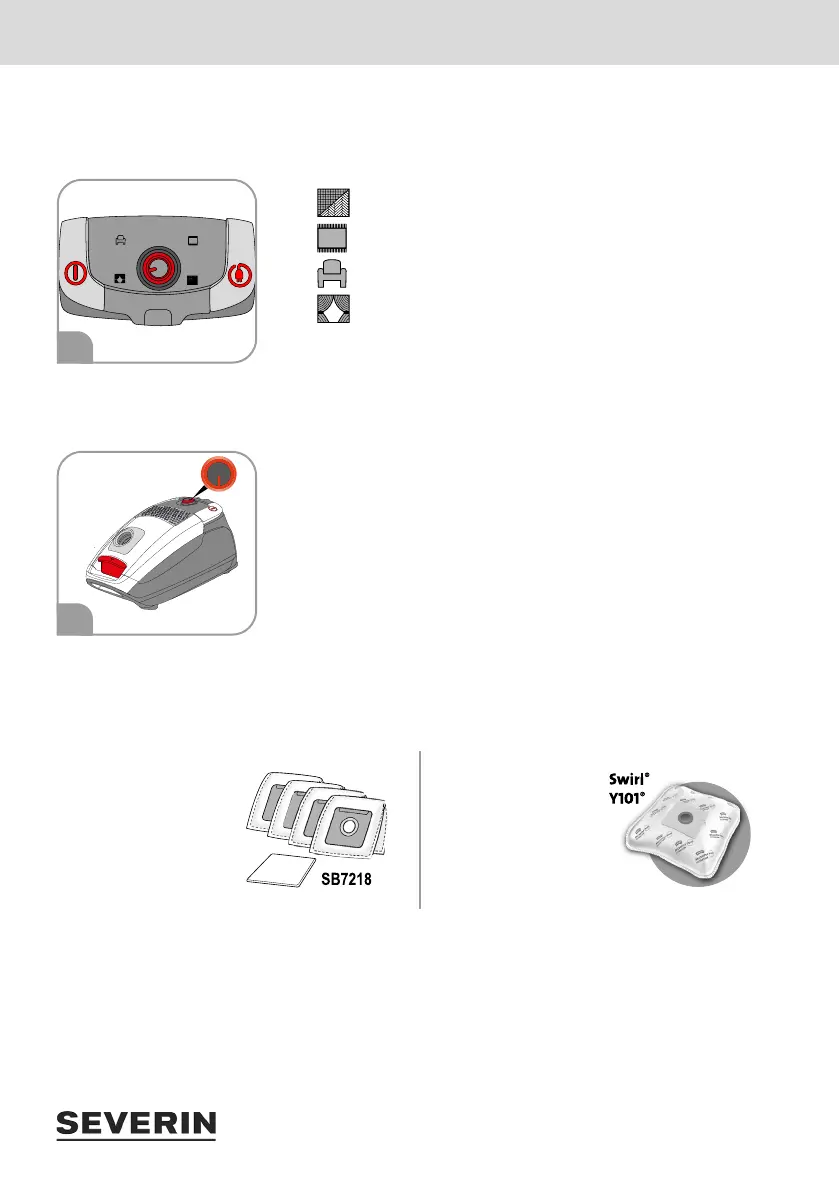
Setting the suction power
The power controller can be set steplessly. The power regulator position should be adjusted according to the
oor to be cleaned:
maximum power: for hard oors, heavily soiled carpets
high power: for carpets, rugs and such like
moderate power: for upholstered furniture, upholstery and mattresses
minimum power: for curtains, drapes and such like
Changing the dust bag
Before changing the dust bag, switch off the device and disconnect the power plug from the socket.
Latest point at which to change the dust bag:
as soon as the suction power noticeably decreases
as soon as the light on the power regulator lights up red (Fig. 3),
before prolonged storage or
before shipment.
The dust bag and its contents can be disposed of in normal household waste unless it contains dirt that is
forbidden in household waste.
Only use dust bags of the same type:
Either from the Severin
range of spare parts:
Severin dust bag set
(4 dust bags + 1 motor
lter)
Art. No.: SB7218
Or from the Swirl range
of accessories: Swirl
®
Y101
®
MicroPor
®
Plus
Swirl
®
, Y 101
®
and MicroPor
®
are registered trademarks
of a company of the Melitta
®
Group and are not connected to
SEVERIN in any way.
It is recommended that the lters be cleaned as well at this time (“4 Cleaning and maintaining the device”
on page 22).
With regard to changing the dust bag, see also Quick Start Guide Cleaning and maintenance.
2
3


 To Next Page