22
cleaning anD mainTaining The DeVice
4 Cleaning and maintaining the device
Before changing or cleaning the lters, switch the device off and disconnect the power plug from the socket.
Clean the lters no later than when the light on the power regulator lights up red (Fig. 3).
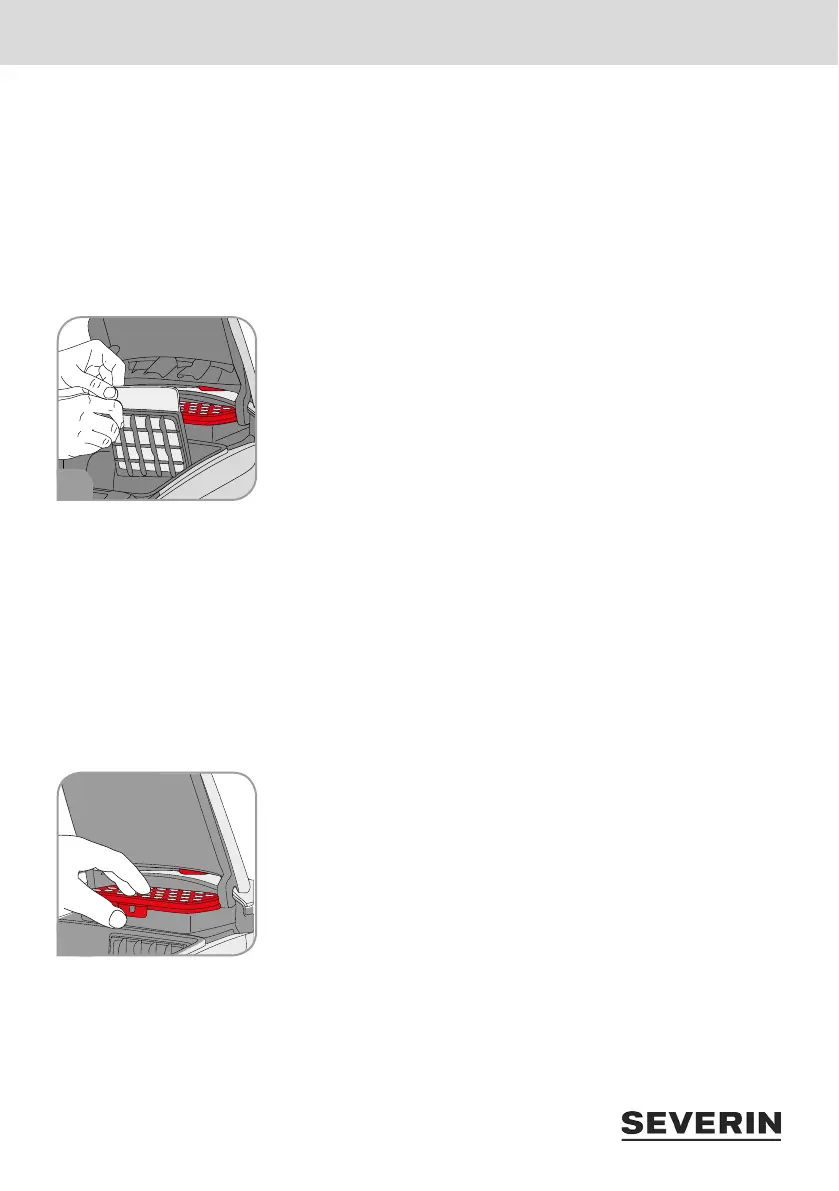
Cleaning the motor lter
The motor lter is comprised of a washable eece. However, it cannot be washed in the dishwasher or
washing machine.
1. Open the cover of the device and remove the dust bag (“Changing the
dust bag” on page 21).
2. Push up the lter holder and remove the motor lter (Fig. 4).
3. Rinse the motor lter out thoroughly under running water (max. 40 °C)
( Quick Start Guide, Cleaning and maintenance).
4. Let the motor lter dry for approx. 24 hours at room temperature after
cleaning. Wait until the motor lter is completely dry before reinserting
it. Otherwise germs and mould may form.
5. Reinsert the motor lter in the lter holder and insert the holder into the housing in the direction of the
arrow.
If the lter is damaged or deformed, replace the lter with a new one (“5 Spare parts/accessories” on
page 23).
With regard to cleaning the motor lter, see also Quick Start Guide Cleaning and maintenance.
Cleaning the exhaust lter
The exhaust lter cannot be washed! The exhaust lter must only be cleaned dry by tapping it out and
carefully brushing it out.
1. Unlock the exhaust lter (Filter. 5) and remove it.
2. First knock out the exhaust lter and then brush it carefully with a soft
brush (e.g. with the furniture brush provided) ( Quick Start Guide,
Cleaning and maintenance).
3. Reinsert the exhaust lter in the device and press on it until it audibly
locks in place.
If the lter is damaged or deformed, replace the lter with a new one
(“5 Spare parts/accessories” on page 23).
With regard to cleaning the exhaust lter, see also Quick Start Guide Cleaning and maintenance.
4
5


 To Next Page