19
142 x 208 mm
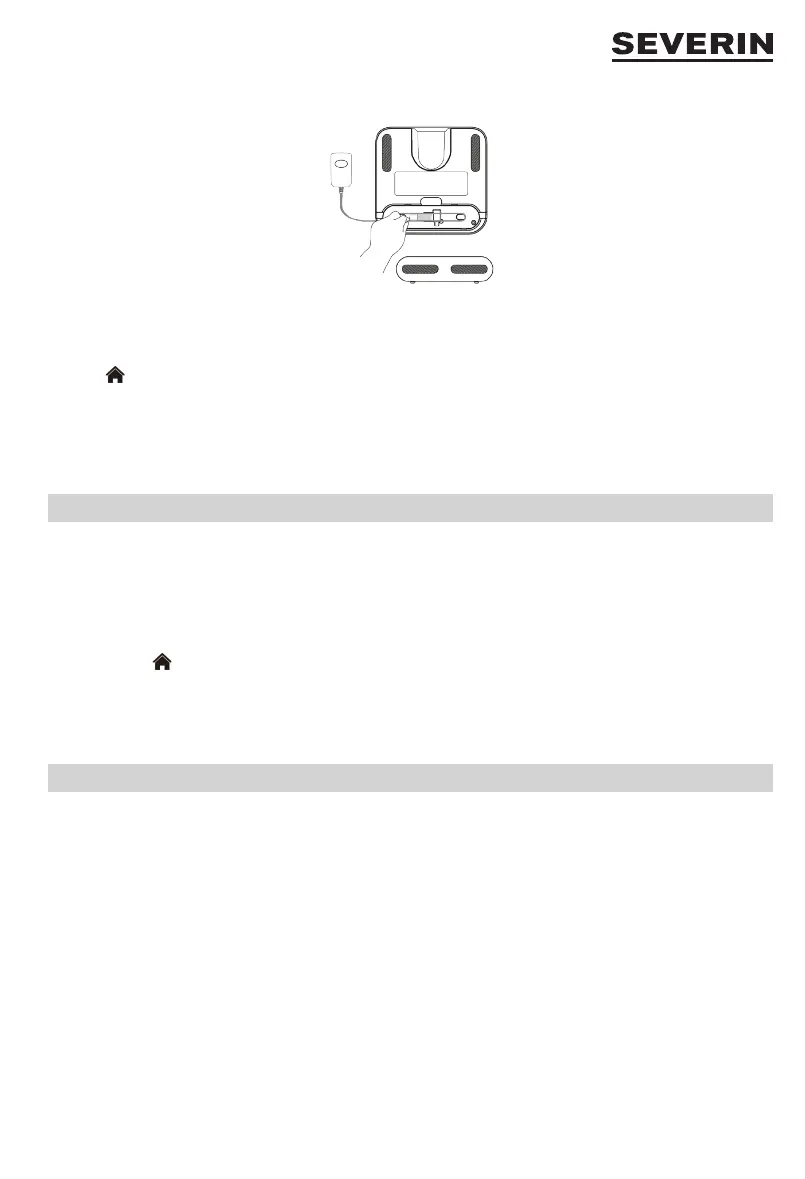
2. Open the ap at the bottom of the charging station and connect the power supply unit to the charging station.
3. Connect the mains adapter to a power socket.
TIP:
It is advisable to check whether the appliance can nd the charging station. To do this, place the appliance in the room and
press the button on the remote control or the appliance. If the appliance does not nd the charging station, the charging
station must be placed in a more accessible location
NOTES:
∙ The free space around the charging station is not cleaned by the appliance to avoid accidental contact with the charging
station.
∙ The appliance can only nd the station when the charging station power supply is connected to mains power supply.
Charging the Battery
∙ The appliance is equipped with a rechargeable battery that must be fully charged before rst use.
∙ As soon as the battery need to be charged, the ring on the appliance lights up orange. The appliance returns to the
charging station independently.
∙ Charging the battery can also be started manually:
1. Place the appliance with the charging electrodes on the charging contacts at the charging station.
or
2. Press the button on the appliance or the remote control. The appliance returns to the charging station
independently.
∙ The ring on the appliance ashes orange when the battery charge is very low. During charging, the ring ashes white.
When the appliance is charged, the ring lights up white continuously.
∙ Charging takes up to 5 hours.
Acoustic signals and illuminated ring
∙ As soon as a problem occurs, the ring ashes orange and acoustic signals are heard. Then solve the problem using the
table below.
∙ The ring ashes orange for 10 minutes and then goes into sleep mode. If the appliance is in sleep mode, press any key
on the remote control. The appropriate acoustic signal sounds again. Then solve the problem. The ring lights up white and
the appliance is in standby mode.


 To Next Page