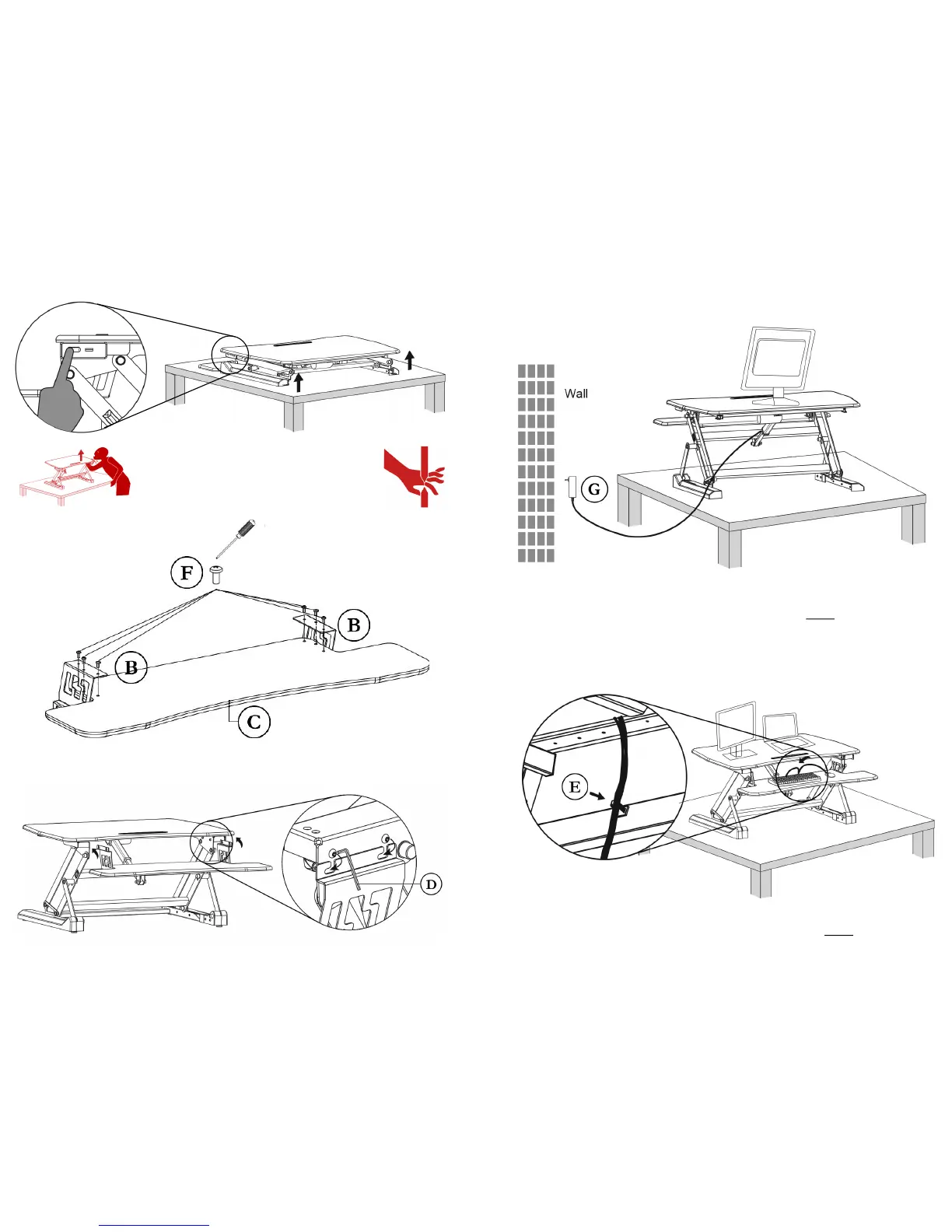
STEP 6. Hook BRACKETS (B) over the bolts on the inner legs of the AIRLIFT™ DESK (A).
Tighten bolts clockwise with included ALLEN WRENCH (D).
STEP 4. Press the UP buon on the controller to li the AIRLIFT™ DESK (A).
ALWAYS route your POWER CORD (G) through the REAR of the desk.
NEVER route cables through the legs of the desk.
Cable Management
WARNING: DO NOT PLACE HANDS ON
DESK LEGS. MOVING PARTS CAN CRUSH.
Sck the WIRE CLIP (E) to back of the crossbar. Use this clip to route
cables from keyboards, mice and monitors through the REAR of the desk.
STEP 5.
Flip TRAY (C) upside down.
Aach BRACKETS (B) to
underside of TRAY (C) with
SCREWS (F) and screwdriver.





 To Previous Page