8
Stitch patterns
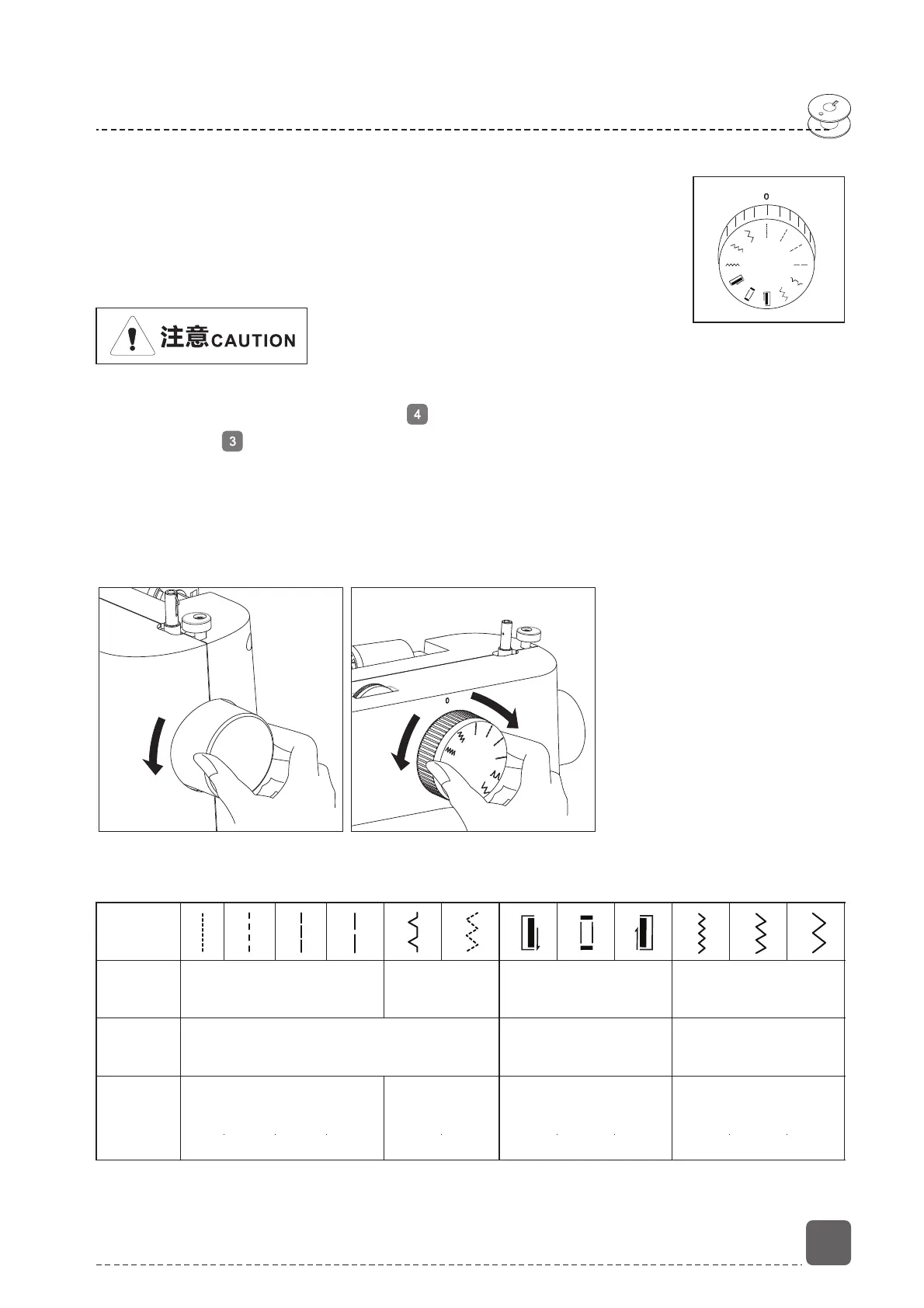
Selection of stitch pattern
1. Stitch pattern selection function
This machine has 12 kinds of stitch patterns, you can use
the pattern selection dial to select the stitch you want.
Rotating the dial, make sure the pattern you want it lined
up with the mark.
When the needle in the fabric, never turn the pattern selection dial, otherwise, the
needle may bend or break, the machine will be damaged, there is even a risk of
personal injury.
Before changing the stitch, always make sure that the needle is at its highest
position by turning the hand wheel towards you. And then turn the pattern
selection dial to select the pattern you want. Do not turn the pattern selection
dial while sewing.
Stitch
Model
Presser
foot
Purpose
Straight stitch
Standard foot
Blind stitch
Buttonhole
Buttonhole
presser foot
Zigzag stitch
Standard foot
Shorter stitch
Longer stitch
Blind
hemming
Buttonhole
Hemming
Applique
1
2
4
3
1
3
2
4


 To Next Page