26
EN
TEMPERATURE SETTING
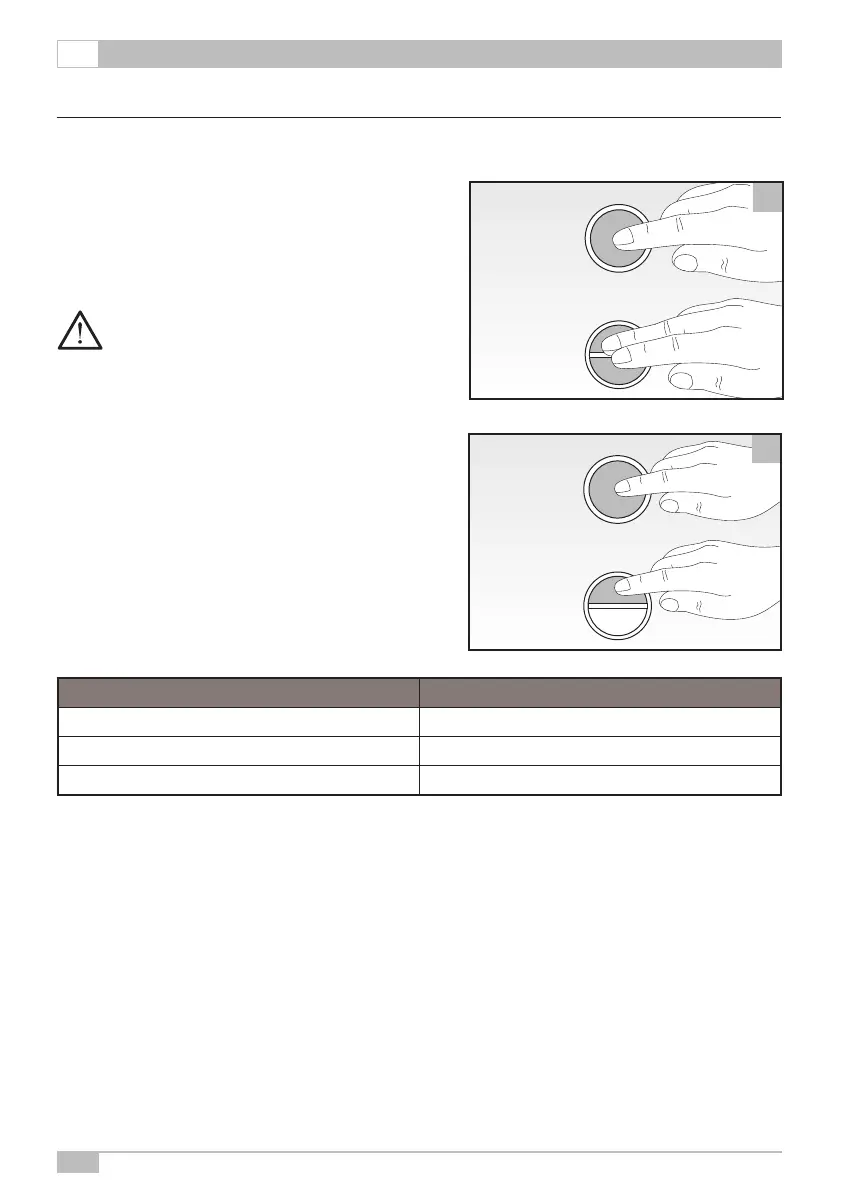
To enter the temperature setting mode, proceed as follows:
• Switch on the machine keeping the coffee dispensing but-
tons pressed for 5 seconds:
▪ ⓬ for the Manual version
▪ ➌ and ❹ for the Automatic version.
NOTE: The machine set up permits to set the
temperature on 3 levels, at intervals of 3°C
(-3°C, Standard, +3°C).
MANUAL version
Once having entered temperature setting, select by means
of the coffee dispensing button ⓬.
AUTOMATIC version:
Once having entered temperature setting, select by means
of the short coffee dispensing button ⓬.
The three temperature levels are shown by the Blue LED
and/or the Red one, as follows:
TEMPERATURE LEVEL LED
Minimum Blue (steady light on)
Standard Blue and Red (steady light on)
Max Red (steady light on)
The temperature level changes every time the coffee dispensing button is pressed.
MANUAL
version
16
MANUAL
version
AUTOMATIC
version
MANUAL
version
17
MANUAL
version
AUTOMATIC
version


 To Next Page