Pairing Timeout
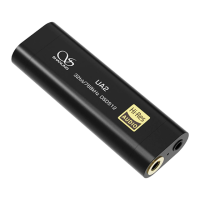
If no device is paired with the Shanling UP2 in 5 minutes after entering
the pairing mode, Shanling UP2 will automatically power off.
Pairing process
While the Shanling UP2 is in pairing mode, turn on Bluetooth on your
device and search for available Bluetooth devices. Click on “ShanLing
UP2” to finish pairing process. If the pairing was successful, the indicator
will flash blue light every 5 seconds.
Disconnection
1. If the distance between the Shanling UP2 and the connected device is
beyond the effective connection range, the Shanling UP2 will
automatically power off after 10 minutes.
2. If you manually turn off Bluetooth on the connected device, the
Shanling UP2 will automatically enter pairing mode and if no new
device is connected within 5 minutes, the Shanling UP2 will power off
automatically.
Simultaneously Connecting Two Devices
1. After pairing the Shanling UP2 with the fist device (indicator will flash
blue light every 5 seconds), power off the Shanling UP2 and turn off
Bluetooth on the first device.
2. Pair the Shanling UP2 with the second device. After pairing is
successful (indicator will flash blue light every 5 seconds), power off
the Shanling UP2 again.


 To Next Page