sharkclean.comsharkclean.com
NOTE: All accessories are compatible with both the wand and the handle.NOTE: For deep carpet cleaning per ASTM F608 (embedded dirt in carpets), set to MAX suction and use setting II, Carpet.
WHOLE-HOME CLEANING
CLEANING MODES
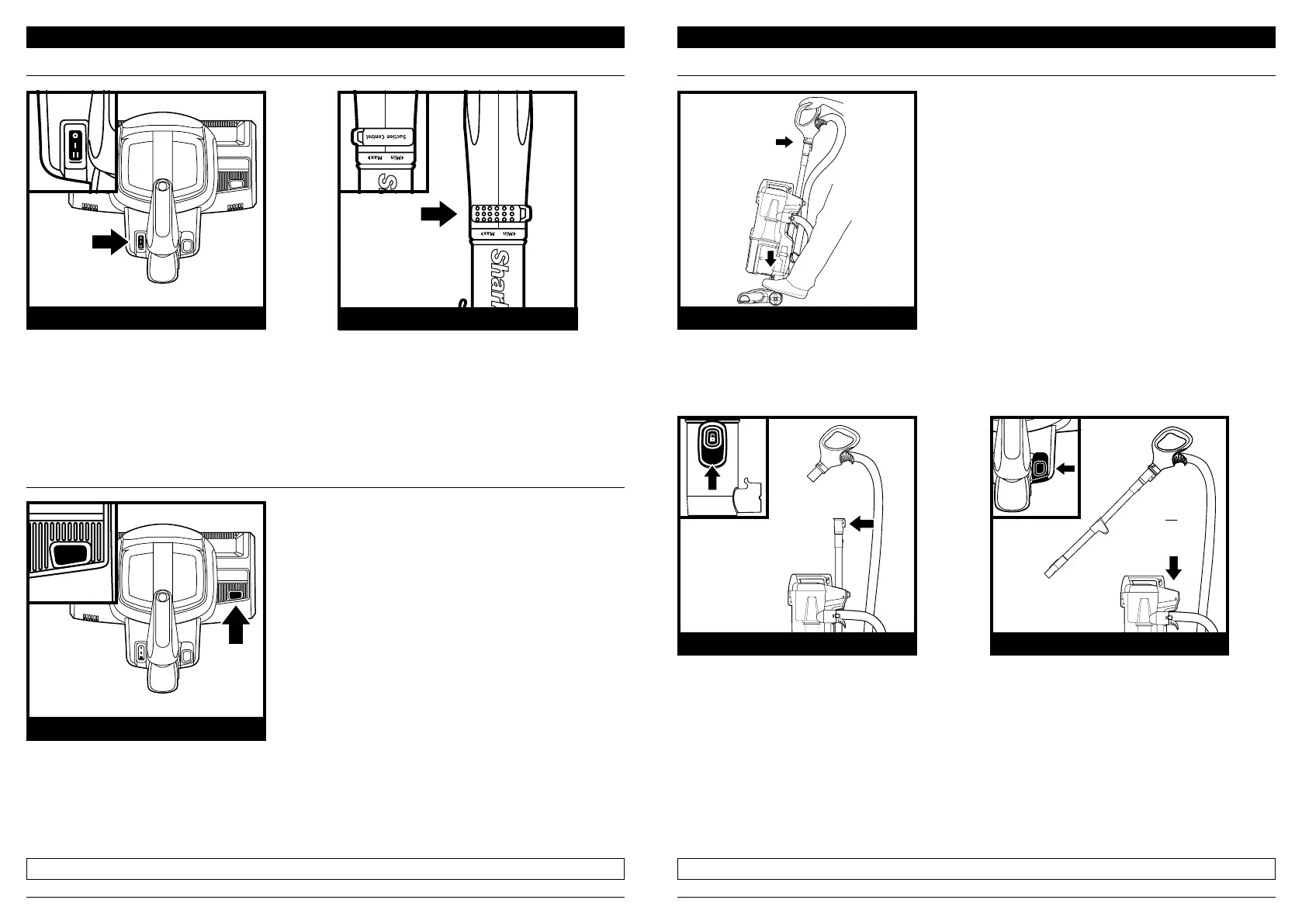
To engage Brushroll, turn on the power, step
on the floor nozzle, and tilt handle back.
Select surface setting:
O O
I Hard Floor
For bare floors and area rugs. The
brushrolls will spin slowly in this mode.
II Carpet
For carpets. The brushrolls spin quickly in
this mode.
WHAT DOES THE BRUSHROLL INDICATOR LIGHT MEAN?
Solid Green: The brushroll is spinning and working as intended.
Solid Red: There is a jam in the brushroll area. Turn o and unplug the vacuum and remove any
blockages in the nozzle.
Flashing Red: The motorized floor nozzle is overheating. Turn the vacuum o and wait a minimum
of 60 minutes for the unit to cool down. See Troubleshooting section for more information.
Press the Wand Release button and pull
up on the wand to detach it from the
pod. Attach an accessory to the wand.
Press the Handle Release button and
pull up on the handle to detach it
from the wand. Attach an accessory
to the handle.
ABOVE-FLOOR—WANDABOVE-FLOOR—HANDLE
WHOLE-HOME CLEANING
SETTINGS
BRUSHROLL INDICATOR LIGHT
UPRIGHT MODE
INDICATOR LIGHT
POWER/SURFACE SWITCH
The Suction Control Slider located on the
handle allows you to adjust the suction
depending on the floor type.
MIN: to reduce suction and increase
maneuverability on carpets.
MAX: to increase suction on bare floors.
SUCTION CONTROL



 To Next Page