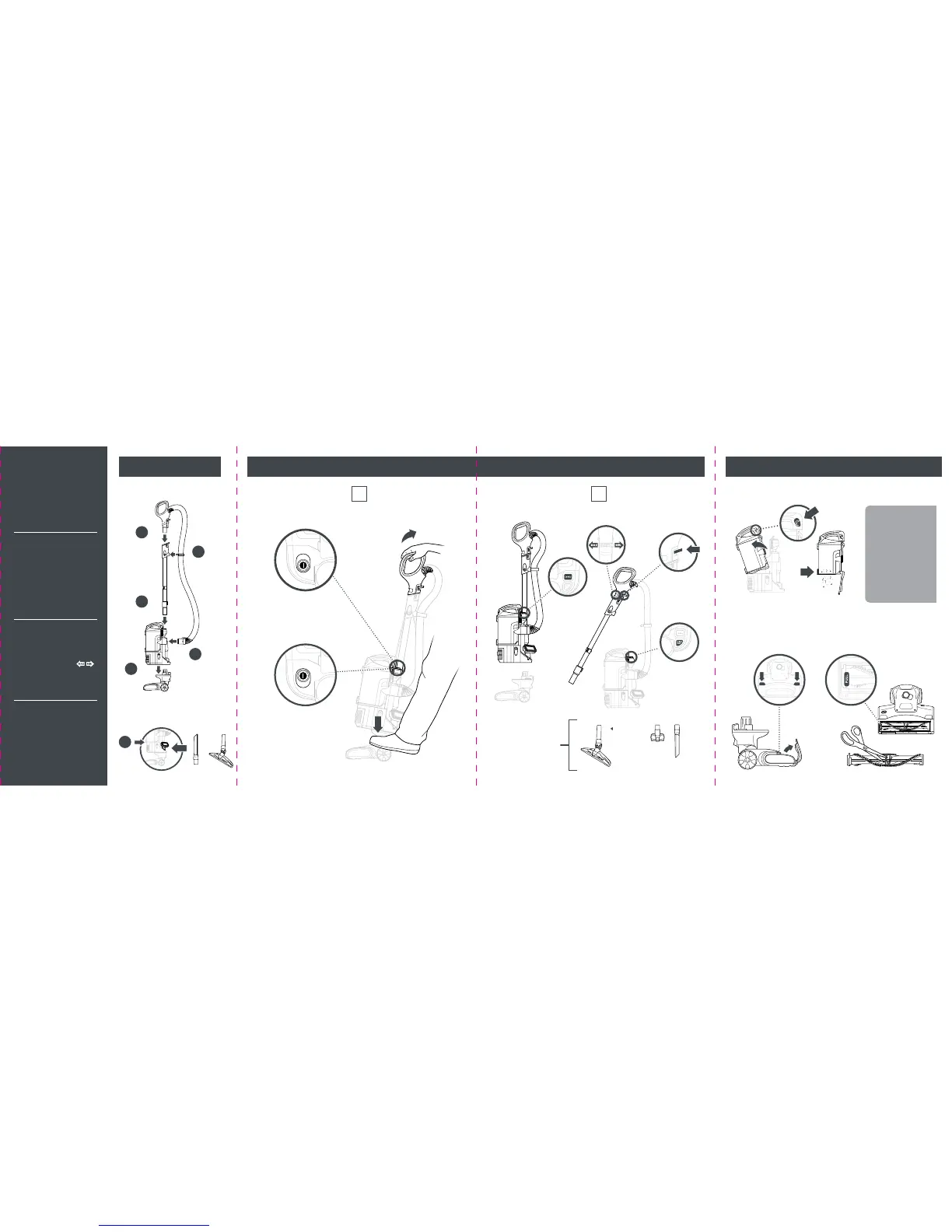
2 WAYS TO CLEAN:
1
UPRIGHT
2
LIFT-AWAY
®
OR
Handle
Release
Wand
Release
Suction
Control
NOTE:
The flat si de
of the Hard
Floor Hero™
attachment
should face
forward.
ASSEMBLE
Assemble vacuum
3
(Click)
2
(Click)
4
(Click)
1
(Click)
5
(Click)
HAVING
TROUBLE?
ISSUE
Vacuum is not picking
up debris. No suction
or light suction.
Solution
Empty dust cup, clean
filters, check all openings
for blockages, and clean
brushroll.
ISSUE
Vacuum lifts area rugs.
Solution
Slide the POWER button
to the Hard Floor setting
to turn off the brushroll.
Adjust Suction Control
on handle to minimize suction.
ISSUE
Brushroll does not spin.
The Brushroll Indicator
Light is red.
Solution
Turn off and unplug the
vacuum. Remove any
blockages, then reconnect
and turn vacuum back on.
Brushroll
Access
Brushroll
Access
Empty dust cup after each use
MAINTENANCE
EmptyRelease
Easy brushroll access: just pop open the garage
Push the release buttons and the brushroll garage door will pop open. Lift out the
brushroll to easily remove any string, hair, or debris that may be wrapped around it.
TIP:
Wash filters
every 3 months
to keep the
suction strong.
Rinse filters and
allow to air-dry
completely. Tap
loose dirt from foam
filters as needed
between washes.




 To Previous Page