sharkclean.comsharkclean.com
USING THE SHARK ION™ ROBOT
MAINTENANCE
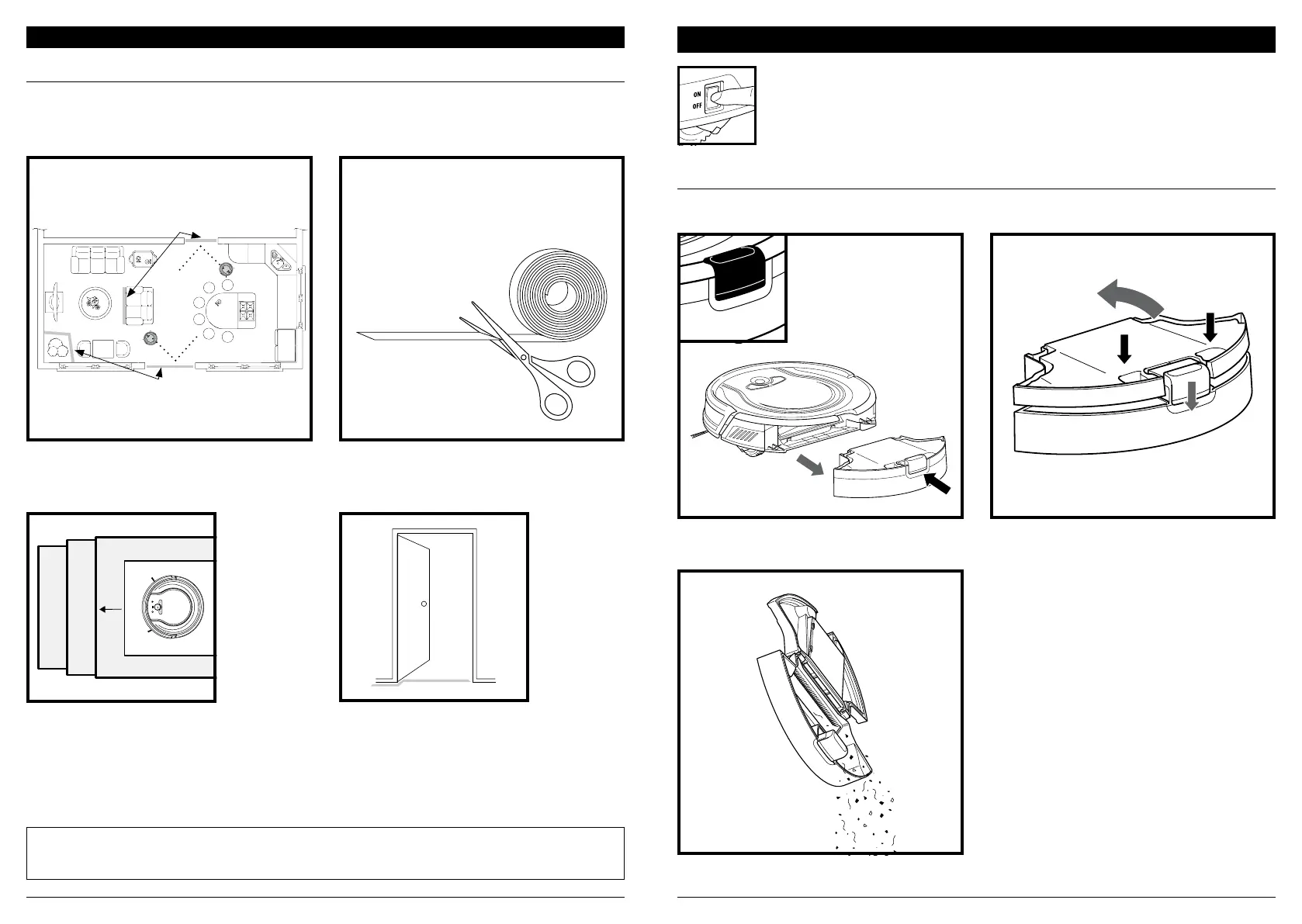
BotBoundary strips
BotBoundary strips
Cut the BotBoundary strip to the desired length
(18˝/45cm minimum) so that it spans the length
of the doorway or object you want to block o.
Identify areas or objects you want the robot to avoid.
To keep your robot away from certain areas, such as pet bowls, fragile objects, power strips,
or doorways, use the BotBoundary strips to quickly and easily create “no-go zones”.
NOTE: To prevent bumping, place strips at least 2 inches in front of the object you want to block o.
NOTE: You do not need to use BotBoundary strips on stairs. Your robot has cli sensors that will prevent it from falling
o any ledges or stairs.
For best results, make sure your BotBoundary strip
is completely flat against the floor. Make a closed
loop around an object, or place the strips between
fixed objects, like door frames or the legs of a couch,
to create no-go zones.
EMPTYING THE DUST BIN
Press the dust bin removal button and slide out the
dust bin.
CAUTION: Turn o power before performing any maintenance.
To open the dust bin lid, press and hold the button
while lifting the lid, using the finger slots.
Empty debris and dust into trash.
EMPTY DUST BIN AFTER EACH USE.
BotBoundary™ strips
For your robot’s cli sensors to work properly,
all runners, rugs, or carpets must be at least
4 inches from any stairs (or extend over the edge
of the stairs.)
If a runner, rug, or carpet edge is less than
4 inches from the stairs and can’t be moved,
use a BotBoundary strip to block o the stairs.


 To Next Page