QUICKSTORE PORTABLE USB3.0
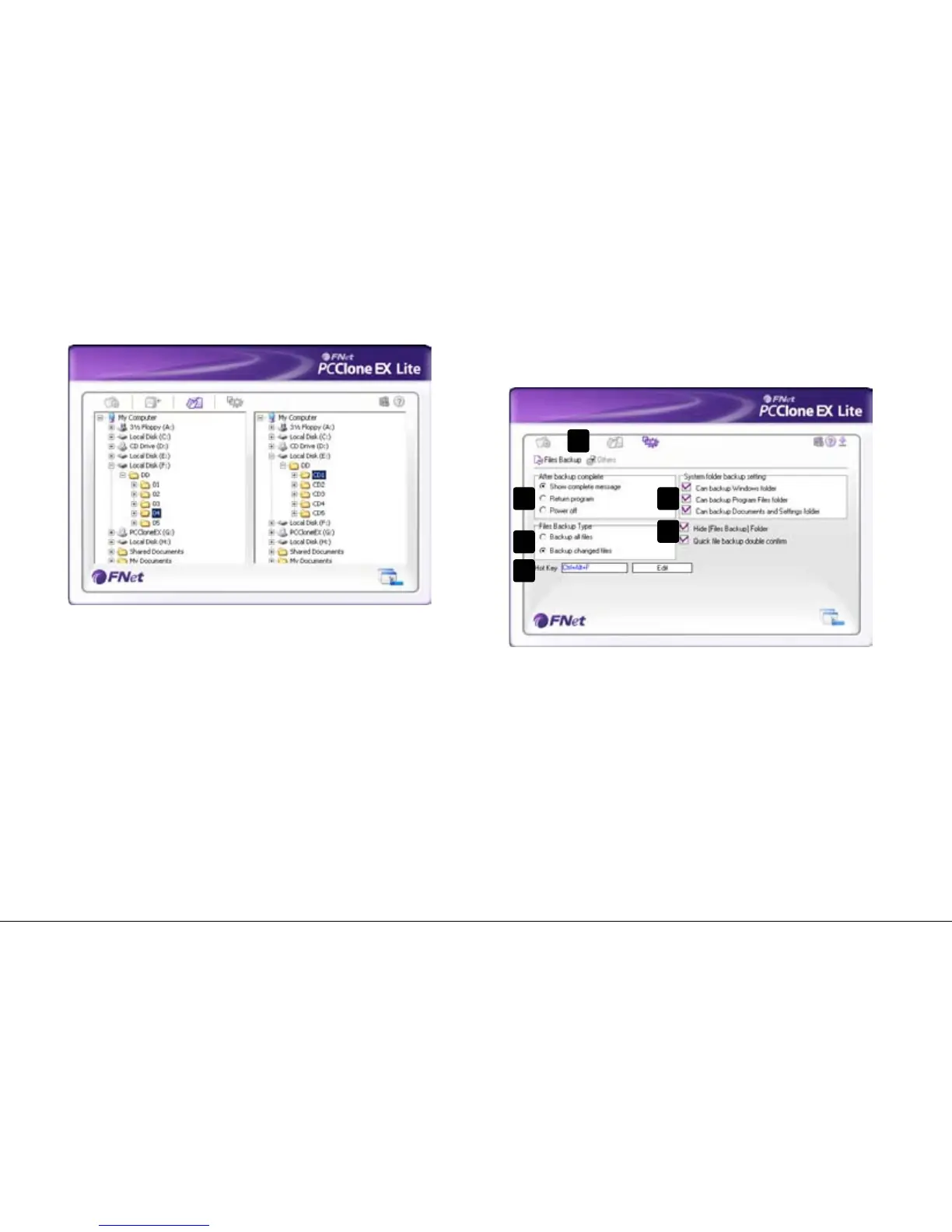
7.4 File manager
TheFileManagermakesiteasytogovernyourlocalfolders/les
andsupportssimilarfunctionsasknownfromtheWindows
Explorer.
7.5 Setup
7.5.1 Files Backup
A – Selectbetweenthewindows"FilesBackup"(7.5.1)and
"Others"(7.5.2).
B – Decide what shall happen after the backup has been
completed:“Showcompletemessage”willshowa
summaryofthebackup;“Returnprogram”returnstothe
program;“Poweroff”willshutdownyoursystem.
C – Choose whether all or only changed files shall be secured.
D – Determine a hot key to start the backup.
E – Selectwhichsystemfoldersshallbeincludedintothe
backup.
F – Determine whether the Files Backup folder shall be hidden
and if the quick file backup shall be double confirmed or
not.
D
E
F
A
B
C


 To Next Page