E 17
Dimension: 176 x 250 mm
FLE (M) Sdn. Bhd
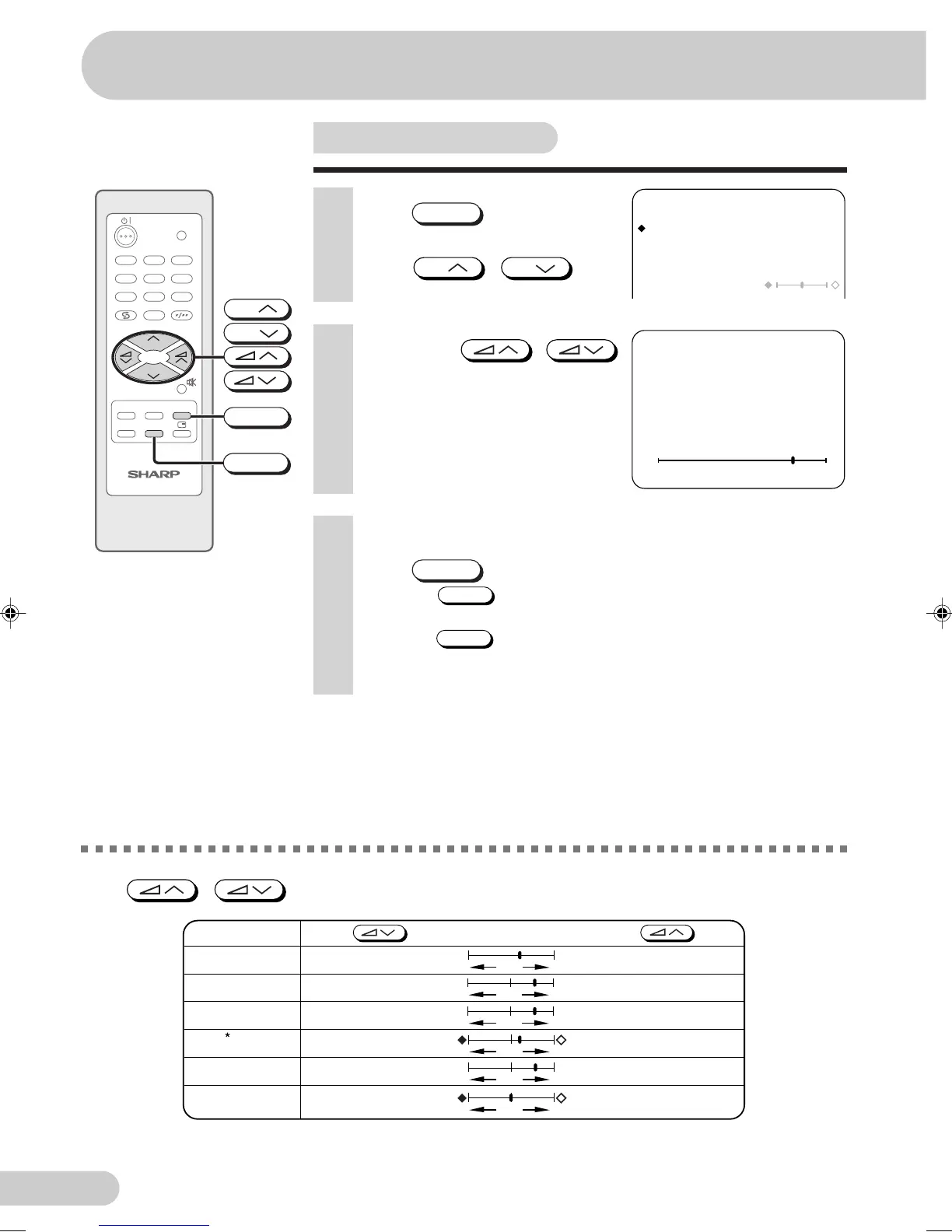
Picture adjustment
1 Press
PICTURE
to call PICTURE
screen.
2 Press
CH
/
CH
to
select adjustment items.
PICTURE
CONTRAST 50
COLOUR 0
BRIGHTNESS 0
TINT
SHARPNESS 0
WHITE TEMP
4 Repeat steps 2 and 3 above to adjust other items.
5 Press
PICTURE
to return to normal screen.
• Pressing
NORMAL
while a PICTURE selection is displayed, only the
selected mode is reset to the standard (factory-setting) position.
• Pressing
NORMAL
while a PICTURE screen is displayed will reset all
the items of PICTURE screen to the standard (factory-setting)
position.
TV/VIDEO
TV
0
NORMAL
TIMERFEATURE
CH-SET
PICTURE
1
4
7
2
5
8
3
6
9
CH
CH
NORMAL
PICTURE
CH
CH
3 Adjust using
/
.
• Wait for approximately three seconds
to return to PICTURE screen.
-
+
CONTRAST
50
CONTRAST
Selected item Press Press
COLOUR
BRIGHTNESS
TINT
SHARPNESS
To decrease
contrast
For less colour
intensity
For less
brightness
To move tint toward
red
For less
sharpness
To increase
contrast
For more colour
intensity
For more
brightness
To move tint toward
green
For more
sharpness
- +
- +
- +
- +
WHITE TEMP To more reddish
background
To more bluish
background
The following table lists the adjustment items shown in the PICTURE screen and how they change as you
press
/
.
*: TINT can only be selected and adjusted when receiving NTSC broadcasts. (AV only)
Settings and adjustments
21H1-FRU(17-21)EN 12/8/04, 9:36 am17



 To Next Page