E 23
Dimension: 176 x 250 mm
FLE (M) Sdn. Bhd
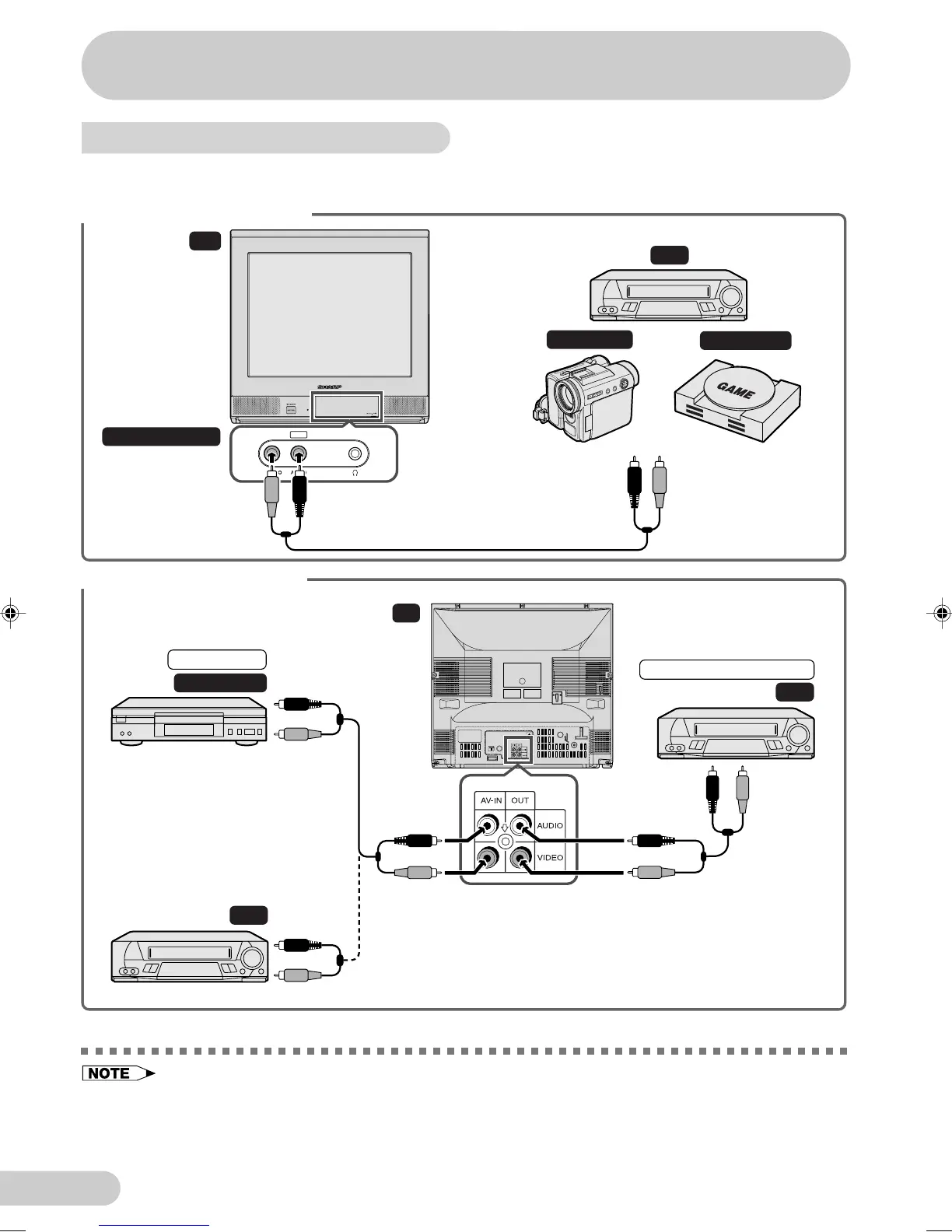
Connecting to video equipment
Enjoy playback from a video disc player, VCR or other video equipment by connecting
them to this TV set using the Audio/Video in terminals.
Example use of front terminals
TV
VCR
Video Game
Camcorder
Behind the door
To Audio/Video
out terminals
Yellow : To VIDEO
Red : To AUDIO
AV-2 IN
For Playback
DVD Player
For Recording and Editing
VCR
VCR
TV
To Audio/
Video out
terminals
To Audio/
Video out
terminals
To Audio/
Video in
terminals
Yellow : To VIDEO
Red : To AUDIO
Example use of rear terminals
• Turn off the power on the TV set and the VCR being connected before making the above connections.
Be sure the cord plugs are fully inserted in the connection terminals.
• The audiovisual cords required to connect the TV set with video equipment may differ from those
shown in the above diagram. See the operation manual of your video equipment for connection details.
• The above recording and editing connections are for intended solely for personal use and not for the
illegal copying of audiovisual material protected by copyright laws.
Connections
21H1-FRU(22-23)EN 2/8/04, 5:34 pm23



 To Next Page