20
Dimension: 140 X 215 mm
•
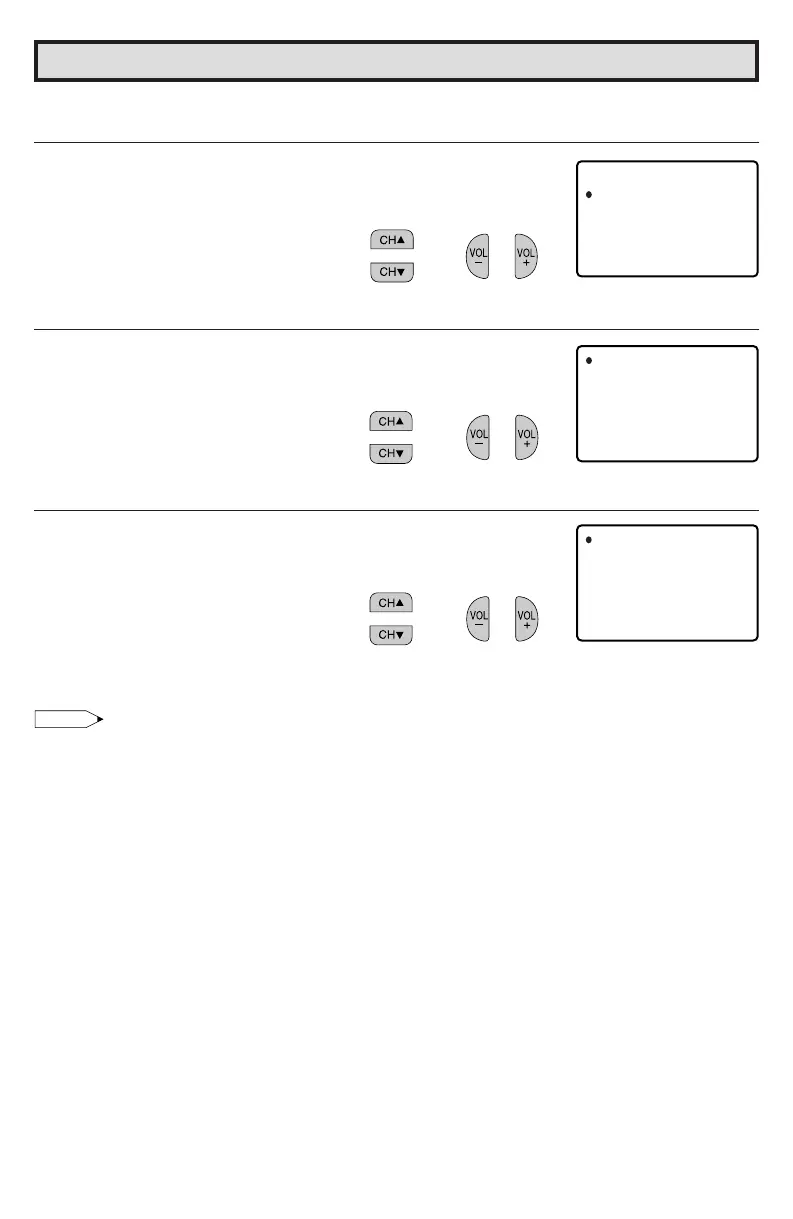
How to set additional rating mode (Example)
Once downloading is complete, you can set the blocking pattern as follows.
1 Repeat steps 1 to 4 of [1] MPAA RATING.
2 Press CH a/s to move the “E” mark to “Cdn. English Ratings”,
then press VOL k/l.
3 You can select “BLOCK” or “– – – – –” (unblock) for each rating
item by pressing CH a/s and VOL k/l.
4 You can select “BLOCK” or “– – – – –” (unblock) for each rating
item by pressing CH a/s and VOL k/l if you select “Cdn. French
Ratings” in step 2.
Note:
• You are able to download up to 4 different rating systems.
MPAA
TV GU I
Cdn .
DOWN L
nEglis Rhatinsg
Cdn .
rFenchRatinsg
EDLINES
OAD : ON
STATU
S:ON
(After downloading the
rating data)
C
C8+
G
PG
14+
18+
INDIV
B: LOCK
–: ––––
B: LOCK
–: ––––
B: LOCK
–: ––––
IDUAL BL
MENU : RE TURN
OCK
(ENGLISH INDIVIDUAL
BLOCK screen)
G
8+
13+
16+
18+
INDIV
–: ––––
B: LOCK
–: ––––
B: LOCK
–: ––––
IDUAL BL
MENU : RE TURN
OCK
(FRENCH INDIVIDUAL
BLOCK screen)
→
→
→
Parent Control (V-CHIP Operation) (Continued)
36U-S50B(19-22) 03.2.13, 3:07 PM20



 To Next Page