28
Dimension: 140 X 215 mm
Set Up (Continued)
H Channel Setting
If EZ SETUP does not memorize all the channels in your region, follow the instructions below
to manually memorize the channel.
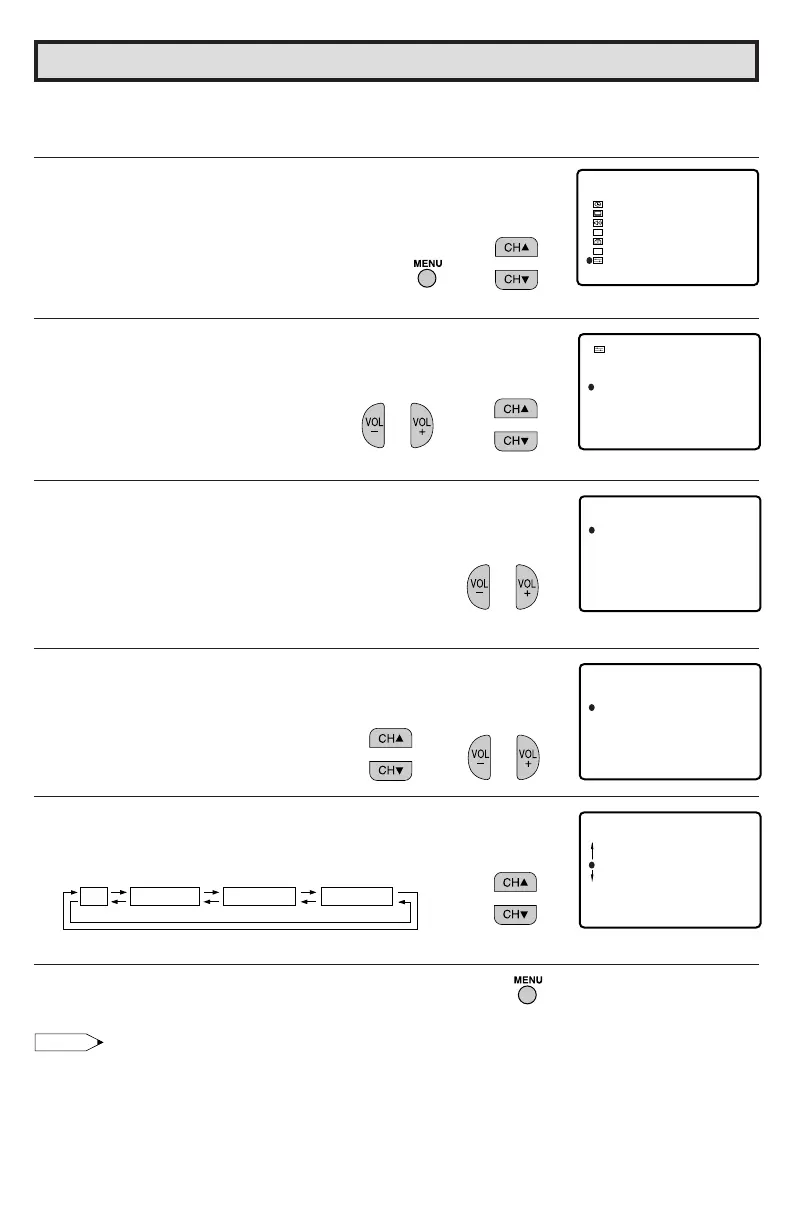
1 Press MENU to access the MAIN MENU screen.
2 Press CH a/s to move the “E” mark to “SET UP”.
3 Press VOL k/l to access the SET UP screen.
4 Press CH a/s to move the “E” mark to “CH SETTING”.
5 Press VOL k/l to access the CH SETTING screen.
6 Press CH a/s to move the “E” mark to “AIR/CABLE”, then press
VOL k/l to access the AIR/CABLE screen.
7 Press CH a/s to move the “E” mark to the desired mode.
8 Press MENU to exit.
Note:
• Receivable channels of your TV set are:
AIR channels: CABLE channels:
VHF: 2 through 13. 1 (HRC and IRC mode only)
UHF: 14 through 69. 2 through 125 (STD, HRC and IRC)
(MAIN MENU screen)
(CH SETTING screen)
(SET UP screen)
(AIR/CABLE screen)
→
→
→
BL UE SCREEN
LANGUAGE
CH SETT I NG
SET UP
AUTO I NPUT
A I R/ CABL E
CH SEARCH
CH MEMORY
EZ SETUP
CH SETT I NG
CABLE
A I R/ CABL E
CABLE HRC
CABLE I RC
AIR
STD
AIR
CABLE STD
CABLE HRC CABLE IRC
A I R/ CABL E
CH SEARCH
CH MEMORY
EZ SETUP
CH SET T I NG
SLEEP T I MER
AUD I O SELECT
CLOSED CAPT I ON
PARENT CONTROL
ENERGY
SET UP
SAVE
V I DEO ADJUST
MENU
CC
ES
36U-S50B(27-28) 03.2.13, 3:09 PM28



 To Next Page