EN-8
1
2
The air conditioner will operate with
lower power consumption than usual in
this mode.
1
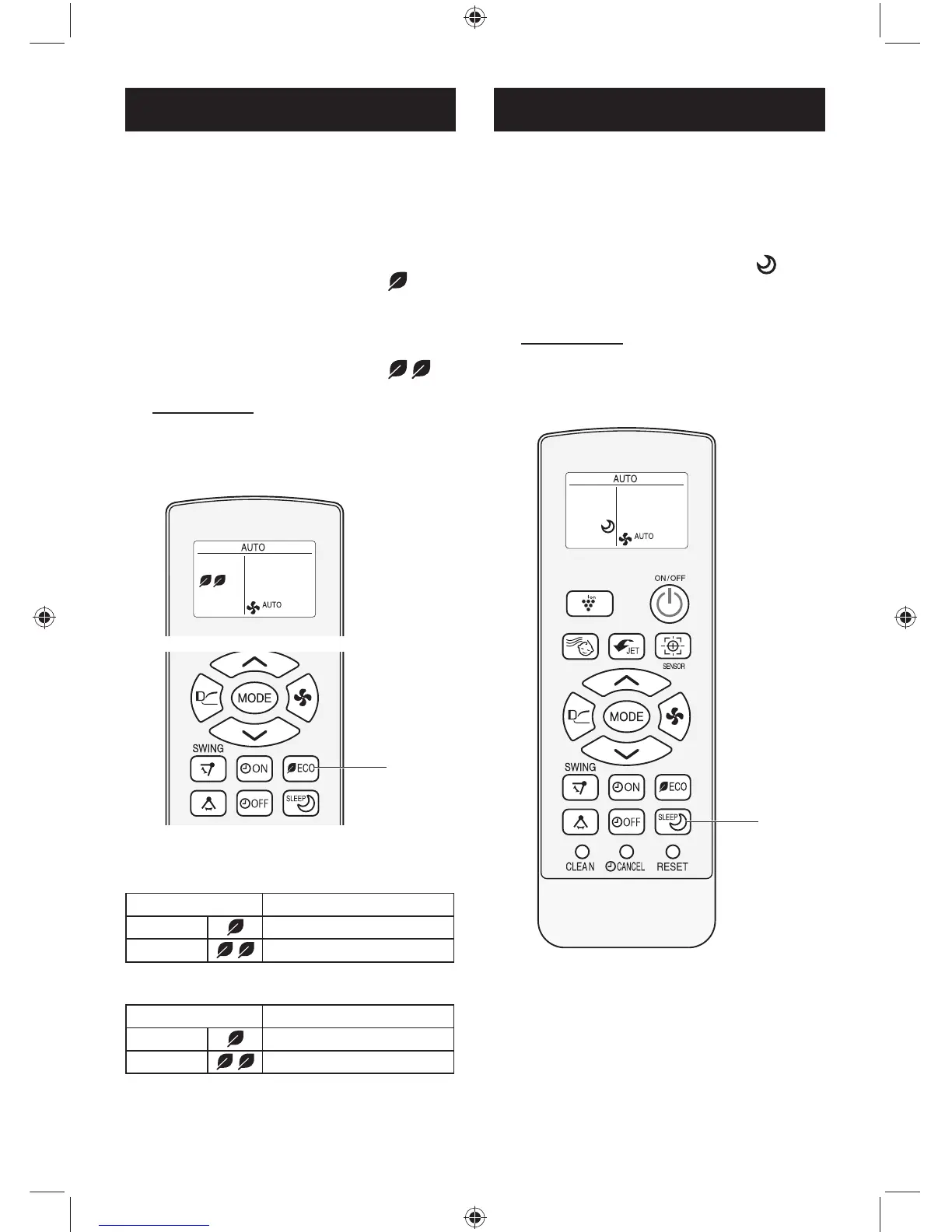
During operation, press the ECO
MODE button to enter 1st step
power consumption mode.
• The remote control will display “ ”.
2
Press the ECO MODE button
again to enter 2nd step power
consumption mode.
• The remote control will display “ ”.
TO CANCEL
Press the ECO MODE button again
during 2nd step power consumption
mode.
ECO MODE OPERATION
For more comfortable sleep, tempera-
ture and fan speed will be controlled
automatically by the best program.
1
During operation, press the
BEST SLEEP button.
• The remote control will display “ ”.
• Temperature and fan speed will be con-
trolled automatically for the best sleep.
TO CANCEL
Press the BEST SLEEP button again.
NOTE:
• BEST SLEEP operation is not available in
DRY mode.
BEST SLEEP OPERATION
1
AH-XP18UHD
AH-X18UED
Mode
Maximum power consumption
1st step 1000 W
2nd step 800 W
AH-XP24UHD
AH-X24UED
Mode
Maximum power consumption
1st step 1500 W
2nd step 1000 W
AH-XP18SHV-1 (A889)_EN.indd EN-8AH-XP18SHV-1 (A889)_EN.indd EN-8 11/8/2559 BE 2:36 PM11/8/2559 BE 2:36 PM



 To Next Page