EasyManua.ls Logo

Sharp Aquos LC C4067U - User Manual

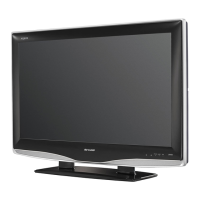
Sharp Aquos LC C4067U
32 pages
Print Icon
To Next Page IconTo Next Page
Loading...
1
LC-C4067U
LIQUID CRYSTAL
TELEVISION
OPERATION MANUAL
ENGLISH
Supplied Accessories
Make sure the following accessories are provided with the product.
Remote control unit
(
g
1)
Page 8
“AA” size battery
(
g
2)
Page 9
Operation manual
(
g
2 languages)
To avoid scratching the frame or screen, please use a soft, lint free cloth for cleaning. Approved
cleaning cloths are available directly from Sharp in single (00Z-LCD-CLOTH) or triple (00Z-LCD-
CLOTH-3) packs. Call 1-800-BE-SHARP for ordering, or VISIT www.sharpusa.com/SharpDirect.
Always use the AC cord supplied with the TV.
IMPORTANT : Please read this operation manual
before starting operating the equipment.
AC cord
(
g
1)
Page 8
Cable clamp
(
g
1)
Page 8
Stand unit
(
g
1)
Page 7
LC-C4067UE00.indd1LC-C4067UE00.indd1 2009/02/2616:25:512009/02/2616:25:51

Questions and Answers

  • J
    James PowersAug 17, 2025
    How to fix Sharp Flat Panel TV when there is no power?
    • J
      James SmithAug 17, 2025
      If your Sharp Flat Panel TV has no power, try the following: First, ensure you've pressed the POWER button on the remote. If the indicator on the TV doesn't light up, press the POWER button on the TV itself. Also, check if the AC cord is properly connected and that the power is turned on.
  • R
    rmartinezAug 20, 2025
    Why is there no picture on my Sharp Flat Panel TV?
    • K
      Kristine RossAug 20, 2025
      If your Sharp Flat Panel TV has no picture, verify the connection to other components. Ensure the correct input signal source is selected. Check the picture adjustments. Confirm that “On” is not selected in “Audio Only,” and ensure a compatible signal is being input.
  • J
    Justin MarksAug 23, 2025
    How to fix Sharp Aquos LC C4067U Flat Panel TV picture cut off?
    • K
      katie28Aug 23, 2025
      If the picture on your Sharp Flat Panel TV is cut off or has a sidebar screen, check if the image position is correct. Also, ensure that screen mode adjustments, such as picture size, are made correctly.
  • N
    Natalie BuckAug 26, 2025
    What to do if my Sharp Aquos LC C4067U Flat Panel TV has no sound?
    • M
      Mrs. Amy SmithAug 26, 2025
      If your Sharp Flat Panel TV has no sound, ensure that the volume isn't too low. Also, check if “Variable” is selected in “Output Select.” Finally, verify that you haven't accidentally pressed the MUTE button on the remote.
  • R
    Robert JacksonAug 28, 2025
    Why does my Sharp Aquos LC C4067U Flat Panel TV remote control not operate?
    • T
      Terry KentAug 28, 2025
      If the remote control for your Sharp Flat Panel TV isn't working, check if the batteries are inserted with the correct polarity. Replace the batteries if they are worn out. Strong or fluorescent lighting near the remote sensor may also interfere with operation.
  • L
    Laura TorresAug 31, 2025
    Why does my Sharp Aquos LC C4067U Flat Panel TV power off suddenly?
    • R
      Richard MartinezAug 31, 2025
      If your Sharp Flat Panel TV suddenly turns off, check if the sleep timer is set. Review the power control settings. Also, ensure that nothing is blocking the vents, as the unit's internal temperature may have increased.
  • F
    fpadillaSep 2, 2025
    How to fix Sharp Flat Panel TV that failed to receive broadcast?
    • T
      teresa17Sep 3, 2025
      If your Sharp Flat Panel TV fails to receive a broadcast, check the antenna cable. Make sure the antenna is correctly set up.
  • E
    Emily SparksSep 5, 2025
    What to do if my Sharp Aquos LC C4067U cannot be operated?
    • J
      James MolinaSep 5, 2025
      If your Sharp Flat Panel TV cannot be operated, external influences such as lightning or static electricity might be the cause. Try turning off the power of the TV or unplugging the AC cord, waiting 1 or 2 minutes, and then plugging it back in to operate the unit.
  • S
    Sara GouldSep 8, 2025
    Why does my Sharp Aquos LC C4067U Flat Panel TV have strange colors?
    • A
      Ashley BrownSep 8, 2025
      If your Sharp Flat Panel TV displays strange colors, light colors, or color misalignment, try adjusting the picture tone. Also, the room may be too bright, making the picture appear dark. Check the input signal setting as well.
  • J
    Joseph FowlerSep 12, 2025
    What does 'No broadcast now' mean on Sharp Aquos LC C4067U Flat Panel TV?
    • D
      Danielle BaileySep 12, 2025
      If your Sharp Flat Panel TV displays 'No broadcast now,' check the broadcast time in the program guide.

Summary

Important Safety Instructions

General Safety Precautions

Essential guidelines for safe installation, operation, and maintenance of the television.

Usage and Environmental Safety Guidelines

Usage and Environmental Safety Guidelines

Precautions for cleaning, ventilation, heat sources, lightning, and power lines to ensure safe operation.

Child Safety and Wall Mounting

Child Safety Considerations

Safety advice on preventing tip-overs, securing the TV, and child-proofing cords.

Product Setup and Installation

Wall Mounting Guidelines

Procedures and precautions for safely mounting the TV to a wall using brackets.

Connecting External Equipment

Connecting Audio;Video Devices

How to connect devices like Blu-ray players, DVD players, VCRs, and game consoles.

Connecting a Personal Computer (PC)

Instructions for connecting a PC to the TV for display and audio.

Watching TV

Initial TV Setup and Configuration

Steps for language selection, TV location, and initial channel scanning.

Direct Remote Control Operations

On-Screen Display Menu Navigation

Picture Menu Settings

Basic Picture Adjustments

Controls for backlight, contrast, brightness, color, tint, and sharpness.

Audio and Power Management Menus

Channel and PC Setup Options

PC Input Signal and Sync Adjustments

Configuring PC display signals, auto-sync, and fine-tuning image position.

Advanced Setup and Parental Controls

Parental Control Configuration

Setting up secret numbers, clearing them, and managing parental control status.

Parental Control Features

V-Chip Content Filtering System

Utilizing V-Chip to block content based on rating systems.

MPAA and TV Parental Rating Systems

Understanding and configuring movie and TV content rating systems for blocking.

Canadian Rating Systems and V-Chip Blocking

Managing V-Chip Blocked Content

Temporarily releasing or reactivating V-Chip blocks and understanding the process.

Option Menu Settings

Troubleshooting and Environmental Cautions

General Troubleshooting Solutions

Common issues and their solutions for TV operation and picture/sound problems.

Digital Broadcasting Issues

Error messages and solutions related to receiving digital broadcasts.

Product Specifications and Accessories

Television Component Specifications

Technical details on LCD panel, resolution, TV function, terminals, power, and dimensions.

Service and Warranty Information

Contacting Sharp for Service

Information on how to find an authorized service center and obtain customer assistance.

Consumer Limited Warranty Details

Terms and conditions of the product's limited warranty, including coverage and exclusions.

Sharp Aquos LC C4067U Specifications

General IconGeneral
Screen Size40 inches
Refresh Rate60 Hz
HDMI Ports3
USB Ports1
Audio Output10W x 2
Smart TVYes
Built-in Wi-FiYes
Display TechnologyLCD
Backlight TypeLED

Related product manuals