18
A31898,SCA/SCNZ R990C O/M
The timer begins to count down.
When the cooking time reaches zero,
will be displayed .
REHEAT
SENSOR
x 3
REHEAT
SENSOR
HELP
x 1
REHEAT
SENSOR
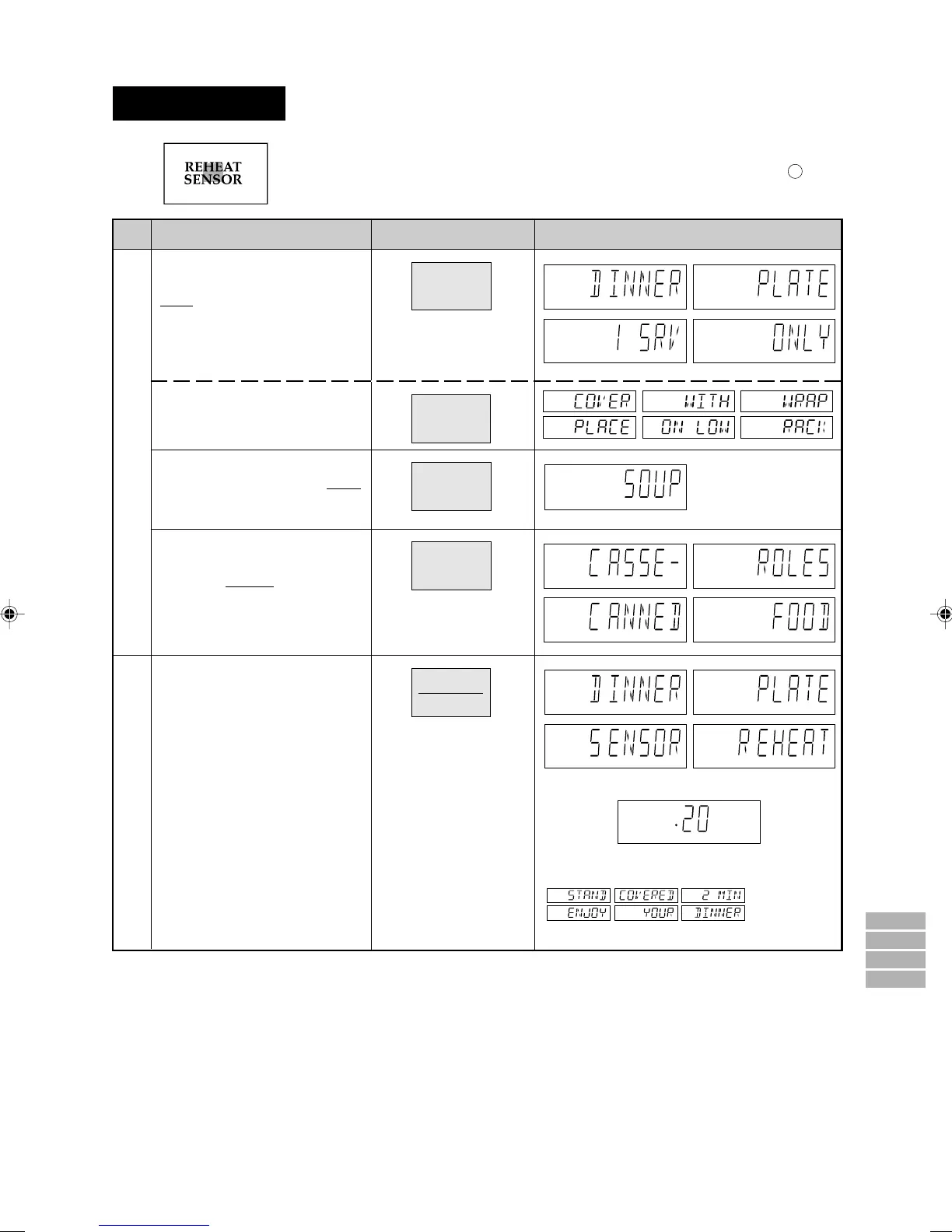
Reheat Sensor
SENSOR
HELP
SENSOR
HELP
SENSOR
HELP
SENSOR
HELP
Step
Procedure Display
To reheat a Dinner Plate, press
the REHEAT SENSOR pad
once.
Pad Order
If you require a cooking hint,
press the HELP pad.
(See NOTE below)
To reheat Soup, press the
REHEAT SENSOR pad twice
within 3 seconds.
COOK
SENSOR
COOK HELP
SENSOR
COOK HELP
COOK
SENSOR
HELP
SENSOR
HELP
INSTANT COOK
START
To reheat Casseroles/Canned
Food, press the REHEAT SEN-
SOR pad
3 times within 3 sec-
onds.
SENSOR
HELP
SENSOR
HELP
SENSOR
HELP
SENSOR
HELP
Suppose you want to reheat a
dinner plate.
Press the INSTANT COOK/
START pad.
The oven starts.
* When the sensor detects the
vapour from the food, the
remaining cooking time will
appear.
(eg. remaining cooking time
is approximately. 20 sec.)
NOTE: You can get a cooking hint whenever HELP is lit in the display. See page 23.
1
2
Press to select 3 popular reheat menus.
Follow the details provided in REHEAT SENSOR MENU GUIDE on page 8 in the
cooking guides.
x 2
SCA/SCNZ R990C14-26* 03.7.18, 3:52 PM18



 To Next Page