19
A31898,SCA/SCNZ R990C O/M
MULTI
COOK
01
1
6
5
3
1
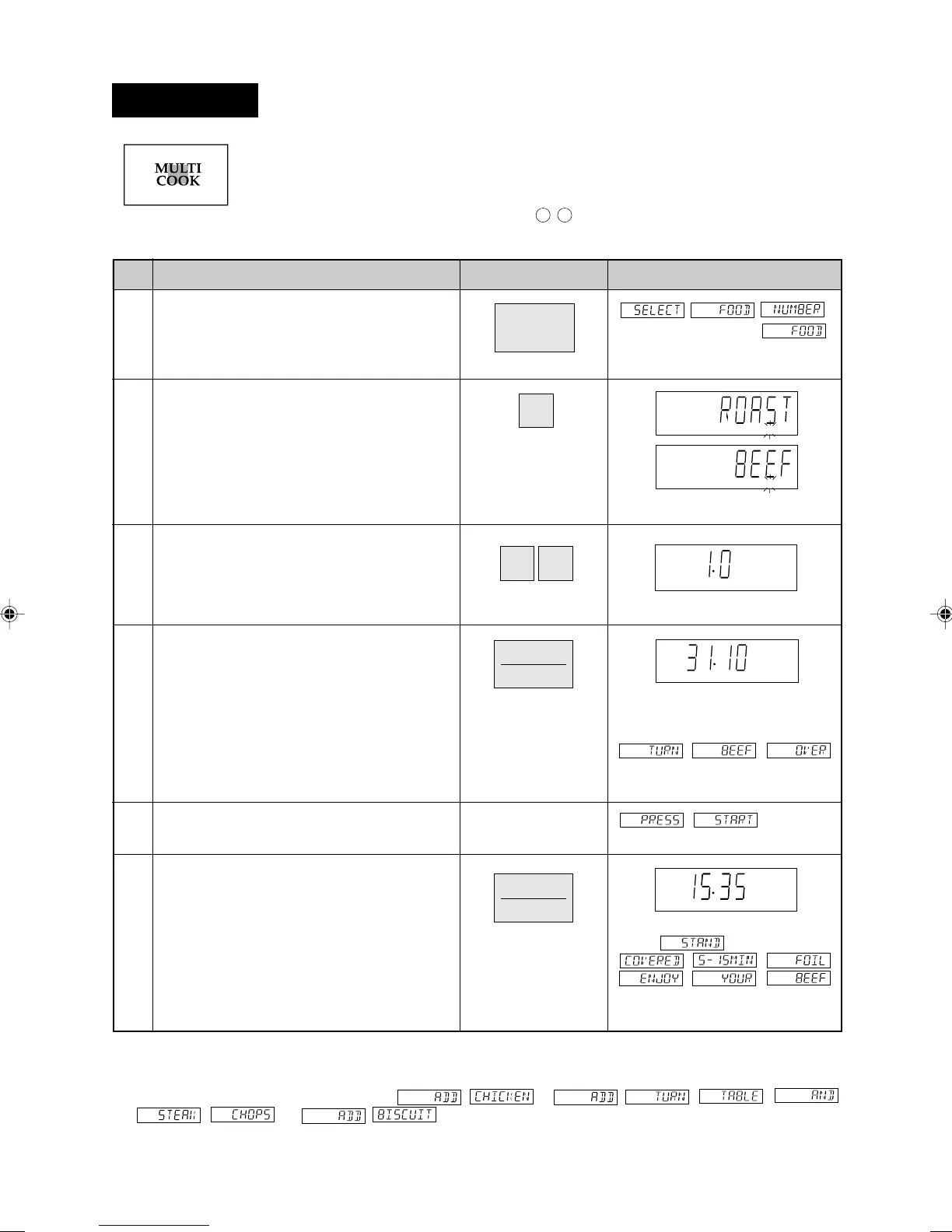
* Suppose you want to cook 1.0 kg Roast Beef (Medium).
Step
Procedure Pad Order Display
Press the MULTI COOK pad.
Select food category for Multi Cook.
Press 1 to cook Roast Beef.
KG will flash on and off.
Enter the weight.
KG stops flashing.
Press the INSTANT COOK/START pad.
The timer begins to count down.
The oven will "beep" 4 times and
will stop.
will be displayed repeatedly.
Open the door. Turn over the meat. Close
the door.
will be
displayed repeatedly.
Press the INSTANT COOK/START pad.
When the cooking time reaches
zero,
will be displayed repeatedly.
2
4
NOTE:
1. You can get a cooking hint whenever HELP is lit in the display. See page 23.
2. For menus 3, 5 and 6: After Step 3, press the INSTANT COOK/START pad and preheat will start
automatically. When the display shows
,
or open the door and enter the food. Then continue with Step 4.
Caution: The oven cabinet, cavity, door, accessories and dishes will become hot. Use thick oven gloves when
removing the food or turntable from the oven to prevent burns.
(Operation guide off: )
1.Roast Beef
2.Roast Lamb
3.Roast Chicken
4.Roast Dinner
5.Grilled Steak/Chops
6.Biscuits
Press to select 6 popular convection and Mix
cooking menus.
Follow the details provided in MULTI COOK
MENU GUIDE or MULTI COOK RECIPES on page
9 -
11
in the cooking guides.
Multi Cook
SCA/SCNZ R990C14-26* 03.7.18, 3:52 PM19



 To Next Page