EasyManua.ls Logo

Sharp DR-P420 - User Manual

Sharp DR-P420
172 pages
Print Icon
To Next Page IconTo Next Page
Loading...
User manual
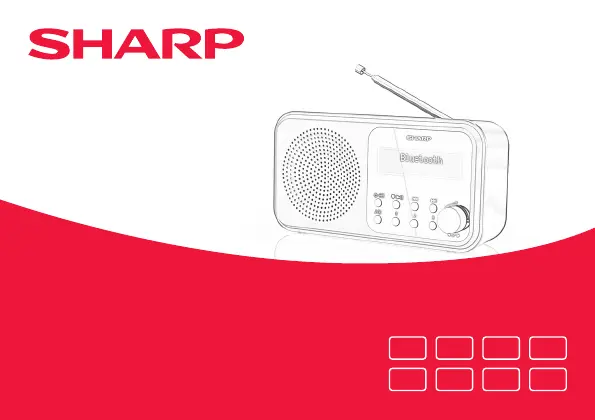
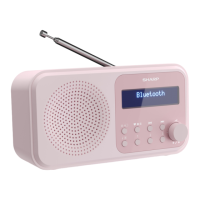
DR-P420 | Tokyo Portable Digital Radio
Product images are for illustration purposes only. Actual product may vary.
EN
IT
DE
NL
ES FR
PL RU

Table of Contents

Questions and Answers

  • M
    Mark GreenAug 10, 2025
    What to do if my Sharp DR-P420 has no sound?
    • D
      djohnsonAug 10, 2025
      If your Sharp Radio has no sound, first, adjust the volume. Also, check that the USB cable is properly connected and that the radio is not in standby mode. If you're using batteries, ensure they have power.
  • D
    donna42Aug 17, 2025
    How to improve the radio reception on my Sharp DR-P420 Radio?
    • K
      Kathleen WeaverAug 17, 2025
      To improve radio reception on your Sharp Radio, fully extend the telescopic aerial (preferably vertically). You can also try rescanning for radio stations. Moving your radio to another location might also improve reception. Check that there is no other electrical equipment close to your radio that may cause interference.
  • H
    Hannah HigginsAug 25, 2025
    Why won't my Bluetooth device connect to my Sharp Radio?
    • K
      karenadamsAug 25, 2025
      If you're having trouble pairing a Bluetooth device with your Sharp Radio, first ensure that you are in Bluetooth mode. Make sure that the radio and the device are within 10 meters of each other. Move the radio and the Bluetooth device away from other Bluetooth devices or electrical equipment. If possible, turn off other nearby Bluetooth devices.
  • C
    Carol HarrisSep 1, 2025
    What to do if the function buttons on my Sharp DR-P420 Radio do not respond?
    • J
      Jenna BuckSep 1, 2025
      If the function buttons on your Sharp Radio are not responding, check that the USB cable is connected to the back of the radio and short press. If you are using batteries, they may need to be replaced. You can also try to factory reset the device.

Summary

Important Safety Instructions

Precautions

Covers general safety measures including child safety, proper location, ventilation requirements, heat considerations, and keeping away from naked flames.

Battery Safety and Disposal

Battery Safety Precautions

Emphasizes child safety regarding batteries and precautions related to environmental conditions like air pressure and temperature.

Radio Controls Overview

Key Function Buttons

Explains the functions of primary buttons like Power/Mode, Play/Pause, track navigation, and Info/Menu.

Initial Setup and Configuration

Initial DAB Station Scan

Describes the automatic scan process for DAB stations upon initial power-up.

DAB Radio Mode Operations

Scanning and Managing DAB Stations

Explains how to perform a full scan for DAB stations and prune unwanted stations from the list.

DAB Station Presets and Information

FM Radio Tuning and Presets

Tuning FM Stations

Guidance on scanning for FM stations and fine-tuning frequencies for better reception.

Bluetooth Mode Operations

Wireless Music Streaming via Bluetooth

Instructions for pairing the radio with Bluetooth devices and wirelessly streaming audio.

Alarm Functionality

Setting an Alarm

Details the conditions and steps required to set an alarm on the radio.

Alarm and Sleep Timer Management

System Settings and Troubleshooting

Troubleshooting: No Sound or Power

Initial steps to troubleshoot issues related to no sound or no power on the device.

Troubleshooting Common Issues

Sharp DR-P420 Specifications

General IconGeneral
Radio typePortable
Tuner typeDigital
Supported radio bandsDAB, DAB+, FM
Radio Data System (RDS)Yes
RMS rated power2 W
Audio formats supportedAAC
Headphone outputs1
USB connector typeMicro-USB
Headphone connectivity3.5 mm
Bluetooth version5.0
Bluetooth profilesA2DP, AVRCP
MaterialPlastic
Handle(s)No
ColorationMonochromatic
Antenna typeExternal
MP3 playback-
Product colorBlack
Volume controlRotary
Number of alarms2
CertificationCE (RED, RoHS, ErP), REACH/PAH/SCCP
Power sourceBattery
Battery life16 h
Battery typeAA
Battery voltage1.5 V
Battery capacity2200 mAh
Battery technologyAlkaline
Number of batteries supported4
Sustainability certificatesCE, ErP, REACH, RoHS
Package typeBox
Package depth88 mm
Package width200 mm
Package height120 mm
Package weight600 g
Master (outer) case width278 mm
Master (outer) case height210 mm
Master (outer) case length256 mm
Master (outer) case weight3800 g
Quantity per master (outer) case6 pc(s)
Weight and Dimensions IconWeight and Dimensions
Depth53 mm
Width174 mm
Height90 mm
Weight400 g

Related product manuals