10
1
2
OPEN CLOSE
MAINTENANCE INSTRUCTIONS
1
2
Unplug this vacuum cleaner from the electrical outlet before servicing.
Fig.17
DIRT COMPARTMENT
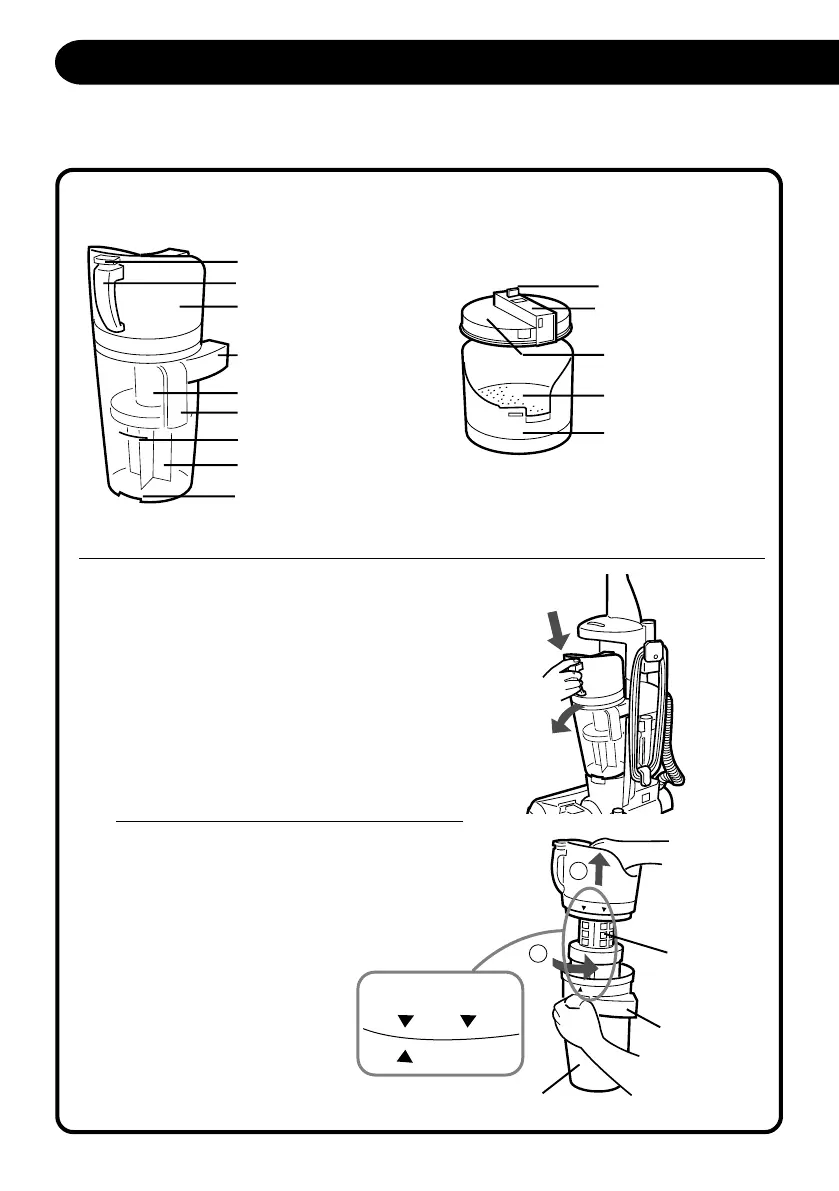
The dirt compartment assembly consists of the following parts:
HOW TO REMOVE AND REPLACE DIRT COMPARTMENT
Press down dirt compartment release button
to remove dirt compartment from vacuum
cleaner. (Fig.19)
Hold lower handle on dust cup and turn top
handle grip slightly to left Remove net filter
assembly from dirt compartment. (Fig.20)
Fig.18
Dirt Compartment Release
Filter Compartment
Upper Handle
Air Duct
Net Filter Assembly
Lower Handle
Dirt Compartment
Rectangular Groove
Filter Clamp
Top Handle Grip
Filter Compartment
Main Filter
Fig.19
Fig.20
Net Filter
Assembly
Air Duct
Dirt Compartment
Filter Cover
Max Fill Line
OPEN/CLOSE marks are at the
side of the Filter Compartment.
S5170/t5180(Layout) 2001.12.20, 8:07 AM10



 To Next Page