15
REPLACEMENT INSTRUCTIONS
HOW TO REPLACE THE HEADLIGHT LAMP
Unplug the vacuum cleaner from the electrical outlet.
1
Remove the dirt compartment.
2
3
4
5
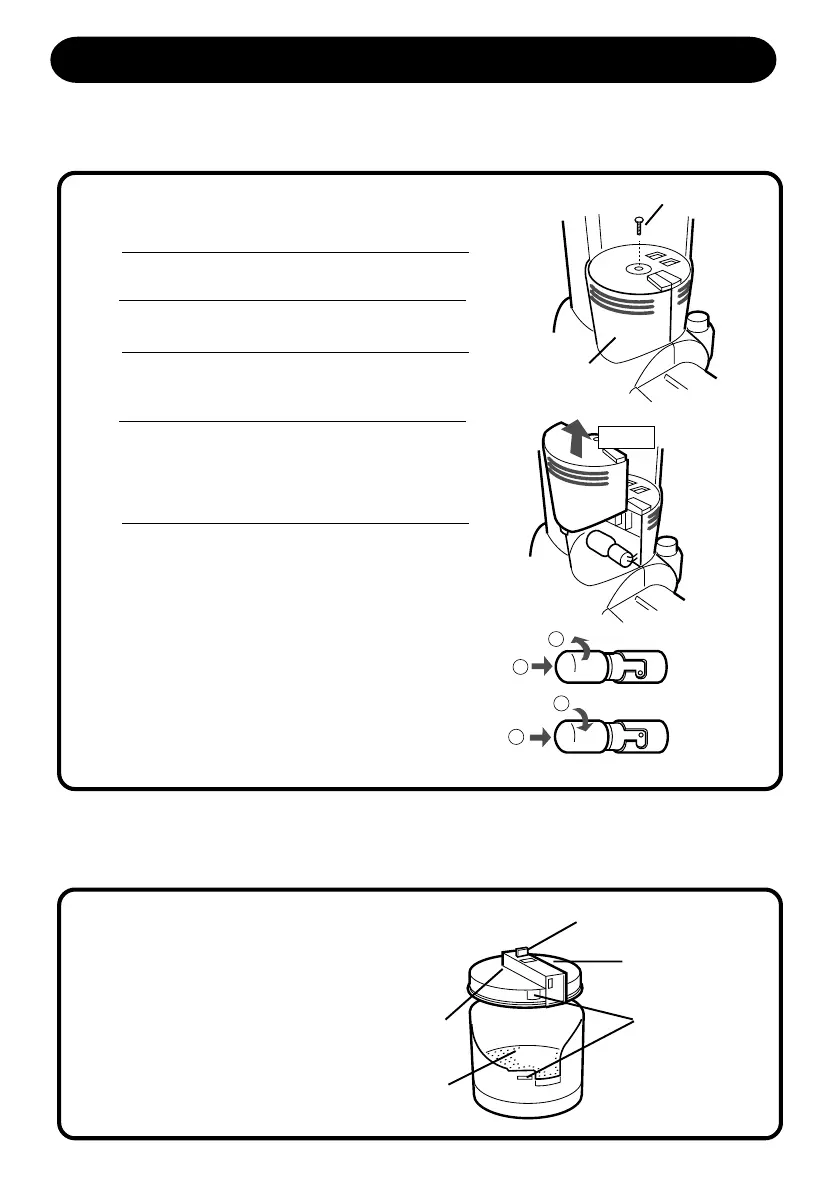
Unscrew the center screw. (Fig.33)
Fig.33
Lift the lamp cover. (Fig.34)
Replace the Lamp cover and secure with the
screw.
Remove the lamp from the socket by pushing in
gently and turning counterclockwise. (Fig. 35)
Install the new lamp by pushing it gently into the
socket and turning clockwise. (Fig. 35)
Use any standard bayonet base vacuum cleaner
lamp rated 125V, 20W.
6
Fig.34
Fig.35
HOW TO REPLACE THE MAIN FILTER
Basically, the main filter can be used throughout
the life of the vacuum cleaner.
If you chose to replace main filter, please refer to
the maintenance instructions on page 12 which
explain how to remove and replace filter.
Fig.36
Center Screw
Lamp cover
Filter Clamp
Top Handle
Grip
Filter Cover
Main Filter
Latch Portion
1
2
1
2
Lift
S5170/t5180(Layout) 2001.12.20, 8:07 AM15



 To Next Page