14
1
Fig.30
Remove the bottom plate, following the
instructions on page 13.
2
3
4
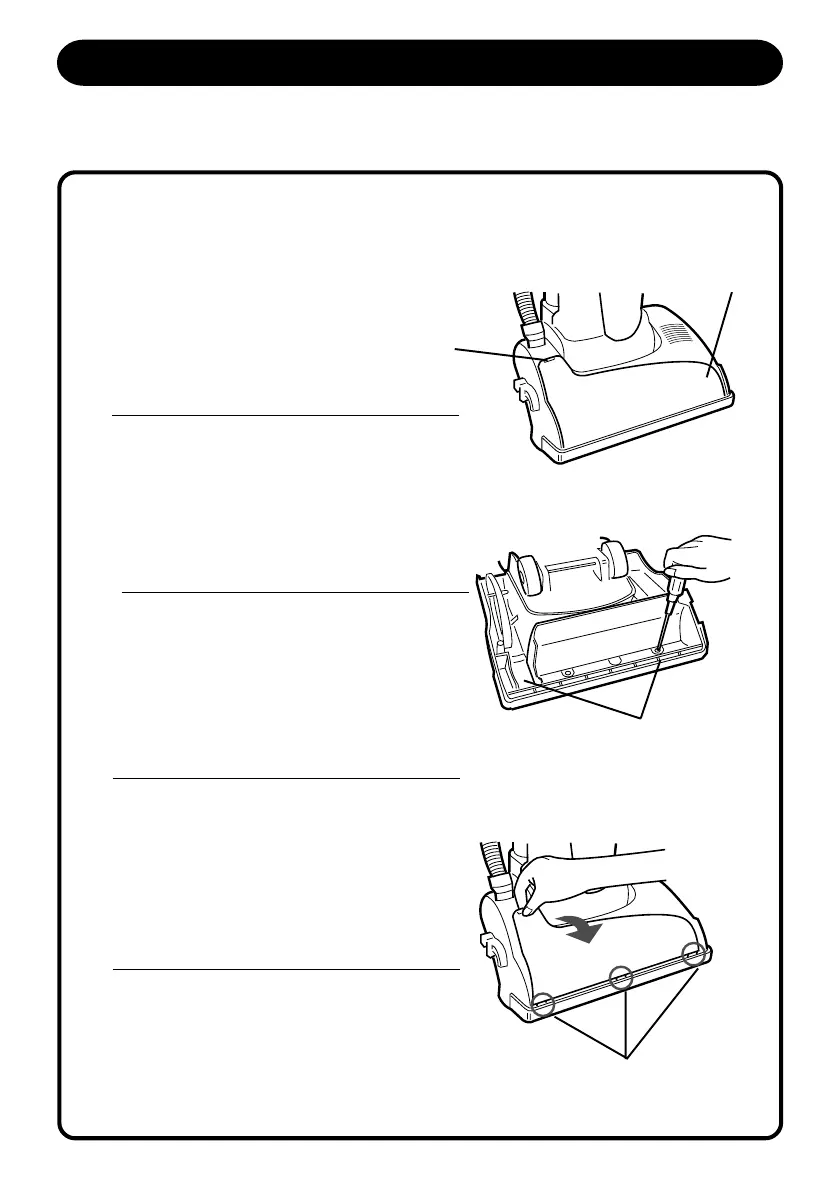
HOW TO REMOVE THE HEAD COVER
If you find excess dirt or obstructions under the head cover, you can remove the head
cover. The head cover is secured by two screws from the bottom side.
Fig.31
Fig.32
5
REPLACEMENT INSTRUCTIONS
MAINTENANCE INSTRUCTIONS
REP
L
Remove the agitator assembly and the belt,
following the instructions on page17.
Unscrew two screws at the nozzle head.
(Fig.31)
Lift the top tab of the head cover and remove.
When resetting the head cover, be sure to fit
the three front tabs in the nozzle head.
Top Tab
Two screws secure
the head cover
Three Front Tabs
Head Cover
S5170/t5180(Layout) 2001.12.20, 8:07 AM14



 To Next Page