13
Net Filter
Fig.28
1
2
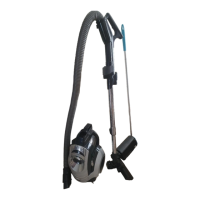
HOW TO REMOVE / AND RESET THE BOTTOM PLATE
Insert the front three tabs of the bottom plate
into the grooves at the front end of the nozzle
head, then reset the bottom plate. (Fig. 29)
Fasten four screws.
Before replacing any parts, unplug the vacuum
cleaner from the electrical outlet and release the
handle. Then turn the vacuum cleaner over,
exposing the underside.
REMOVE
Loosen the bottom plate by unscrewing four
screws, (Fig. 28) then remove the bottom plate.
RESET
Make sure that all the parts are properly position.
Fig.29
Four Screws
Three Tabs
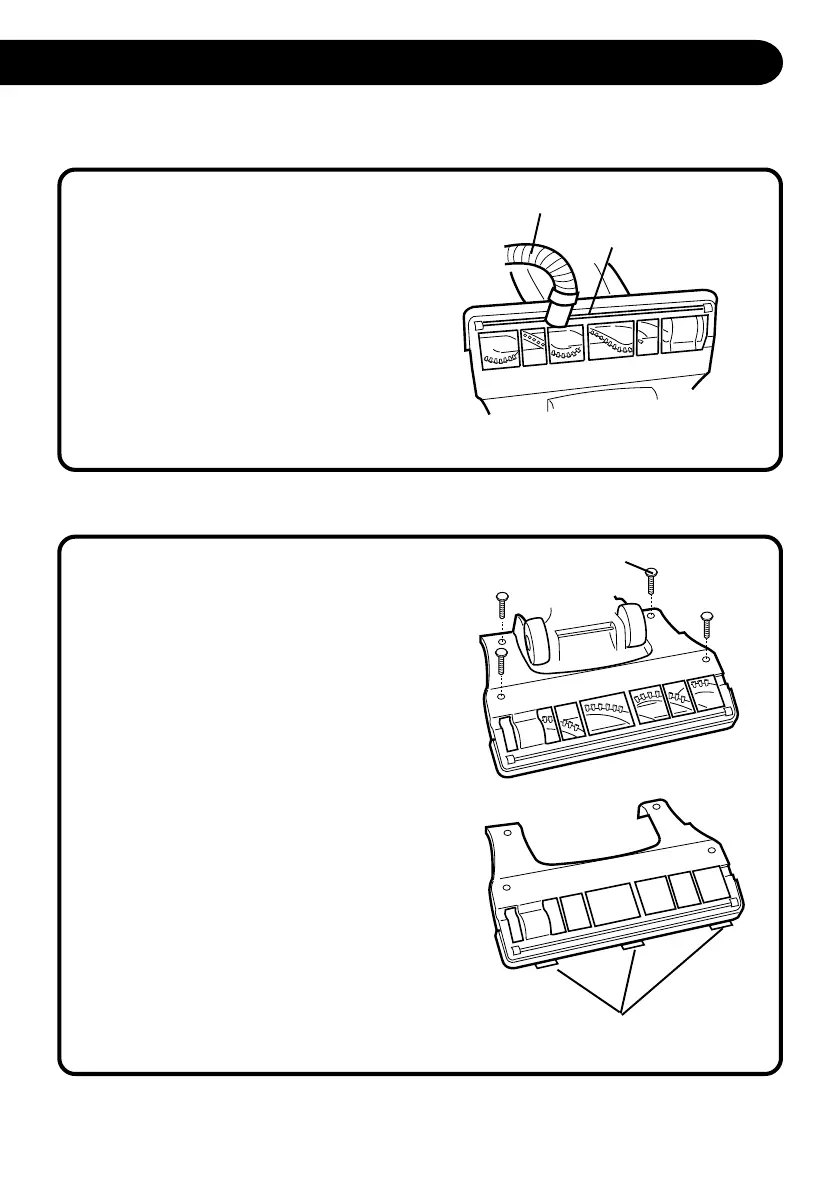
WHEN YOU FOUND ANY OBSTACLES IN THE HEAD COVER OR FRONT CHANNEL
If you find some obstacles such as hair, paper
slip, are caught inside the head cover or front
channel, please try to remove with suction hose
of this vacuum cleaner. (Fig.27)
If this is not enough cleaning, please use some
wooden stick for picking, or removing bottom
plate and / or head cover for cleaning.
Fig.27
Front channel
Suction Hose
S5170/t5180(Layout) 2001.12.20, 8:07 AM13



 To Next Page