EasyManua.ls Logo

Sharp EL-6660 - Page 27

Sharp EL-6660
50 pages
Print Icon
To Next Page IconTo Next Page
To Previous Page IconTo Previous Page
Loading...
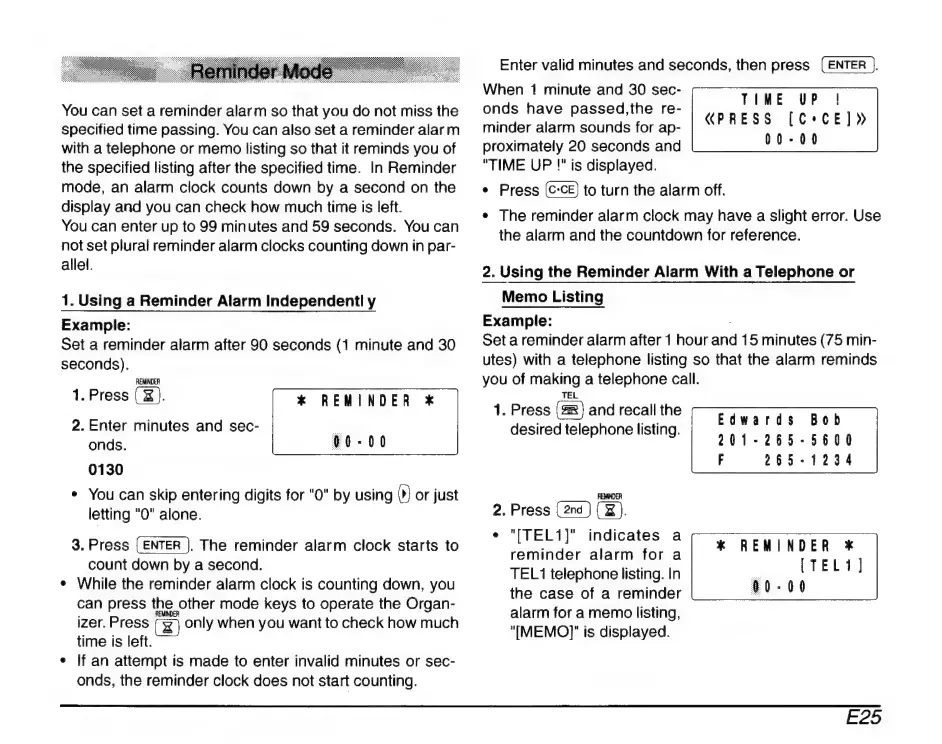
You
can
set
a
reminder
alarm
so
that
you
do
not
miss
the
specified
time
passing.
You
can
also
set
a
reminder
alarm
with
a
telephone
or
memo
listing
so
that
it
reminds
you
of
the
specified
listing
after
the
specified
time.
In
Reminder
mode,
an
alarm
clock
counts
down
by
a
second
on
the
display
and
you
can
check
how
much
time
is
left.
You
can
enter
up
to
99
minutes
and
59
seconds.
You
can
not
set
plural
reminder
alarm
clocks
counting
down
in
par-
allel.
1.
Using
a
Reminder
Alarm
Independentl
y
Example:
Set
a
reminder
alarm
after
90
seconds
(1
minute
and
30
seconds).
REMINDER
1.
Press
(
X
).
2.
Enter
minutes
and
sec-
onds.
0130
e
You
can
skip
entering
digits
for
"0"
by
using
(9
or
just
letting
"0"
alone.
3.
Press
(ENTER
).
The
reminder
alarm
clock
starts
to
count
down
by
a
second.
*
While
the
reminder
alarm
clock
is
counting
down,
you
can
press
the.
other
mode
keys
to
operate
the
Organ-
izer.
Press
only
when
you
want
to
check
how
much
time
is
left.
+
If
an
attempt
is
made
to
enter
invalid
minutes
or
sec-
onds,
the
reminder
clock
does
not
start
counting.
*
REMINDER
*
Enter
valid
minutes
and
seconds,
then
press
(ENTER
}
When
1
minute
and
30
sec-
onds have
passed,the
re-
minder
alarm
sounds
for
ap-
proximately
20
seconds
and
"TIME
UP
!"
is
displayed.
*
Press
to
turn
the
alarm
off.
*
The
reminder
alarm
clock
may
have
a
slight
error.
Use
the
alarm
and
the
countdown
for
reference.
TIME
UP
!
PRESS
[C*CE]ยป
00-00
2.
Using
the
Reminder
Alarm
With
a
Telephone
or
Memo
Listing
Example:
:
Set
a
reminder
alarm
after
1
hour
and
15
minutes
(75
min-
utes)
with
a
telephone
listing
so
that
the
alarm
reminds
you
of
making
a
telephone
call.
TEL
1.
Press
(2)
and
recall
the
desired
telephone
listing.
Bob
Edwards
201-265-5600
F
265-1234
REMIMDER
2.
Press
(x).
+
"ITEL1]"
indicates
a
reminder
alarm
for
a
TEL
1
telephone
listing.
In
the
case
of
a
reminder
alarm
for
a
memo
listing,
"IMEMO]|'
is
displayed.
*
REMINDER
*
E25