EasyManua.ls Logo

Sharp EL-6660 - Page 32

Sharp EL-6660
50 pages
Print Icon
To Next Page IconTo Next Page
To Previous Page IconTo Previous Page
Loading...
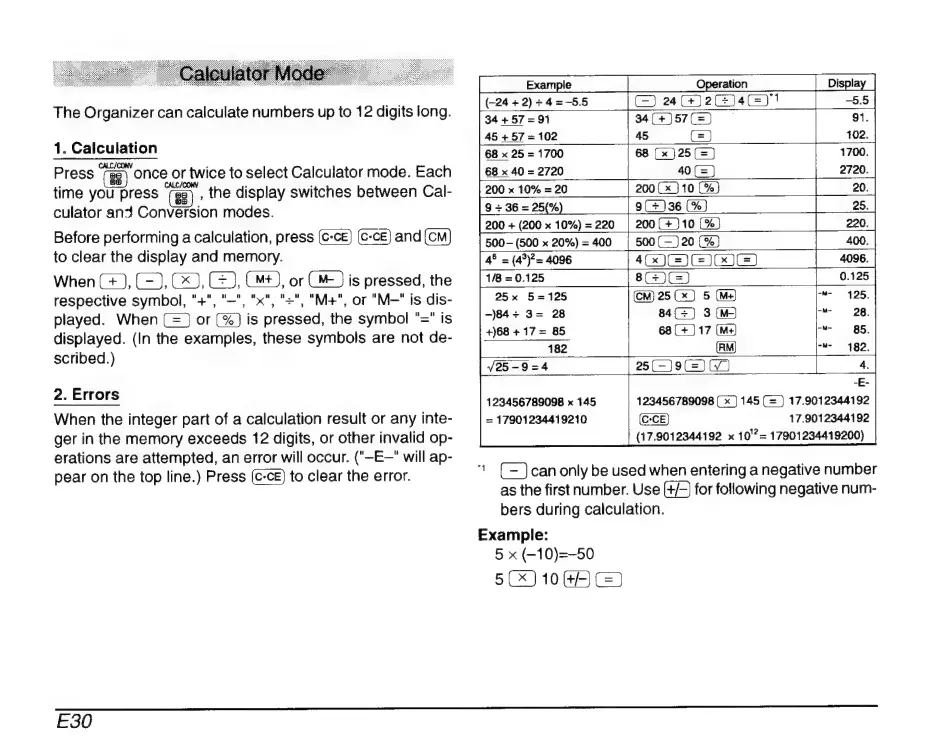
The
Organizer
can
calculate
numbers
up
to
12
digits
long.
1.
Calculation
CALC/
|
Press
once
or
twice
to
select
Calculator
mode.
Each
time
you
press
(gi
the
display
switches
between
Cal-
culator
an3
Conversion
modes.
Before
performing
a
calculation,
press
c-cE)
and
to
clear
the
display
and
memory.
When
(+),
(22,
C9,
C23,
(M4),
or
is
pressed,
the
respective
symbol,
"+",
"=", "x", "=",
"M+",
or
"M—"
is
dis-
played.
When
(=)
or
is
pressed,
the
symbol
"="
is
displayed.
(In
the
examples,
these
symbols
are
not
de-
scribed.)
2.
Errors
When
the
integer
part
of
a
calculation
result
or
any
inte-
ger
in
the
memory
exceeds
12
digits,
or
other
invalid
op-
erations
are
attempted,
an
error
will
occur.
("—E—"
will
ap-
pear
on
the
top
line.)
Press
to
clear
the
error.
Operation
Displa
C242)
4-55
34
+
57
-
91
34(*-)57(2)
`
91.
45
(2)
|
|
102.
68
x
25
=
1700
68
(x)25(2)
68
x
40
=
2720
40
(=)
200
(
x
10
(36)
9(*)36
(9€)
200
(+)10
(36)
200
x
10%
=
20
200
+
(200
x
10%)
=
220
500
(500
x
20%)
2400
|
500(—)20
45
=
(4)=
4096
4GJ9C
GO
GS)
1/8
2
0.125
8)
0.125
(CM)
25
(x)
5
(Ms)
84(=)
3(M
--
28.
25x
5-125
-)84+
3=
28
+)68
+
17
=
85
68(+)17
(M+)
-M-
B5.
182
--
182.
25(-)9
(2)
(7)
123456789098
x
145
=
17901234419210
123456789098
(x)
145
(=
)
17.9012344192
17.9012344192
(17.9012344192
x
10'?=
17901234419200)
"
(=)
can
only
be
used
when
entering
a
negative
number
as
the
first
number.
Use
(+/-)
for
following
negative
num-
bers
during
calculation.
Example:
5
x
(-10)=-50
5(x)10
(42)
(x)
E30

Related product manuals