EasyManua.ls Logo

Sharp EL-6660 - Page 34

Sharp EL-6660
50 pages
Print Icon
To Next Page IconTo Next Page
To Previous Page IconTo Previous Page
Loading...
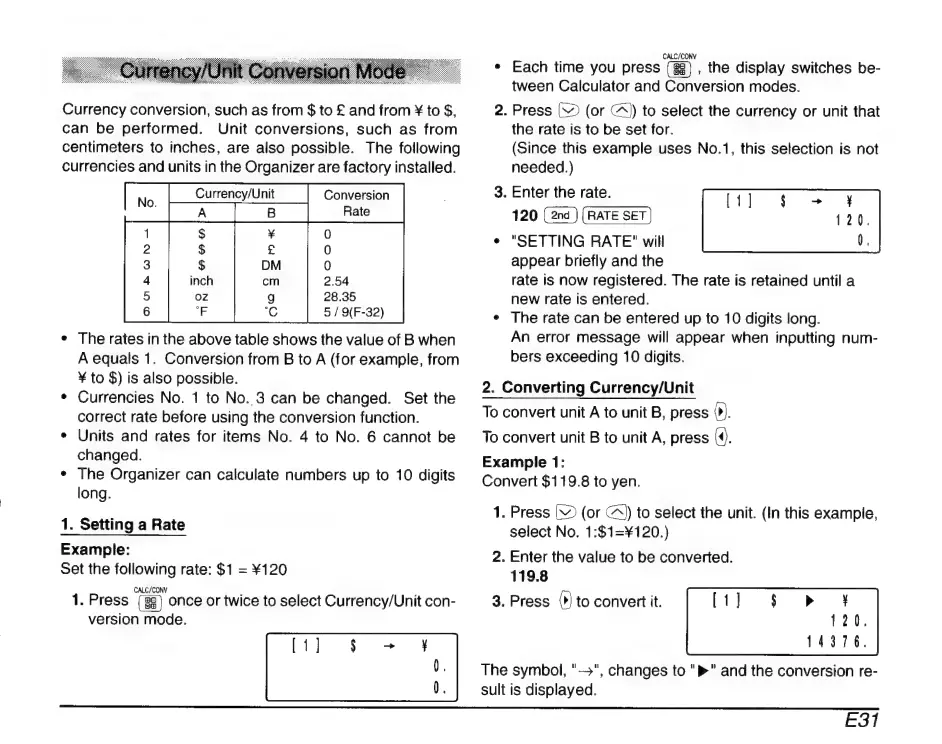
Currency
conversion,
such
as
from
$
to
£
and
from
X
to
$,
can
be
performed.
Unit
conversions,
such
as
from
centimeters
to
inches,
are
also
possible.
The
following
currencies
and
units
in
the
Organizer
are
factory
installed.
Conversion
|
B
|
Pae
2.54
28.35
5
/
O(F-32)
Currency/Unit
*
Therates
in
the
above
table
shows
the
value
of
B
when
A
equals
1.
Conversion
from
B
to
A
(for
example,
from
Y
to
$)
is
also
possible.
*
Currencies
No.
1
to
No.
3
can
be
changed.
Set
the
correct
rate
before
using
the
conversion
function.
*
Units
and
rates
for
items
No.
4
to
No.
6
cannot
be
changed.
*
The
Organizer
can
calculate
numbers
up
to
10
digits
long.
1.
Setting
a
Rate
Example:
Set
the
following
rate:
$1
=
X120
CALC/CONY
|
.
1.
Press
once
or
twice
to
select
Currency/Unit
con-
version
mode.
CALC/CONV
e
Each
time
you
press
,
the
display
switches
be-
tween
Calculator
and
Conversion
modes.
2.
Press
[32
(or
A)
to
select
the
currency
or
unit
that
the
rate
is
to
be
set
for.
(Since
this
example
uses
No.1,
this
selection
is
not
needed.)
3.
Enter
the
rate.
120
+
"SETTING
RATE"
will
appear
briefly
and
the
rate
is
now
registered.
The
rate
is
retained
until
a
new
rate
is
entered.
*
The
rate
can
be
entered
up
to
10
digits
long.
An
error
message
will
appear
when
inputting
num-
bers
exceeding
10
digits.
2.
Converting
Currency/Unit
To
convert
unit
A
to
unit
B,
press
0).
To
convert
unit
B
to
unit
A,
press
(©.
Example
1:
Convert
$119.8
to
yen.
1.
Press
V
(or
©)
to
select
the
unit.
(In
this
example,
select
No.
1:$1=¥120.)
2.
Enter
the
value
to
be
converted.
119.8
3.
Press
(>)
to
convert
it.
The
symbol,
"—",
changes
to
">"
and
the
conversion
re-
sult
is
displayed.
E31

Related product manuals