EasyManua.ls Logo

Sharp EL-6660 - Page 38

Sharp EL-6660
50 pages
Print Icon
To Next Page IconTo Next Page
To Previous Page IconTo Previous Page
Loading...
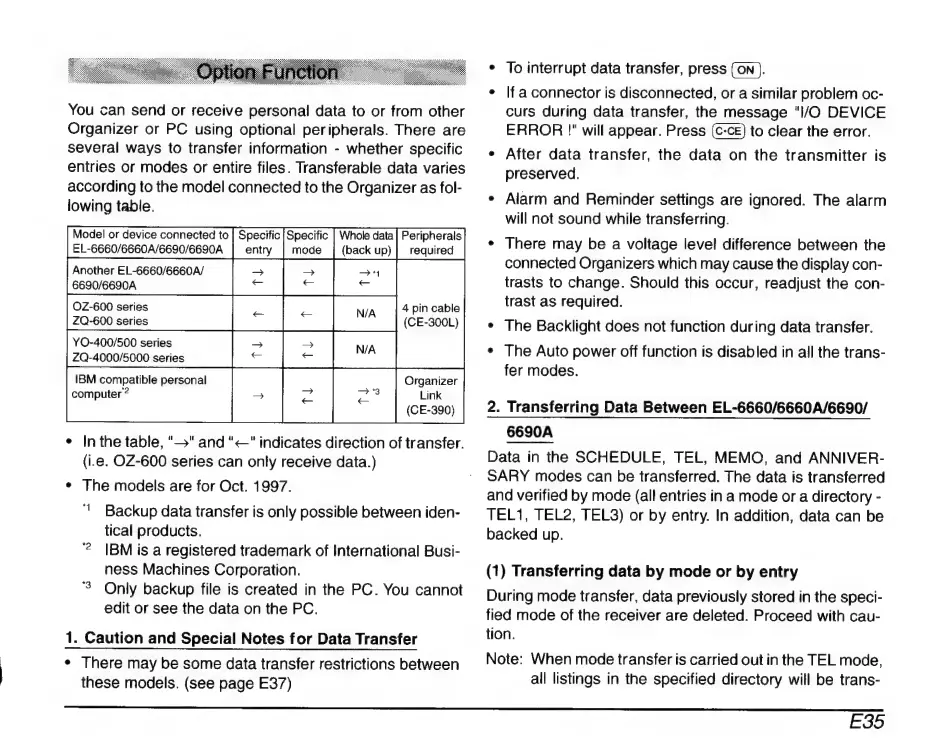
You
can
send
or
receive
personal
data
to
or
from
other
Organizer
or
PC
using
optional
peripherals.
There
are
Several
ways
to
transfer
information
-
whether
specific
entries
or
modes
or
entire
files.
Transferable
data
varies
according
to
the
model
connected
to
the
Organizer
as
fol-
lowing
table.
Model
or
device
connected
to
|
Specific
|
Specific
EL-6660/6660A/6690/6690A
|
entry
|
mode
Another
EL-6660/6660A/
=
6690/6690A
=
OZ-600
series
ZQ-600
series
YO-400/500
series
ZQ-4000/5000
series
IBM
compatible
personal
computer
?
4
pin
cable
(CE-300L)
Organizer
Link
*
Inthe
table,
"S"
and
"
—"
indicates
direction
of
transfer.
(i.e.
OZ-600
series
can
only
receive
data.)
*
The
models
are
for
Oct.
1997.
'
Backup
data
transfer
is
only
possible
between
iden-
tical
products.
?
|BMis
a
registered
trademark
of
International
Busi-
ness
Machines
Corporation.
3
Only
backup
file
is
created
in
the
PC.
You
cannot
edit
or
see
the
data
on the
PC.
1.
Caution
and
Special
Notes
for
Data
Transfer
*
There
may
be
some
data
transfer
restrictions
between
these
models.
(see
page
E37)
To
interrupt
data
transfer,
press
(ON
).
e
|f
a
connector
is
disconnected,
or
a
similar
problem
oc-
curs
during
data
transfer,
the
message
"I/O
DEVICE
ERROR
!"
will
appear.
Press
to
clear
the
error.
e
After
data
transfer,
the
data
on
the
transmitter
is
preserved.
*
Alarm
and
Reminder
settings
are
ignored.
The
alarm
will
not
sound
while
transferring.
*
There
may
be
a
voltage
level
difference
between
the
connected
Organizers
which
may
cause
the
display
con-
trasts
to
change.
Should
this
occur,
readjust
the
con-
trast
as
required.
*
The
Backlight
does
not
function
during
data
transfer.
+
The
Auto
power
off
function
is
disabled
in
all
the
trans-
fer
modes.
2.
Transferring
Data
Between
EL-6660/6660A/6690/
6690A
Data
in
the
SCHEDULE,
TEL,
MEMO,
and
ANNIVER-
SARY
modes
can
be
transferred.
The
data
is
transferred
and
verified
by
mode
(all
entries
in
a
mode
or
a
directory
-
TEL1,
TEL2,
TEL3)
or
by
entry.
In
addition,
data
can
be
backed
up.
(1)
Transferring
data
by
mode
or
by
entry
During
mode
transfer,
data
previously
stored
in
the
speci-
fied
mode
of
the
receiver
are
deleted.
Proceed
with
cau-
tion.
Note:
When
mode
transfer
is
carried
out
in
the
TEL
mode,
all
listings
in
the
specified
directory
will
be
trans-
E35

Related product manuals