EasyManua.ls Logo

Sharp EL-6660 - Page 8

Sharp EL-6660
50 pages
Print Icon
To Next Page IconTo Next Page
To Previous Page IconTo Previous Page
Loading...
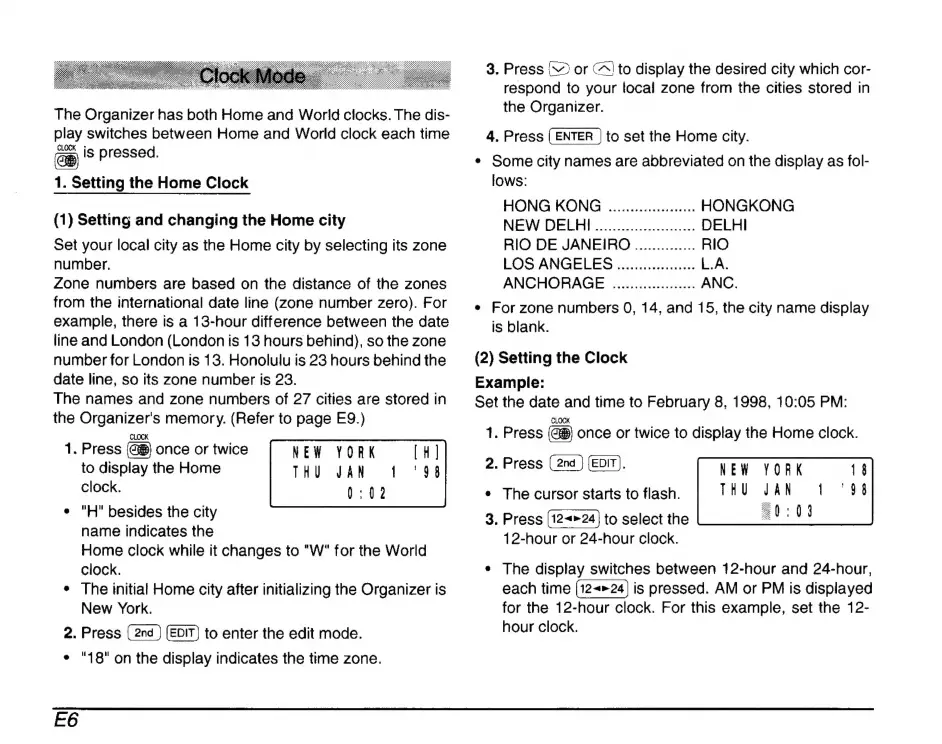
The
Organizer
has
both
Home
and
World
clocks.
The
dis-
play
switches
between
Home
and
World
clock
each
time
is
pressed.
1.
Setting
the
Home
Clock
(1)
Setting
and
changing
the
Home
city
Set
your
local
city
as
the
Home
city
by
selecting
its
zone
number.
Zone
numbers
are
based
on
the
distance
of
the
zones
from
the
international
date
line
(zone
number
zero).
For
example,
there
is
a
13-hour
difference
between
the
date
line
and
London
(London
is
13
hours
behind),
so the
zone
number
for
London
is
13.
Honolulu
is
23
hours
behind
the
date
line,
so
its
zone
number
is
23.
The
names
and
zone
numbers
of
27
cities
are
stored
in
the
Organizers
memory.
(Refer
to
page
E9.)
CLOCK
1.
Press
once
or
twice
to
display
the
Home
JAN
clock.
0:02
*
"H"
besides
the
city
name
indicates
the
Home
clock
while
it
changes
to
"W"
for
the
World
clock.
*
The
initial
Home
city
after
initializing
the
Organizer
is
New
York.
2.
Press
to
enter
the
edit
mode.
*
"18"
on
the
display
indicates
the
time
zone.
NEW
YORK
THU
E6
3.
Press
(
or
(to
display
the
desired
city
which
cor-
respond
to
your
local
zone
from
the
cities
stored
in
the
Organizer.
4.
Press
to
set
the
Home
city.
+
Some
city
names
are
abbreviated
on the
display
as
fol-
lows:
HONG
KONG
...................
HONGKONG
NEW
DELHI
.......................
DELHI
RIO
DE
JANEIRO
..............
RIO
LOS
ANGELES
..................
L.A.
ANCHORAGE
...................
ANC.
*
For
zone
numbers
O,
14,
and
15,
the
city
name
display
is
blank.
(2)
Setting
the
Clock
Example:
Set
the
date
and
time
to
February
8,
1998,
10:05
PM:
CLOCK
1.
Press
once
or
twice
to
display
the
Home
clock.
2.
Press
(EDIT).
+
The
cursor
starts
to
flash.
JAN
3.
Press
to
select
the
20:01
12-hour
or
24-hour
clock.
NEW
YORK
THU
*
The
display
switches
between
12-hour
and
24-hour,
each
time
is
pressed.
AM
or
PM
is
displayed
for
the
12-hour
clock.
For
this
example,
set
the
12-
hour
clock.

Related product manuals