EN -10-
1
2
3
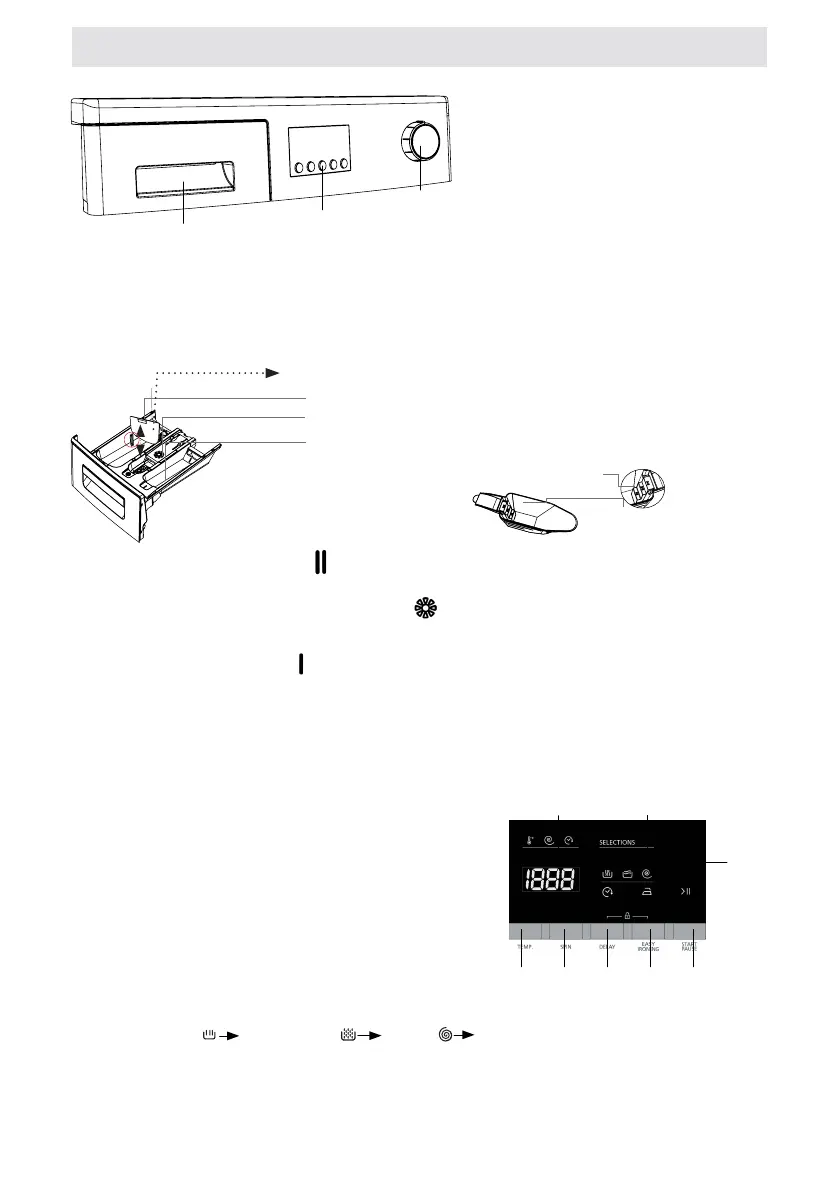
1-Detergent drawer
2
-Programme knob3
Functions
DETERGENT DRAWER
Main wash detergent
Liquid Detergent Apparatus
Softener
Compartment
Pre-wash detergent
compartment
Powder
detergent
spade (*)
Powder detergent
level stages
Main wash detergent compartment: In this compartment, only materials like detergent (liquid or powder),
lime preventer and such can be used.You can nd the liquid detergent aparatus inside your machine at rst
installation. (*)
Fabric conditioner, starch, detergent compartment: You can use softener for your laundry recommended
amount and type by the producer is recommended). Sometimes the fabric conditioners you use for your laundry
mar remain in this compartment. The reason for this is that the conditioner is not viscous. To prevent this situation,
more viscous liquid softeners are recommended to be used or the softener could be thinned and then used.
Pre-wash detergent compartment: This compartment must only be used when the pre-wash feature is selected.
Pre-wash feature is recommended for very dirty laundry. (*) Machinery specications may vary depending on the
product purchased.
PROGRAM KNOB
• You can select the programme you want to wash your laundry in through progra mme knob.
• You may set the programme selection operation by rotating the programme knob in both directions.
• Ensure that the programme knob is exactly on the programme you want to select.
ELECTRONIC DISPLAY
1. Display Panel
2. Washing
3. Rinsing
4. Spinning
5. Finished
6. Delayed start auxiliary function
7. Temperature selection adjustment
8. Auxiliary function button 1
On the electronic display, you may view washing water temperature, spinning revolution speed of your machine,
when your machine will nish washing, the auxiliary functions you have selected and at what stage the programme
you have chosen is ( prewash/wash, rinsing, spinning).Furthermore, electronic display will
warn you by means of fault symbols on the display when a fault occurs on your machine and notify you of the
completion of the washing programme by revealing expression of “END” on the display as soon as the washing
programme you have selected has nished as well.
CHAPTER -4: INTRODUCTION OF CONTROL PANEL SECTIONS
1. Digital Display
2. Wash level display
3. Auxiliary function symbol
4. Water Temperature Adjustment Button
5. Rpm speed adjustment button
6. Delayed start auxiliary function
7. Auxiliary function button
8. Start/Pause button
21
4 5 6 7 8
3
-Elektronic Display and Additional




 To Next Page