EasyManua.ls Logo

Sharp JC-AV1 - Page 4

Sharp JC-AV1
11 pages
Print Icon
To Next Page IconTo Next Page
To Previous Page IconTo Previous Page
Loading...
POWER
SOURCE
|
m@
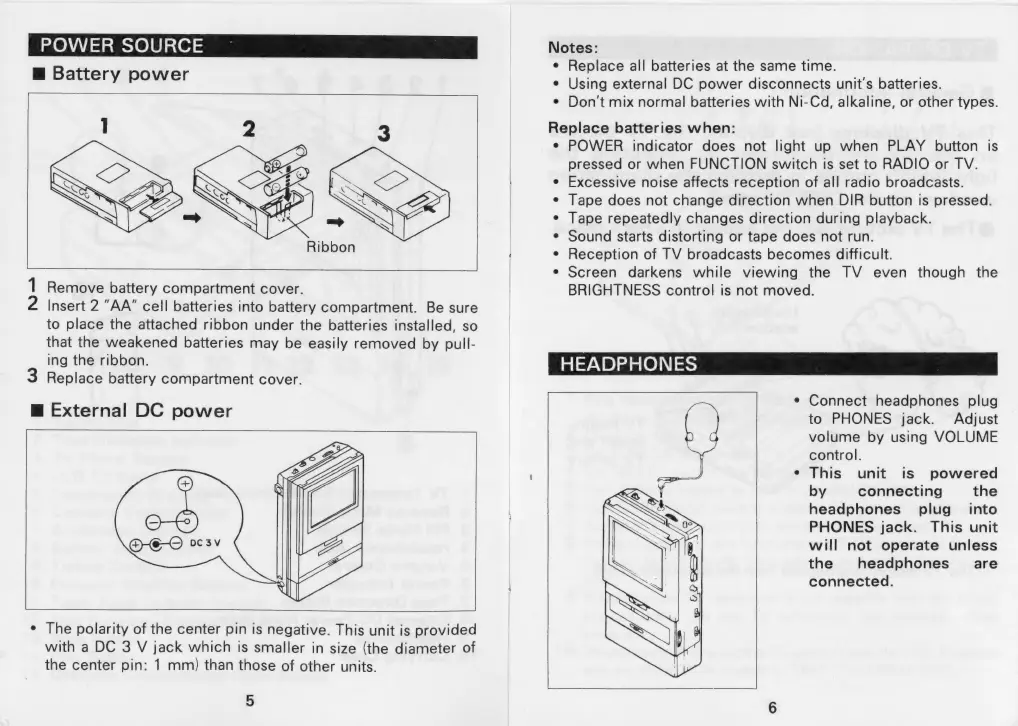
Battery
power
Ribbon
1
Remove
battery
compartment
cover.
2
Insert
2
“AA”
cell
batteries
into
battery
compartment.
Be
sure
to
place
the
attached
ribbon
under
the
batteries
installed,
so
that
the
weakened
batteries
may
be
easily
removed
by
pull-
ing
the
ribbon.
3
Replace
battery
compartment
cover.
m@
External
DC
power
¢
The
polarity
of
the
center
pin
is
negative.
This
unit
is
provided
with
a
DC
3
V
jack
which
is
smaller
in
size
(the
diameter
of
the
center
pin:
1
mm)
than
those
of
other
units.
5
Notes:
¢
Replace
all
batteries
at
the
same
time.
e
Using
external
DC
power
disconnects
unit's
batteries.
¢
Don't
mix
normal
batteries
with
Ni-Cd,
alkaline,
or
other
types.
Replace
batteries
when:
¢
POWER
indicator
does
not
light
up
when
PLAY
button
is
pressed
or
when
FUNCTION
switch
is
set
to
RADIO
or
TV.
Excessive
noise
affects
reception
of
all
radio
broadcasts.
Tape
does
not
change
direction
when
DIR
button
is
pressed.
Tape
repeatedly
changes
direction
during
playback.
Sound
starts
distorting
or
tape
does
not
run.
Reception
of
TV
broadcasts
becomes
difficult.
Screen
darkens
while
viewing
the
TV
even
though
the
BRIGHTNESS
control
is
not
moved.
@ e
e
e
@
HEADPHONES
¢
Connect
headphones
plug
to
PHONES
jack.
Adjust
volume
by
using
VOLUME
control.
This
unit
is
powered
by
connecting
the
headphones
plug_
into
PHONES
jack.
This
unit
will
not
operate
unless
the
headphones
_—
are
connected.

Related product manuals