EasyManua.ls Logo

Sharp JC-AV1 - Page 5

Sharp JC-AV1
11 pages
Print Icon
To Next Page IconTo Next Page
To Previous Page IconTo Previous Page
Loading...
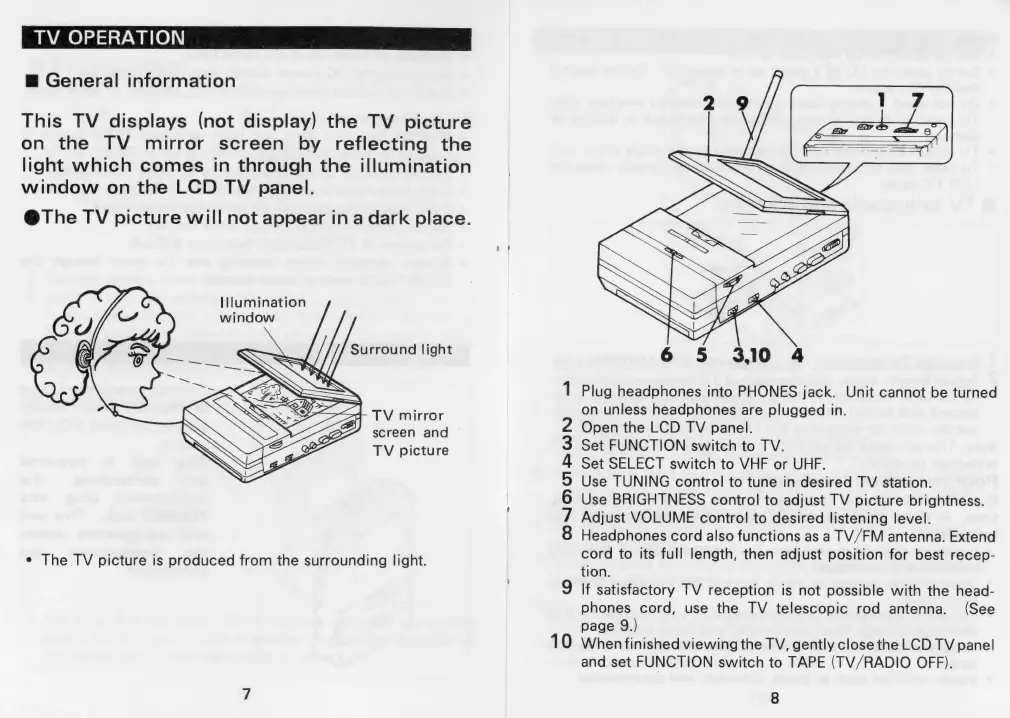
TV
OPERATION
m@
General
information
This
TV
displays
(not
display)
the
TV
picture
on
the
TV
mirror
screen
by
reflecting
the
light
which
comes
in
through
the
illumination
window
on
the
LCD
TV
panel.
@The
TV
picture
will
not
appear
in
a
dark
place.
Illumination
window
Surround
light
d-
TV
mirror
screen
and
TV
picture
¢
The
TV
picture
is
produced
from
the
surrounding
light.
1
Plug
headphones
into
PHONES
jack.
Unit
cannot
be
turned
on
unless
headphones
are
plugged
in.
2
Open
the
LCD
TV
panel.
3
Set
FUNCTION
switch
to
TV.
4
Set
SELECT
switch
to
VHF
or
UHF.
5
Use
TUNING
control
to
tune
in
desired
TV
station.
6
Use
BRIGHTNESS
control
to
adjust
TV
picture
brightness.
7
Adjust
VOLUME
control
to
desired
listening
level.
8
Headphones
cord
also
functions
as
a
TV/FM
antenna.
Extend
cord
to
its
full
length,
then
adjust
position
for
best
recep-
tion.
9
If
satisfactory
TV
reception
is
not
possible
with
the
head-
phones
cord,
use
the
TV
telescopic
rod
antenna.
(See
page
9.)
10
When
finished
viewing
the
TV,
gently
close
the
LCD
TV
panel
and
set
FUNCTION
switch
to
TAPE
(TV/RADIO
OFF).
8

Related product manuals