EasyManua.ls Logo

Sharp JC-AV1 - Page 6

Sharp JC-AV1
11 pages
Print Icon
To Next Page IconTo Next Page
To Previous Page IconTo Previous Page
Loading...
Notes:
¢
Stereo
sound
is
not
available
for
TV.
¢
Gently
open
the
LCD
TV
panel
up
to
about
50°.
Do
not
open
it
beyond
this
angle.
*
Do
not
exert
a
strong
force
on
the
illumination
window,
LCD
TV
panel
or
mirror
screen.
Doing
so
may
result
in
trouble
or
damage.
TV
screen
brightness
may
also
depend
on
the
angle
of
the
unit.
¢
To
listen
only
to
the
sound
of
a
TV
broadcast,
simply
close
the
LCD
TV
panel.
m@
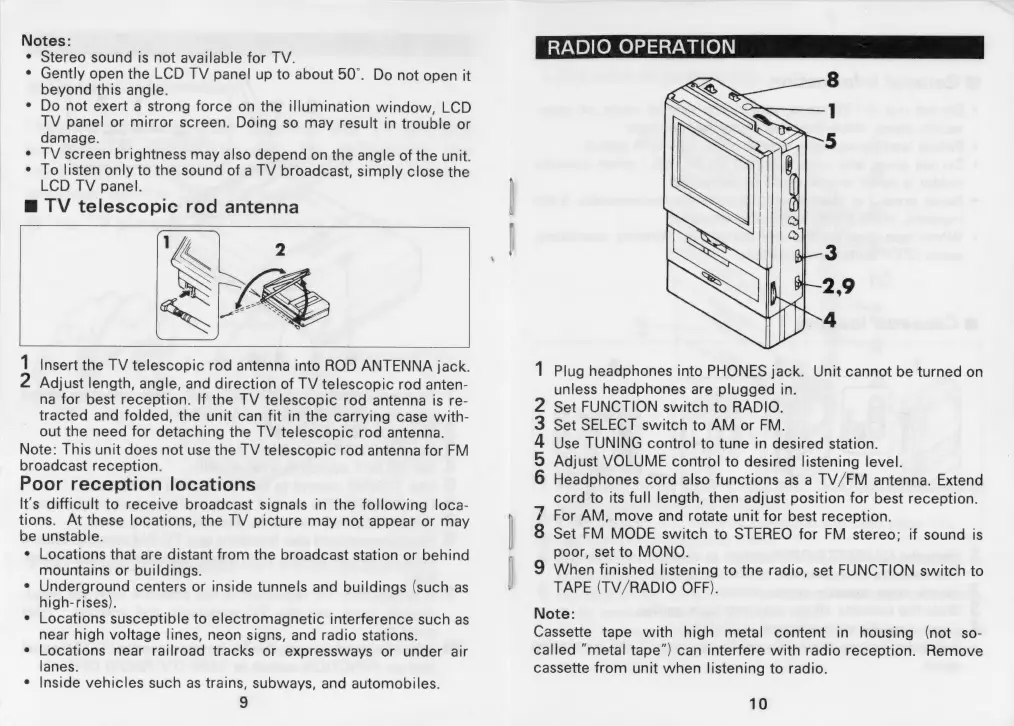
TV
telescopic
rod
antenna
1
Insert
the
TV
telescopic
rod
antenna
into
ROD
ANTENNA
jack.
2
Adjust
length,
angle,
and
direction
of
TV
telescopic
rod
anten-
na
for
best
reception.
If
the
TV
telescopic
rod
antenna
is
re-
tracted
and
folded,
the
unit
can
fit
in
the
carrying
case
with-
out
the
need
for
detaching
the
TV
telescopic
rod
antenna.
Note:
This
unit
does
not
use
the
TV
telescopic
rod
antenna
for
FM
broadcast
reception.
Poor
reception
locations
It's
difficult
to
receive
broadcast
signals
in
the
following
loca-
tions.
At
these
locations,
the
TV
picture
may
not
appear
or
may
be
unstable.
¢
Locations
that
are
distant
from
the
broadcast
station
or
behind
mountains
or
buildings.
e
Underground
centers
or
inside
tunnels
and
buildings
(such
as
high-rises).
¢
Locations
susceptible
to
electromagnetic
interference
such
as
near
high
voltage
lines,
neon
signs,
and
radio
stations.
¢
Locations
near
railroad
tracks
or
expressways
or
under
air
lanes.
Inside
vehicles
such
as
trains,
subways,
and
automobiles.
9
SS;
RADIO
OPERATION
Plug
headphones
into
PHONES
jack.
Unit
cannot
be
turned
on
unless
headphones
are
plugged
in.
Set
FUNCTION
switch
to
RADIO.
Set
SELECT
switch
to
AM
or
FM.
Use
TUNING
control
to
tune
in
desired
station.
Adjust
VOLUME
control
to
desired
listening
level.
Headphones
cord
also
functions
as
a
TV/FM
antenna.
Extend
cord
to
its
full
length,
then
adjust
position
for
best
reception.
For
AM,
move
and
rotate
unit
for
best
reception.
Set
FM
MODE
switch
to
STEREO
for
FM
stereo;
if
sound
is
poor,
set
to
MONO.
When
finished
listening
to
the
radio,
set
FUNCTION
switch
to
TAPE
(TV/RADIO
OFF).
Note:
Cassette
tape
with
high
metal
content
in
housing
(not
so-
called
“metal
tape”)
can
interfere
with
radio
reception.
Remove
cassette
from
unit
when
listening
to
radio.
OO
COn~n
HOIPWNH
10

Related product manuals