EasyManua.ls Logo

Sharp JC-AV1 - Page 7

Sharp JC-AV1
11 pages
Print Icon
To Next Page IconTo Next Page
To Previous Page IconTo Previous Page
Loading...
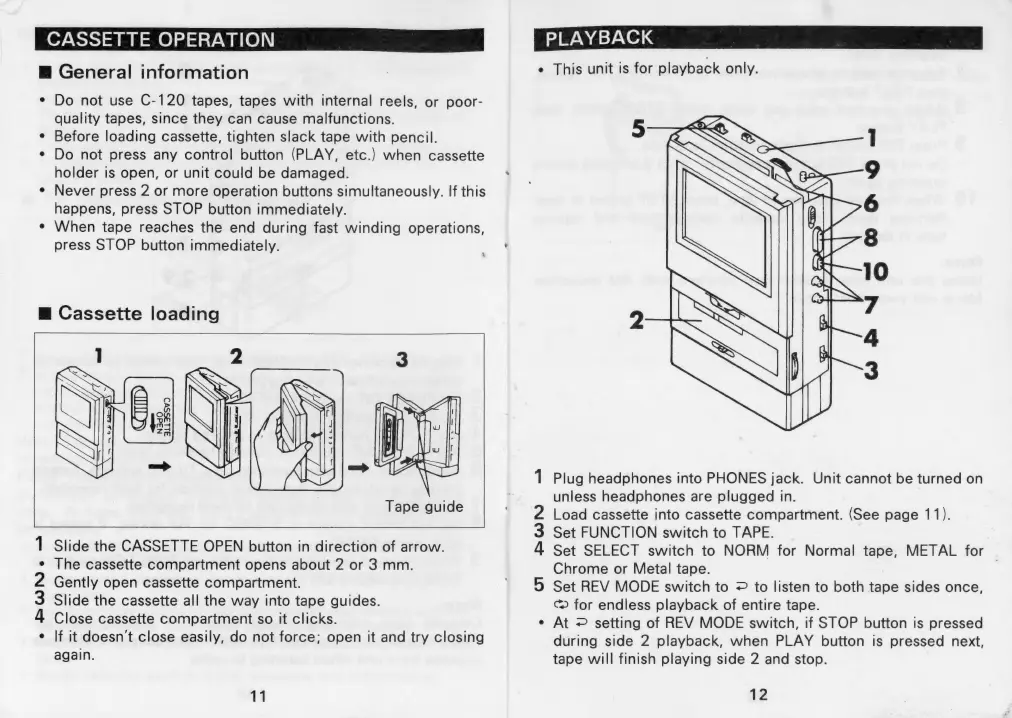
CASSETTE
OPERATION
|
@
General
information
¢
Do
not
use
C-120
tapes,
tapes
with
internal
reels,
or
poor-
quality
tapes,
since
they
can
cause
malfunctions.
Before
loading
cassette,
tighten
slack
tape
with
pencil.
Do
not
press
any
control
button
(PLAY,
etc.)
when
cassette
holder
is
open,
or
unit
could
be
damaged.
¢
Never
press
2
or
more
operation
buttons
simultaneously.
If
this
happens,
press
STOP
button
immediately.
¢
When
tape
reaches
the
end
during
fast
winding
operations,
press
STOP
button
immediately.
\
m@
Cassette
loading
Tape
guide
1
Slide
the
CASSETTE
OPEN
button
in
direction
of
arrow.
e
The
cassette
compartment
opens
about
2
or
3
mm.
Gently
open
cassette
compartment.
Slide
the
cassette
all
the
way
into
tape
guides.
4
Close
cassette
compartment
so
it
clicks.
e
If
it
doesn't
close
easily,
do
not
force;
open
it
and
try
closing
again.
11
PLAYBACK
¢
This
unit
is
for
playback
only.
1
Plug
headphones
into
PHONES
jack.
Unit
cannot
be
turned
on
unless
headphones
are
plugged
in.
2
Load
cassette
into
cassette
compartment.
(See
page
11).
3
Set
FUNCTION
switch
to
TAPE.
4
Set
SELECT
switch
to
NORM
for
Normal
tape,
METAL
for
Chrome
or
Metal
tape.
5
Set
REV
MODE
switch
to
=
to
listen
to
both
tape
sides
once,
Cc)
for
endless
playback
of
entire
tape.
e
At
©
setting
of
REV
MODE
switch,
if
STOP
button
is
pressed
during
side
2
playback,
when
PLAY
button
is
pressed
next,
tape
will
finish
playing
side
2
and
stop.
12

Related product manuals