EasyManua.ls Logo

Sharp JC-K99 - Page 7

Sharp JC-K99
Print Icon
To Next Page IconTo Next Page
To Previous Page IconTo Previous Page
Loading...
©
@
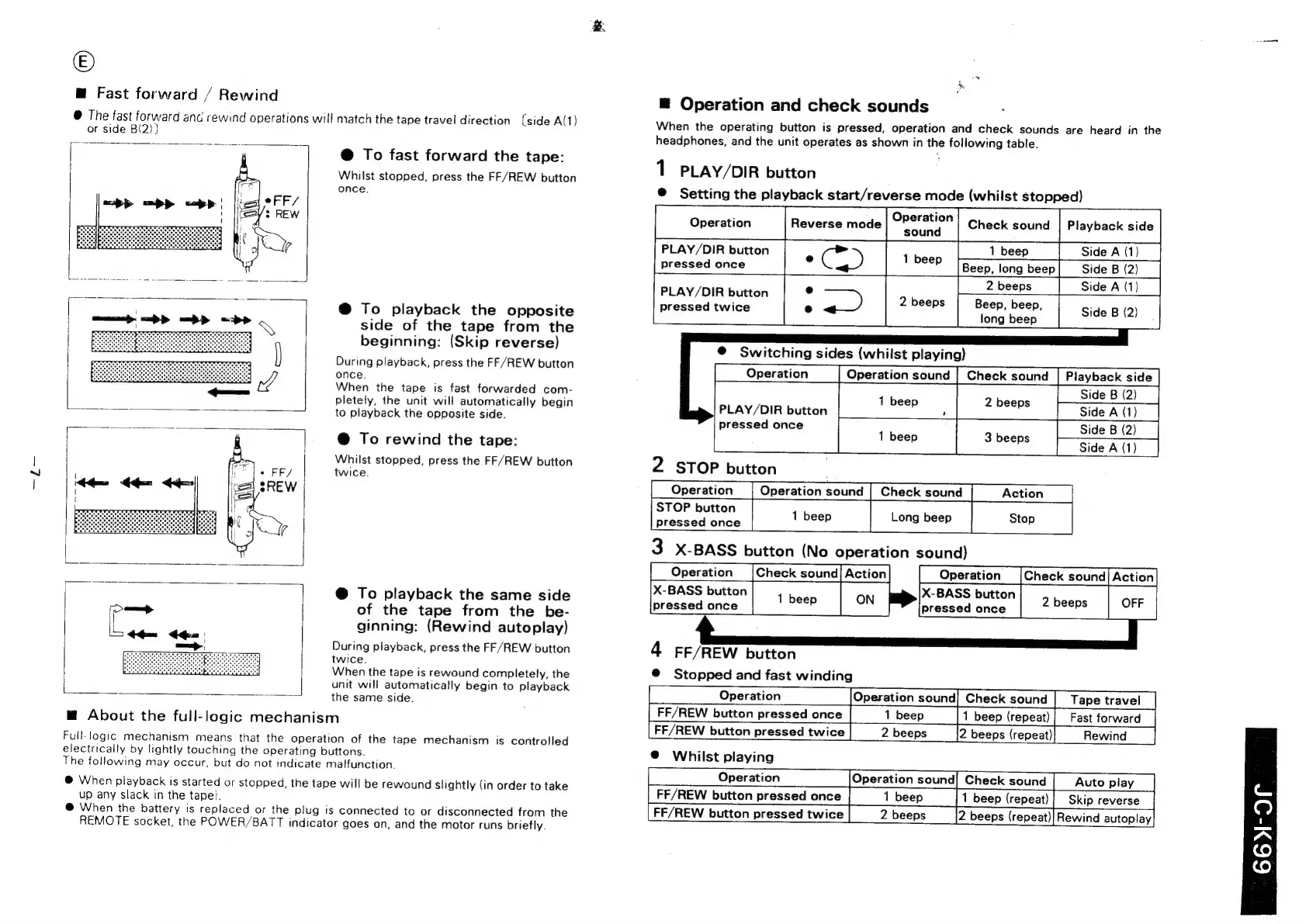
Fast
forward
/
Rewind
@
The
fast
forward
and
rewind
operations
will
match
the
tape
travel
direction
(side
A(1)
or
side
B(2)}
@
To
fast
forward
the
tape:
Whilst
stopped,
press
the
FF/REW
button
once.
@
To
playback
the
opposite
side
of
the
tape
from
the
beginning:
(Skip
reverse)
During
playback,
press
the
FF/REW
button
once.
When
the
tape
is
fast
forwarded
com-
pletely,
the
unit
will
automatically
begin
to
playback
the
opposite
side.
@
To
rewind
the
tape:
Whilst
stopped,
press
the
FF/REW
button
twice.
@
To
playback
the
same
side
of
the
tape
from
the
be-
ginning:
(Rewind
autoplay)
During
playback,
press
the
FF/REW
button
twice.
When
the
tape
is
rewound
completely,
the
unit
will
automatically
begin
to
playback
the
same
side.
m@
About
the
full-logic
mechanism
Full-logic
mechanism
means
that
the
operation
of
the
tape
mechanism
is
controlled
electrically
by
lightly
touching
the
operating
buttons.
The
following
may
occur,
but
do
not
indicate
malfunction.
@
When
playback
is
started
or
stopped,
the
tape
will
be
rewound
slightly
(in
order
to
take
up
any
slack
in
the
tape).
@
When
the
battery
is
replaced
or
the
plug
is
connected
to
or
disconnected
from
the
REMOTE
socket,
the
POWER/BATT
indicator
goes
on,
and
the
motor
runs
briefly.
@
Operation
and
check
sounds
When
the
operating
button
is
pressed,
operation
and
check
sounds
are
heard
in
the
headphones,
and
the
unit
operates
as
shown
in
the
following
table.
1
PLAY/DIR
button
@
Setting
the
playback
start/reverse
mode
(whilst
stopped)
PLAY/DIR
button
.
Gis,
pressed
once
e
e
Operation
Check
sound
sound
oe
:
2
beeps
Beep,
beep,
long
beep
@
Switching
sides
(whilst
playing)
Operation
sound
|
Check
sound
2
STOP
button
Check
sound
STOP
button
pressed
once
Playback
side
Side
A
(1)
Side
B
(2)
Side
A
(1)
Side
B
(2)
PLAY/DIR
button
pressed
twice
Playback
side
Side
B
(2)
Side
A
(1)
Side
B
(2)
Side
A
(1)
PLAY/DIR
button
pressed
once
X-BASS
button
pressed
once
4
FF/REW
button
@
Stopped
and
fast
winding
Operation
sound
1
beep
Operation
FF/REW
button
pressed
once
FF/REW
button
pressed
twice
Check
sound
1
beep
(repeat)
2
beeps
(repeat)|
Rewind
_|
Check
sound
1
beep
(repeat)
2
beeps
(repeat)!
Rewind
autoplay
@
Whilst
playing
Operation
FF/REW
button
pressed
once
FF/REW
button
pressed
twice
Operation
sound
1
beep

Related product manuals