EasyManua.ls Logo

Sharp JC-K99 - Precautions for Assembly

Sharp JC-K99
Print Icon
To Next Page IconTo Next Page
To Previous Page IconTo Previous Page
Loading...
JC-K99
©
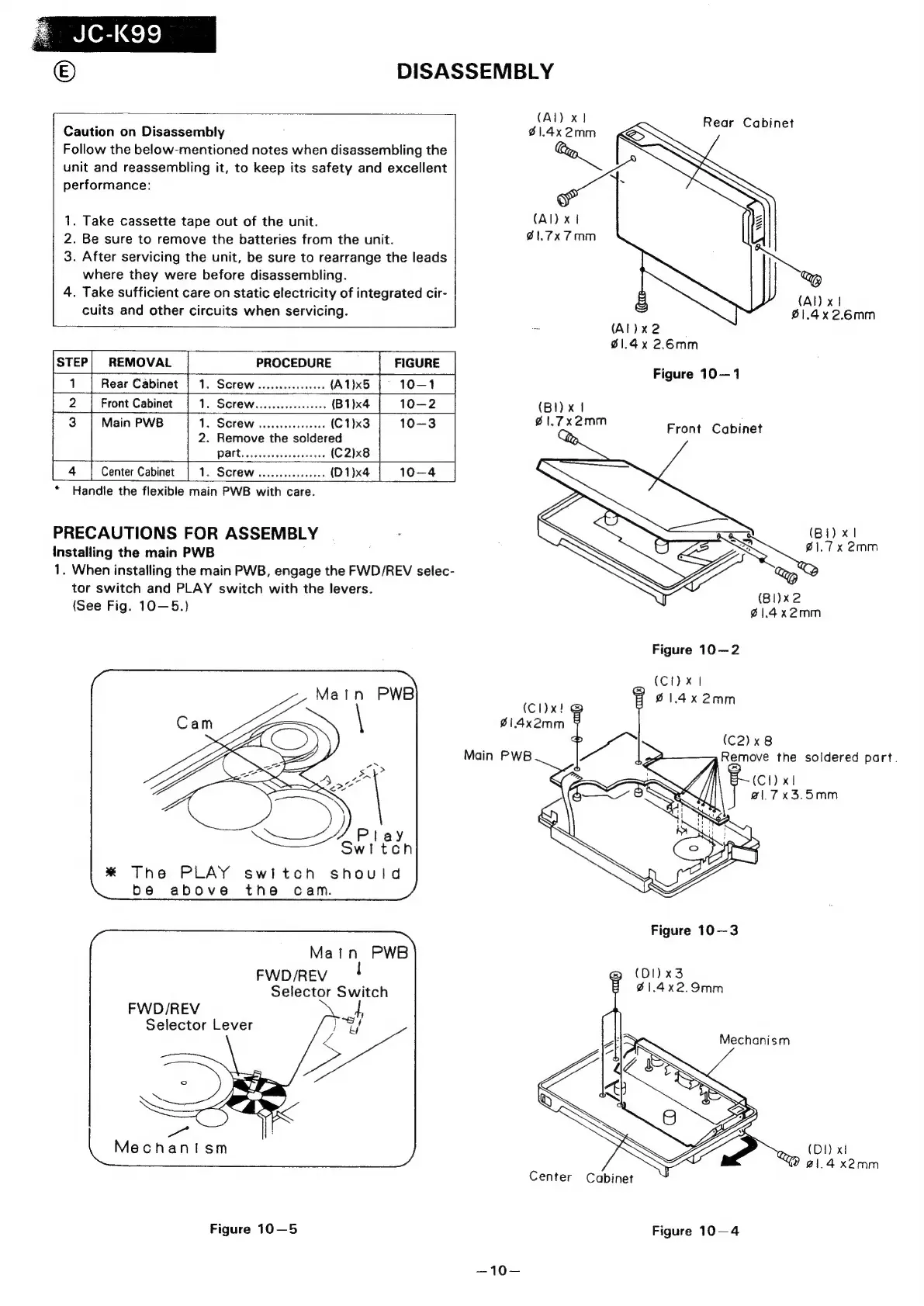
DISASSEMBLY
(Al)
x}
Cabinet
Caution
on
Disassembly
S1.4x
2mm
ear
Cabine
Follow
the
below-mentioned
notes
when
disassembling
the
unit
and
reassembling
it,
to
keep
its
safety
and
excellent
re
performance:
r
1.
Take
cassette
tape
out
of
the
unit.
(Al)
xt
2.
Be
sure
to
remove
the
batteries
from
the
unit.
81.7x
7mm
3.
After
servicing
the
unit,
be
sure
to
rearrange
the
leads
where
they
were
before
disassembling.
4.
Take
sufficient
care
on
static
electricity
of
integrated
cir-
(Al)
x1
cuits
and
other
circuits
when
servicing.
£1.4x
2.6mm
=
(Al)
x2
01.4x
2.6mm
STEP|
REMOVAL
PROCEDURE
7
~
Figure
10—1
1
Rear
Cabinet
|
1.
Screw.............0
(A1)x5
2
|
Front
Cabinet
1.
SCrEW......cceeeeeeees
(B1)x4
(BI)
x1
3
Main
PWB
1.
SCreW
.....ceceeeeeeee
(C1)x3
@1.7x2mm
Prank
Cabinet
2.
Remove
the
soldered
Dates
2.
sescieeeesess
(C2)x8
4
Center
Cabinet
1.
Screw
......ccceeeeeee
(D1)x4
10—4
*
Handle
the
flexible
main
PWB
with
care.
PRECAUTIONS
FOR
ASSEMBLY
Installing
the
main
PWB
1.
When
installing
the
main
PWB,
engage
the
FWD/REV
selec-
tor
switch
and
PLAY
switch
with
the
levers.
(Bi)
x1
ae
:
BlI)x2
(See
Fig.
10—5.)
Ba
x2mm
Figure
10—2
(CI)
x
|
61.4
(cl)x!
al
214x2mm
oe
(C2)x8
Main
PWB
Remove
the
soldered
part.
}
4
(C1)
x1
@|.7x3.5mm
*
The
PLAY
switch
should
be
above
the
cam.
Matn
PWB
FWD/REV
Selector
Switch
FWD/REV
Selector
Lever
a
!
.
Mechanism
(DI)
x!
21.4
x2mm
Center
Cabinet
Figure
10—5
Figure
10—4
—10—

Related product manuals