24
EN
O
PTIONAL SETTING
No Signal Off
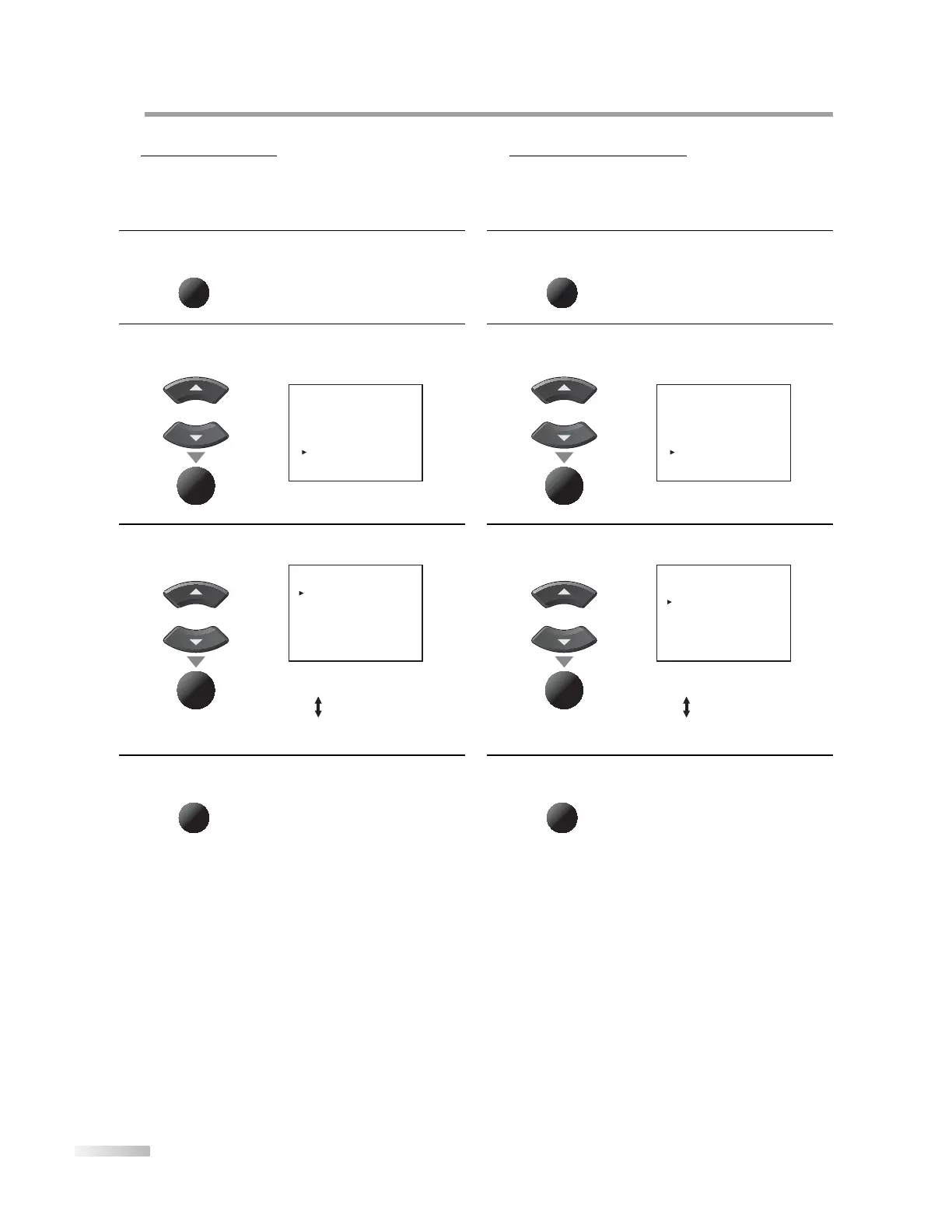
You can set the unit to turn itself o automatically when there is no signal
input from the antenna terminal and no operation for 5 minutes.
1
Press [MENU] to display the main menu.
MENU
2
Use [Cursor
K
/L] to select “OPTION”, then press
[ENTER].
e.g.) digital TV mode
or
ENTER
- TV SETUP -
PICTURE
CHANNEL SETUP
V-CHIP SETUP
LANGUAGE [ENGLISH]
CAPTION [OFF]
BACK LIGHT [BRIGHT]
COLOR TEMP. [COOL]
OPTION
DTVCC
SELECT: K , L SET : ENTER
3
Use [Cursor
K
/L] to select “NO SIGNAL OFF”, then
press [ENTER] repeatedly to set to “ON” or “OFF”.
or
ENTER
- OPTION SETUP -
BLUE SCREEN [OFF]
NO SIGNAL OFF [OFF]
NO OPERATION OFF [OFF]
SELECT: K , L SET : ENTER
4
Press [MENU] to exit.
MENU
5 No Operation Off
You can set the unit to turn itself o automatically when there is no
operation for 180 minutes.
1
Press [MENU] to display the main menu.
MENU
2
Use [Cursor
K
/L] to select “OPTION”, then press
[ENTER].
e.g.) digital TV mode
or
ENTER
- TV SETUP -
PICTURE
CHANNEL SETUP
V-CHIP SETUP
LANGUAGE [ENGLISH]
CAPTION [OFF]
BACK LIGHT [BRIGHT]
COLOR TEMP. [COOL]
OPTION
DTVCC
SELECT: K , L SET : ENTER
3
Use [Cursor
K
/L] to select “NO OPERATION OFF”, then
press [ENTER] repeatedly to set to “ON” or “OFF”.
or
ENTER
- OPTION SETUP -
BLUE SCREEN [OFF]
NO SIGNAL OFF [OFF]
NO OPERATION OFF [OFF]
SELECT: K , L SET : ENTER
4
Press [MENU] to exit.
MENU
5












 To Next Page