Quick Start Set Up Guide
For information on using the TV’s features, please refer to the operating Instructions.
Quick & easy guide for setting up your TV
What is included in the box
Using the remote control
Setting up the TV for the rst time - including attaching the stand
Connecting other devices to the Television
Need help setting up or using your TV?
Please contact the UK & ROI Helpline*
Telephone UK 0330 024 0803 or ROI 01443 3323
Online support at: www.umc-uk.co.uk
Email support at: service@umc-uk.co.uk
*Calls to 0330 numbers are charged at standard call rates and are included as part of any bundled minutes with your
phone provider.
Calls to the ROI number are charged at the local call rate.
The telephone opening hours are Monday to Friday 8.30am to 6pm, Saturday 9am – 5pm.
Bank Holidays - 10am to 4pm
Closed Christmas and New Years day
Model Numbers
LC-32HI5232KF
LC-32HI5232KFW
LC-32DI5232KF
LC-32DI5232KFW
LC-32HI5332KF
LC-32HI5432KF
LC-32HI5532KF
Trademark Sharp
Model ID
LC-32HI5232KF
LC-32HI5232KFW
LC-32DI5232KF
LC-32DI5232KFW
LC-32HI5332KF
LC-32HI5432KF
LC-32HI5532KF
Energy e ciency class A+
Visible screen size (diagonal) 81 cm / 32 inches
On-mode power consumption 31.0 W
Annual energy consumption *1 45 kWh
Standby power consumption *2 <0.50 W
O mode power consumption n/a
Screen resolution 1366 (H) x 768 (V)
*1: Energy consumption XYZ kWh per year, based on the power consumption of the television operating 4
hours per day for 365 days. The actual energy consumption will depend on how the television is used.
*2: When the TV is turned o with the remote control/standby button and no function is active.
LC-32HI5232KF
LC-32HI5232KFW
LC-32HI5332KF
LC-32HI5432KF
LC-32HI5532KF
LC-32DI5232KF
LC-32DI5232KFW
RF 75 ohm Antenna / Analog / DVB / Satellite
Inputs 3 x HDMI, 2 x USB, 1 x Mini-SCART,
1 x RJ45 LAN/Ethernet, 1 x Mini Component/YPbPr,
1 x Mini AV IN - Composite Video/CVBS and L/R Audio shared for Composite Video and
Component/YPbPr
Sound Outputs 1 x Digital Optical Audio output, 1 x 3.5mm Headphone
Speaker* / Ampli er
Watts (RMS)
2 x 10 / 2 x 8
Voltage and power
consumption
AC 220V ~ 240V; 50Hz
31/45/70W (home mode/standard/max)
(<0.5W in Standby)
AC 220V ~ 240V; 50Hz
31/45/80W (home mode/standard/max)
(<0.5W in Standby)
Dimensions including
stand (mm)
732W x 470H x 173D
Net weight (Kgs) 5.3 5.5
Wall Mounting VESA 200 x 200 (mm)
Win a
Soundbar
Register your manufacturers guarantee online within 14 days of purchase at
www.registertoday.co.uk/sharp and enter into a prize draw to
Terms and conditions apply. Online registration only.
ly
1 x SCART to Mini-SCART adapter
Freeview Play brings together live TV viewing
with ‘‘catch up’’ TV services such as BBC iPlayer,
ITV player, More4 and Demand 5. The Freeview
Play Explore app features a carousel of genres
to select from when searching for programmes,
such as sport, comedy, dramas and soaps, etc.
Content is made up from recommendations of
the major broadcasters and offers an
alternative means of searching.
Note that to use the full functionality of
Freeview Play your set must be connected
to the internet.
To receive Freeview channels, in particular
Freeview HD channels, you will need a
Digital TV aerial and be in a good
Freeview coverage area.
You can check coverage for your postcode
at www.freeview.co.uk.
Please note that any Freeview HD channels
found during tuning will be placed in
channel positions above 100. For
example, 101 (BBC1 HD) 102 (BBC2 HD) etc.
Accessories
Included with this TV are the following accessories
What is included in the box
Using the remote control
Technical Speci cation
Please save your box/packaging as you will need this in the event of warranty/service repair or support.
We are unable to carry out warranty/service if you are unable to package it correctly. The safest way to
package your item in the event of warranty/service repair is in it’s original box/packaging.
1 x Operating Instructions
1 x Quick start guide
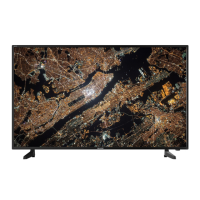
1 x TV
1 x RF cable
1 x Mini composite / AV cable
1 x Mini component / YPbPr cable
1 x Remote Control and 2 x AAA Batteries
*Built-in Harman Kardon speaker systems (Full-range speaker and tweeter).
Harman Kardon is trademark of HARMAN International Industries, Incorporated,
registered in the United States and/or other countries.
1 x Stand installation pack
4 x
1 x L (left)
1 x R (right)
7
8
9
0
1
2
3
4
5
6
TV
GUIDE
VOL
CH
SOURCE
SOUND
PICTURE
ON/OFF
TEXT
SUBTITLE
INFO
TV
BACK
FAV
APPS
GO
TO
A-B
3D
RE
PEAT
RE
C LI ST
PVR/MEDIA
EXIT
MENU
OK
Freeview Play
1
4
2
3
STANDBY - Switch on the TV when in standby or vice versa.
FREEVIEW PLAY - Access the Freeview Play app.
NUMBER BUTTONS - 0–9 to select a TV channel directly.
MUTE - Mute the sound or vice versa.
TV GUIDE - Opens the 7 day TV guide (digital TV mode).
VOL (+/-) - To increase/decrease the sound level.
PICTURE - Scrolls through picture mode options.
SOUND- Scrolls through sound mode options.
SOURCE - To display the input/source menu.
CH (+/-) - To increase or decrease the channel being watched.
MENU - To display OSD menu.
EXIT - To exit all menus.
( / / / / OK) - Allows you to navigate the on-screen menus and adjust
the system settings to your preference.
BACK - To go back a previous step.
FAV - To display favourites menu.
INFO - Press once for now/next channel information.
- Press twice for information about the current programme.
TEXT - To enter/exit Text.
SUBTITLE - To switch the dialogue at the bottom of the screen (on/off).
TV - To switch to Digital Channels.
YOUTUBE - Access the Youtube App.
NETFLIX - Access the Netfl ix App.
APPS - Access the APPS menu.
RECORD - Access the USB record function.
REC LIST - Opens the list of previously recorded items.
GOTO - To go to a specifi c chapter.
A-B - Press once to set point, press a second time to return to point.
ANGLE/3D - Select different angle of DVD.
REPEAT - To repeat playback.
- To restart the current chapter
- To advance forward to the next chapter
- To stop the playback/Eject Disc
(To EJECT the disc press/hold the button for 4 seconds)
- To play in fast rewind mode
- To play in fast forward mode
- To play/pause
Key
3
2
1
For models with integrated DVD players.
For models with PVR Function.
For models with USB Playback.
For models with 3D functions.
4
1 x Power Cable
SHA-QSW-0026 LC-32DI5232KF.indd 1SHA-QSW-0026 LC-32DI5232KF.indd 1 03/07/2018 12:39:0903/07/2018 12:39:09

 Need help?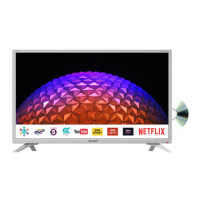







 To Next Page

 General