22
LC-32LB591U / LC-32LB591C 32" HD LED 720p Sharp Roku TV
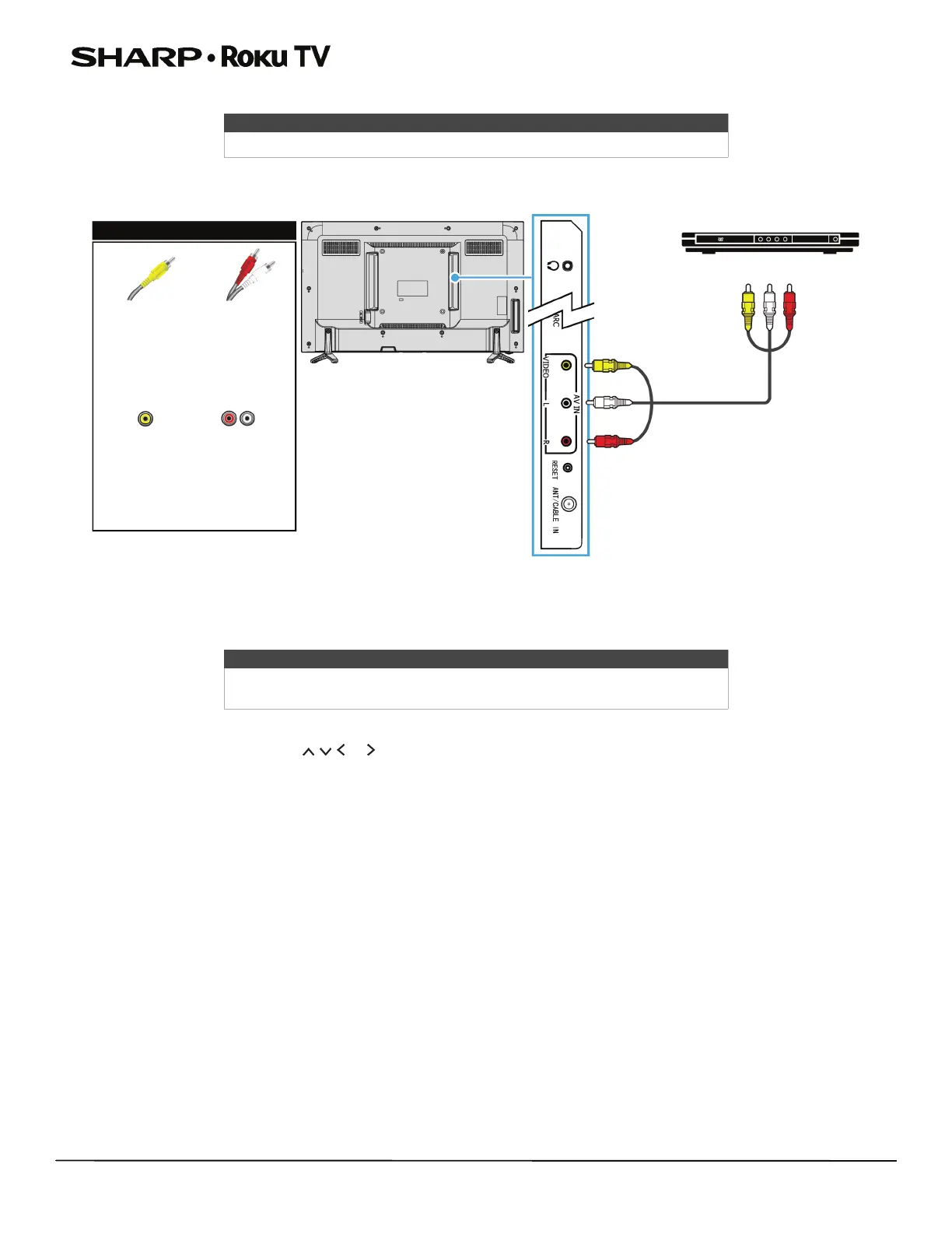
AV (good)
1 Make sure that your TV’s power cord is unplugged and the DVD or Blu-ray player is turned off.
2 Connect an AV cable (not provided) to the VIDEO jack and L and R (audio) jacks on the left side your TV and to the
AV OUT jacks on the DVD or Blu-ray player.
3 Plug your TV’s power cord into a power outlet, then turn on your TV and DVD or Blu-ray player.
4 On the Home screen, press or to highlight the AV tile, then press OK.
Note
Cables are often color-coded to match color-coded jacks.
Note
When you connect the audio using the L and R (audio) jacks, the audio
output is analog.
AV cable
Left side
of TV
AV cable
connector
AV jack
Audio cable
connectors
Analog
audio jacks
DVD or Blu-ray player
On your TV




 To Next Page