English - 10 -
Remote Control Buttons
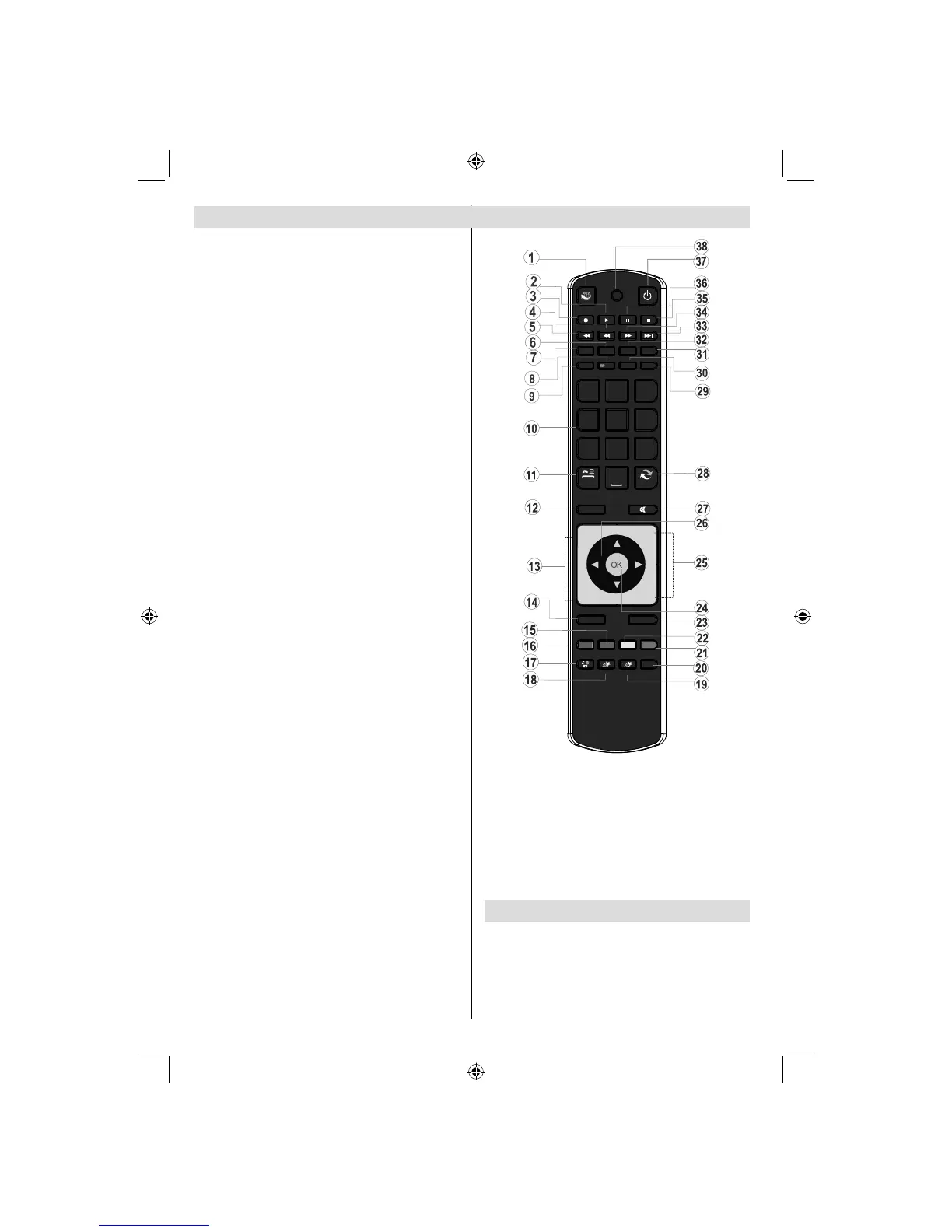
Acti1. vate Portal mode (*)
Play (in Media Browser mode) 2.
Programme recording3.
Fast rewind (in Media Browser mode)4.
No function5.
Mono/Stereo - Dual I-II / Current Language / 6.
Play preview (in Media Browser mode)
Image size 7.
Teletext / Mix8.
Electronic Programme Guide9.
Numeric buttons10.
AV / Source11.
Menu on/off 12.
Programme Down - Page up / Programme Up - 13.
Page down
Back to previous menu 14.
Green button15.
Red button16.
Media Browser17.
My Button 1: Power save mode eco/off18.
My Button 2(**)19.
Info / Reveal (in TXT mode)20.
Blue button21.
Yellow button22.
Exit (in DTV mode) / Return / Index page (in 23.
TXT mode)
OK / Select / Hold (in TXT mode) / Channel List24.
Volume up / down25.
Navigation buttons26.
Mute27.
Previous programme / Now (in EPG mode)28.
Sleep timer29.
Favourite mode selection30.
Picture mode selecion / Changes picture mode 31.
(in Media Browser video mode)
Subtitle on-off / TXT subtitle (analogue TV 32.
mode) / Subtitle (in Media Browser mode).
No function33.
Fast forward (in Media Browser mode)34.
Stop (in Media Browser mode)35.
Pause / Timeshift recording36.
Standby37.
Operation LED light38.
(*) Please refer to Portal TV section to learn
how to use remote control while in portal TV
function.
P -
P +
SOURCE
GHI
PQRS
SCREEN
MENU
EPG
BACK
1
4
7
-
V +
V
SWAP
ABC DEF
JKL MNO
TUV WXYZ
LANG
SUBTITLE
INFO
PRESETS
FAV SLEEP
TEXT
EXIT
2
3
5
6
8
9
0
Y BTN 1MUTO Y BTN 2MUTOMULTIMEDIA
INTERNET
(**)USING MY BUTTON 2
When on a desired source, channel or link, press MY
BUTTON 2 for fi ve seconds, until the “MY BUTTON
IS SET” message is displayed on the screen. This
confirms that MY BUTTON 2 is now associated with
the selected function.
A01_[GB]_MB70_5112UK_DVBT_C_DLNA_HBBTV_MMH_WIFI_32942LED_GOLD11_10075886_50201414.indd 10A01_[GB]_MB70_5112UK_DVBT_C_DLNA_HBBTV_MMH_WIFI_32942LED_GOLD11_10075886_50201414.indd 10 16.04.2012 14:48:5216.04.2012 14:48:52



 To Next Page